Zendesk SYSPRO Integration: What It Actually Solves
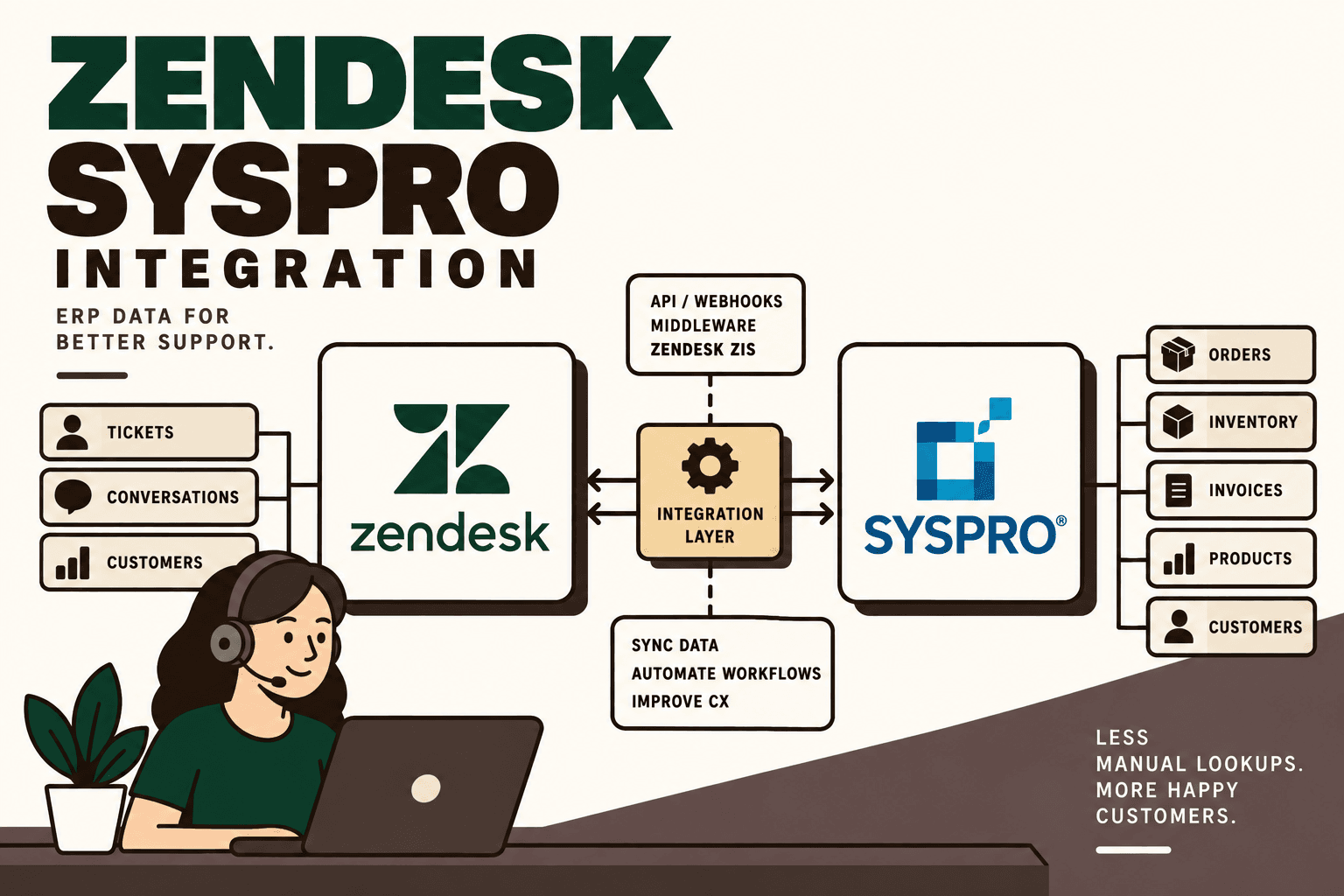
A Zendesk SYSPRO integration connects customer-support workflows with ERP data so agents can work with operational context without repeatedly switching between systems.
For a manufacturer, distributor or D2C business running SYSPRO, a support ticket may require information that lives in the ERP: customer account details, sales orders, invoices, product information, inventory or fulfillment status. Zendesk is where the customer interaction happens; SYSPRO is where much of the operational information is maintained.
The integration creates a controlled path between those systems. Instead of asking an agent to search the ERP manually, a workflow can identify the customer or order, retrieve approved information from SYSPRO and surface it inside Zendesk.
The research supplied for this article identifies the core pattern as Zendesk → integration layer → SYSPRO → Zendesk, with webhooks, APIs or middleware connecting the systems. :contentReference[oaicite:0]{index=0}
Quick Answer
Yes, Zendesk can be integrated with SYSPRO. A common architecture uses Zendesk triggers, webhooks or Integration Services to initiate a workflow, an integration layer to transform and validate data, and SYSPRO interfaces such as OData or other configured SYSPRO integration services to access ERP information.
Zendesk officially supports webhooks that send HTTP requests to external endpoints based on Zendesk activity. It also provides Zendesk Integration Services, or ZIS, for building workflows that respond to events and interact with external systems. Zendesk Webhooks documentation Zendesk Integration Services documentation
SYSPRO provides OData as a controlled way for third-party applications to query SYSPRO data without direct SQL access. SYSPRO describes OData as a RESTful integration method for accessing SYSPRO data through an HTTPS endpoint. SYSPRO OData solution factsheet
Why Connect Zendesk to SYSPRO?
The business problem is usually not a lack of data. It is fragmented access to data.
A customer may ask, “Where is my order?” Zendesk contains the conversation, but the answer may depend on an ERP record. A customer may ask whether an item is available, but inventory information may live in SYSPRO. A billing question may require invoice or account information that support agents cannot see directly in Zendesk.
Without integration, the workflow often becomes:
- Open the Zendesk ticket.
- Identify the customer or order.
- Open SYSPRO.
- Search for the account or transaction.
- Find the relevant operational information.
- Return to Zendesk.
- Write the response.
- Repeat the process for the next ticket.
The integration changes that workflow by making the required operational context available where the support interaction already happens.
What Can a Zendesk SYSPRO Integration Automate?
| Zendesk workflow | SYSPRO data or action | Example use |
|---|---|---|
| Customer ticket | Customer account | Retrieve approved account information |
| Order-status question | Sales order | Show order status to the support agent |
| Billing question | Invoice information | Retrieve relevant invoice details |
| Product question | Product or SKU data | Check product information |
| Availability question | Inventory data | Surface inventory context |
| Fulfillment question | Order or shipment information | Provide fulfillment context |
| Zendesk ticket update | ERP-side workflow | Trigger an approved operational action |
| ERP event | Zendesk ticket | Create or update support work when an ERP event needs attention |
These use cases are based on the supplied search research, which specifically identifies customer accounts, sales orders, invoices, products, inventory and shipments as potential integration points. :contentReference[oaicite:1]{index=1}
Typical Zendesk SYSPRO Integration Architecture
A practical architecture looks like this:
Zendesk → Webhook or ZIS → Integration Layer → SYSPRO → Integration Layer → Zendesk
In a ticket-driven workflow:
- A customer creates or updates a Zendesk ticket.
- A Zendesk trigger, webhook or ZIS event starts the integration.
- The integration receives the ticket identifier and relevant customer or order information.
- The integration validates the identifiers and determines which SYSPRO information is required.
- The integration calls the appropriate SYSPRO interface.
- The response is transformed into the format required by Zendesk.
- Approved information is written into the ticket or surfaced to the agent.
- The agent or an approved AI workflow uses the verified information to handle the customer request.
Zendesk documents that webhooks can be connected to triggers or automations for ticket activity, and that webhook requests can use JSON and authentication. Zendesk webhook creation and monitoring
Zendesk Webhooks and SYSPRO
Webhooks are useful when the support workflow needs to send information to an external integration endpoint.
For example, a Zendesk ticket could trigger a webhook when a defined condition is met. The webhook sends an HTTP request to the integration endpoint. The integration then determines what information needs to be retrieved from SYSPRO.
Zendesk's documentation states that webhooks can send HTTP requests based on activity in Zendesk, including ticket activity when connected to a trigger or automation. The Webhooks API also supports monitoring and retry behavior. Zendesk Webhooks API
This makes the webhook useful as the event mechanism, but it should not contain all of the business logic. The integration layer should generally be responsible for validation, mapping, error handling and communication with SYSPRO.
Zendesk Integration Services as an Alternative to External Middleware
Zendesk Integration Services, or ZIS, provides another architecture option.
Zendesk describes ZIS as a set of Zendesk-hosted web services that can integrate Zendesk with other systems. ZIS can execute business logic in response to events and make API calls into Zendesk or external systems. Zendesk Integration Services
This matters because not every integration requires a separately hosted middleware application for every workflow.
| Architecture | Best suited to | Key consideration |
|---|---|---|
| Zendesk Webhook + custom API | Custom workflows and complex business logic | Maximum control, but requires an integration service |
| Zendesk ZIS | Workflows that can be handled within Zendesk's integration capabilities | Reduces the need to build and host some middleware components |
| External middleware | Multi-system orchestration | Useful when Zendesk and SYSPRO are only two parts of a larger workflow |
| Hybrid | Complex enterprise environments | Use Zendesk-native orchestration for simple events and external services for broader business logic |
Zendesk's developer documentation explicitly describes ZIS as a way to build and run integrations and notes that it can reduce or eliminate the need to build and host middleware for certain integration functions. Zendesk ZIS documentation
How SYSPRO OData Fits Into the Integration
SYSPRO OData is particularly relevant when the integration needs controlled access to ERP data.
SYSPRO describes OData as a secure method for accessing SYSPRO data through a RESTful API and HTTPS endpoint. It is intended for customers, third-party software providers and systems integrators that need access to SYSPRO data. SYSPRO OData solution factsheet
SYSPRO's documentation also describes connecting third-party applications to SYSPRO OData through an endpoint and authenticated OData operator. SYSPRO OData reference guide
For a support workflow, that can provide a controlled path such as:
Zendesk → Integration Service → SYSPRO OData → Customer / Order / Inventory Data → Zendesk
The exact SYSPRO interface should depend on what the workflow needs to do. Reading operational information is different from creating or modifying ERP transactions, so the integration architecture should not assume that one interface is appropriate for every operation.
Order Status: The Most Obvious Support Workflow
Order-status requests are a useful example because the customer question and ERP answer are clearly connected.
Customer: “Where is my order?”
The workflow can be:
- Customer contacts support through Zendesk.
- Zendesk identifies the customer and, where available, the order number.
- A trigger or webhook starts the integration.
- The integration validates the order identifier.
- The integration queries the relevant SYSPRO data.
- The integration receives the current order or fulfillment information.
- The response is normalized into customer-support fields.
- Zendesk displays the approved information to the agent.
Illustrative scenario: A customer asks about an order delayed in transit. The integration retrieves the relevant order and fulfillment information from SYSPRO and presents the approved status inside Zendesk. The agent then responds using the retrieved data rather than manually searching the ERP.
The scenario is illustrative; the actual fields and workflow depend on the SYSPRO configuration and the organization's order and fulfillment model.
Customer Account Lookup
Customer lookup is another foundational workflow.
The integration can use an approved identifier such as a customer number, order number or another mapped identifier to retrieve relevant information from SYSPRO.
Email can be useful for identifying a Zendesk requester, but it should not automatically be treated as the authoritative ERP identifier. A better design explicitly defines how Zendesk identities map to SYSPRO customer records.
This identity mapping becomes particularly important when the same customer interacts through multiple channels, has multiple accounts or when an organization serves both B2B and D2C customers.
Inventory and Product Availability
Support teams often receive product availability questions that require ERP information.
A connected workflow could allow the agent to retrieve approved product or inventory context from SYSPRO without leaving Zendesk.
The integration should distinguish between different kinds of availability information. For example, available inventory, allocated inventory, incoming stock and customer-specific availability may represent different business meanings. The support interface should expose the field that actually answers the customer's question.
Five Anchor POV: The value of inventory integration is not simply displaying more ERP fields. It is translating operational data into the smallest set of customer-service decisions an agent needs to make.
Invoice and Payment Questions
Billing-related tickets can also use the same architecture.
A support request can trigger an integration that retrieves approved invoice information from SYSPRO. The response can then be associated with the ticket or displayed to the agent.
Because invoice and payment information can be sensitive, this workflow requires stricter access controls and careful field selection. The integration should return only information that the support role is authorized to see.
Two-Way Zendesk SYSPRO Integration
Integration does not necessarily mean that information only flows from SYSPRO into Zendesk.
A two-way architecture may look like:
Zendesk ↔ Integration Layer ↔ SYSPRO
Examples can include:
- Zendesk retrieves order information from SYSPRO.
- Zendesk sends an approved workflow request to the integration layer.
- The integration validates the request.
- The integration invokes the appropriate SYSPRO operation.
- The result is returned to Zendesk.
The critical distinction is between reading data and changing ERP state.
A read-only order-status lookup can often be automated with relatively low operational risk. A workflow that changes an order, approves a refund or modifies customer information requires stronger validation and potentially human approval.
What Should Be Automated and What Should Stay Human?
| Workflow | Automation approach | Human involvement |
|---|---|---|
| Customer lookup | Deterministic lookup | Review only when identity is ambiguous |
| Order-status lookup | Deterministic ERP query | Agent handles unusual cases |
| Inventory lookup | Deterministic ERP query | Agent handles exceptions |
| Ticket classification | Rules or AI classification | Human review for uncertain classifications |
| Response drafting | AI-assisted using verified ERP data | Approval based on risk and workflow |
| ERP transaction change | Controlled automation | Human approval for high-impact actions |
| Complex complaint | Context retrieval and summarization | Human-led resolution |
The general principle is simple: use deterministic integration for predictable facts, AI for interpretation, and humans for high-impact judgment.
Where AI Fits Into a Zendesk SYSPRO Integration
AI can sit above the integration layer rather than replacing the ERP or the integration itself.
A conceptual architecture is:
Customer → Zendesk → AI support workflow → integration layer → SYSPRO → verified data → AI response → Zendesk
The AI layer could determine whether a request requires:
- Customer lookup
- Order lookup
- Inventory lookup
- Invoice lookup
- Product availability
- Order-status information
- Human escalation
- An approved ERP workflow
The supplied research specifically identifies these AI-assisted workflow possibilities and emphasizes that SYSPRO should remain the operational source of truth while Zendesk remains the customer-support interface. :contentReference[oaicite:2]{index=2}
The architecture should therefore avoid asking an AI model to invent an order status. The AI should request or receive verified SYSPRO data and then interpret that information within defined support rules.
Why the Source of Truth Matters
If an order status exists in SYSPRO, Zendesk should generally not become an independent source of truth for that status.
Instead, Zendesk can display a synchronized or retrieved representation of the ERP data.
This distinction matters because duplicated operational data can become stale.
For example, if inventory changes in SYSPRO but a manually copied inventory field in Zendesk does not update, an agent could provide incorrect availability information.
A stronger design is:
SYSPRO owns operational truth → integration retrieves approved data → Zendesk displays support context.
API, Webhook or Middleware?
These technologies solve different parts of the integration.
| Technology | Role | When it matters |
|---|---|---|
| API | Request and exchange data | When Zendesk or middleware needs to read or update a system |
| Webhook | Event notification | When an event should trigger an external workflow |
| Middleware | Orchestration and business logic | When multiple systems, transformations or rules are involved |
| ZIS | Zendesk-hosted integration orchestration | When supported workflows can be implemented inside Zendesk's integration services |
| OData | Controlled access to SYSPRO data | When third-party applications need structured access to SYSPRO data |
Zendesk documents webhooks as an event-to-HTTP mechanism and ZIS as a hosted integration framework. SYSPRO documents OData as a RESTful approach for controlled access to ERP data. Zendesk Webhooks Zendesk Integration Services SYSPRO OData
Security and Access Control
A Zendesk SYSPRO integration can expose customer, financial, order and inventory information, so security should be designed before production deployment.
Important controls include:
- Least privilege: give each integration component only the access it needs.
- Authentication: protect API credentials, tokens and integration secrets.
- Authorization: restrict sensitive ERP information by role and workflow.
- Data minimization: return only the fields required by Zendesk.
- Transport security: use secure HTTPS connections for external API traffic.
- Validation: validate customer and order identifiers before querying or modifying ERP data.
- Auditability: log important integration events and changes.
- Human approval: require approval for high-impact ERP actions.
Zendesk supports authenticated webhooks and provides mechanisms for verifying webhook authenticity. Zendesk Webhooks security and authentication
SYSPRO describes OData as a secure and auditable method for accessing ERP data through a RESTful HTTPS endpoint. SYSPRO OData solution factsheet
Handling Failed Integrations
A production integration should assume that requests will sometimes fail.
Potential failures include:
- Zendesk webhook delivery failure
- SYSPRO endpoint unavailable
- Authentication failure
- Customer identifier not found
- Order identifier not found
- Malformed ERP response
- Timeout
- Duplicate event
- Unexpected business state
Zendesk documents retry behavior for certain webhook failures and provides monitoring capabilities. Zendesk Webhooks API
The integration layer should classify errors rather than retrying everything indefinitely. A temporary timeout may be retriable; an invalid customer identifier may require an exception workflow.
Idempotency and Duplicate Events
Event-driven systems must account for duplicate delivery.
Zendesk documents that events used by ZIS are designed for at-least-once delivery and that a single action can produce the same event multiple times. It also notes that ZIS does not guarantee FIFO processing across event sequences. Zendesk ZIS trigger events
This has a direct architectural implication: integration workflows should not assume that every event is delivered exactly once or in a guaranteed order.
Use stable identifiers, duplicate detection and idempotent operations where appropriate.
Illustrative scenario: A ticket event triggers a workflow that creates an ERP-side request. If the same event is delivered twice, the integration should recognize the existing request or external identifier rather than creating an unintended duplicate action.
Polling vs Event-Driven Integration
| Approach | How it works | Trade-off |
|---|---|---|
| Polling | Checks for changes on a schedule | Simple for some workflows but may introduce delay and unnecessary requests |
| Webhook-driven | Zendesk activity triggers an HTTP request | Useful for event-based workflows |
| Scheduled batch | Processes records at defined intervals | Useful when real-time updates are unnecessary |
| Hybrid | Events handle important changes while reconciliation checks consistency | Balances responsiveness and consistency |
Not every ERP-support workflow needs to be real time. The correct synchronization model depends on the business decision being made.
What to Measure
The success of a Zendesk SYSPRO integration should be measured through operational outcomes, not simply API-call volume.
| Metric | What it tells you |
|---|---|
| Manual ERP lookups | How often agents still leave Zendesk to find information |
| Ticket enrichment success | Whether required ERP context reaches the support workflow |
| Integration failure rate | How often technical intervention is required |
| Response time | Whether operational data reaches the agent quickly enough |
| Exception rate | How frequently workflows require human investigation |
| Data accuracy | Whether Zendesk information matches the ERP source |
| Ticket handling time | Whether repetitive investigation effort is decreasing |
| Customer-service outcomes | Whether better context changes relevant support metrics |
Baseline these metrics before automation. Do not assume that integration automatically produces a particular percentage improvement.
How to Prioritize the First Automation
A useful practical framework is:
volume × frequency × manual effort × error cost × revenue impact ÷ implementation complexity.
This is a practical prioritization model, not an industry-standard formula. :contentReference[oaicite:3]{index=3}
A repetitive order-status lookup may score highly because it happens frequently, consumes manual time and has a clear workflow. A rare and highly complex ERP transaction may deserve a later phase because its implementation and exception-handling requirements are greater.
Implementation Roadmap
1. Map the current workflow
Document the trigger, customer input, Zendesk fields, ERP lookup, decision points, outputs, exceptions and human handoffs.
2. Establish a baseline
Measure ticket volume, manual ERP lookups, handling time, response time, errors and exception frequency.
3. Define data ownership
Decide which system owns customer, order, inventory, invoice and support fields.
4. Define the identity model
Determine how Zendesk users and tickets map to SYSPRO customers, orders and other ERP records.
5. Select the integration architecture
Choose between Zendesk webhooks, ZIS, external middleware, custom APIs and SYSPRO interfaces based on the workflow requirements.
6. Build the smallest useful workflow
Start with one high-volume, low-risk workflow such as customer or order lookup.
7. Add guardrails
Implement validation, authentication, permissions, retries, logging, monitoring, duplicate detection and exception handling.
8. Pilot
Run the workflow with a controlled group of tickets or agents before expanding it across support operations.
9. Measure
Compare the post-integration workflow against the baseline.
10. Scale
Only expand into inventory, invoices, automated customer communication or ERP-side actions after the foundational workflow is reliable.
This sequence follows the supplied implementation playbook: map, baseline, prioritize, classify, connect, add guardrails, pilot, measure and scale. :contentReference[oaicite:4]{index=4}
Common Zendesk SYSPRO Integration Mistakes
1. Treating the integration as a simple data sync
A useful integration is a workflow, not just a pipe between two databases or APIs. The business rules determine what should be retrieved, transformed and displayed.
2. Making Zendesk the ERP source of truth
Operational fields should remain owned by the appropriate ERP workflow. Zendesk should present the information required for support.
3. Exposing too much ERP data
Agents do not need every SYSPRO field. Narrow data access reduces complexity and supports stronger security.
4. Ignoring duplicate events
Event-driven workflows need idempotency because an event may be delivered more than once.
5. Automating high-impact ERP changes too early
Read-only lookups are generally easier to control than actions that modify ERP state. Start with retrieval workflows before automating sensitive transactions.
6. Adding AI before integration reliability
An AI support workflow cannot compensate for missing, stale or incorrectly mapped ERP data. The underlying integration should be dependable first.
Where Five Anchor Fits
Five Anchor is positioned as AI Infrastructure for D2C & E-Commerce, with capabilities spanning commerce infrastructure, ERP integrations, customer operations and AI workflows. ERP integrations and AI-powered customer operations are directly relevant to a Zendesk SYSPRO architecture. :contentReference[oaicite:5]{index=5}
The practical implementation is not simply “connect Zendesk and SYSPRO.” It is to map the support workflow, identify the required ERP data, establish the system-of-record model, build the integration, add validation and human escalation, then measure the operational outcome.
For a D2C or ecommerce operation, that architecture can become a broader customer-operations layer connecting the helpdesk with ERP, order processing, inventory and other operational systems. Five Anchor's role in that model can include workflow mapping, ERP integration, automation, AI-assisted support workflows, guardrails and measurement.
Five Anchor POV: The integration should be designed around the customer-service decision rather than the systems themselves. If the support question is “Where is my order?”, the architecture should make the trusted order status easy to retrieve. If the question is “Can I buy this product?”, the workflow should retrieve the relevant availability data. The interface and automation should follow the operational decision.
Zendesk SYSPRO Integration Checklist
- Identify the highest-volume support workflows requiring ERP data.
- Map Zendesk fields to SYSPRO customer, order, product and other identifiers.
- Define the system of record for every important field.
- Choose between webhook, ZIS, middleware and custom API architectures.
- Determine whether SYSPRO OData or another configured SYSPRO integration interface is appropriate.
- Limit the ERP data exposed to Zendesk.
- Protect credentials and API tokens.
- Validate customer and order identifiers.
- Design for duplicate events and retries.
- Monitor integration failures.
- Define human escalation for ambiguous or high-impact cases.
- Baseline operational metrics before deployment.
- Pilot one high-volume, low-risk workflow.
- Measure the result before expanding the integration.
Final Takeaway
A Zendesk SYSPRO integration connects customer conversations with the operational information required to resolve them.
Zendesk provides webhooks, APIs and Integration Services for building event-driven integrations, while SYSPRO provides integration mechanisms such as OData for controlled access to ERP data. Zendesk Webhooks Zendesk Integration Services SYSPRO OData
The strongest starting point is usually a focused workflow such as customer lookup or order-status retrieval. Once that workflow is reliable, the architecture can expand into inventory, invoices, fulfillment, customer self-service, AI-assisted support and controlled ERP actions.
The key design principle is straightforward: SYSPRO remains the operational source of truth, Zendesk remains the customer-support interface, and the integration layer controls how information and actions move between them.
Key Takeaways
- •Zendesk and SYSPRO can be connected through webhooks, APIs, Zendesk Integration Services and an external integration layer.
- •SYSPRO OData provides a controlled RESTful method for third-party applications to access SYSPRO data without direct SQL access.
- •Common workflows include customer lookup, order-status retrieval, invoice information, product data, inventory visibility and fulfillment context.
- •SYSPRO should generally remain the operational source of truth while Zendesk serves as the customer-support interface.
- •Read-only ERP lookups are a practical starting point before automating high-impact ERP transactions.
- •Event-driven integrations must account for retries, duplicate events, authentication, validation and monitoring.
- •AI can classify requests and summarize verified ERP information, but it should not invent operational facts that can be retrieved deterministically.
Zendesk SYSPRO Integration Architecture Options
| Approach | Primary role | Main consideration |
|---|---|---|
| Inventory Sync Frequency | 15–30 min batch polling (high oversell risk) | Sub-second atomic locking (<450ms) |
| Concurrent Drop Resilience | Fails under concurrency; causes negative stock balance | Redis atomic reservation queue guarantees exact counts |
| Error Handling & Retries | Silent failure; manual CSV audit needed | Dead-letter queues with automated exponential retry |
| Fulfillment Routing Speed | 2–4 hours delayed batch export to 3PL warehouse | Instantaneous automated webhook dispatch (<90 sec) |