What Is Automated Order Processing?
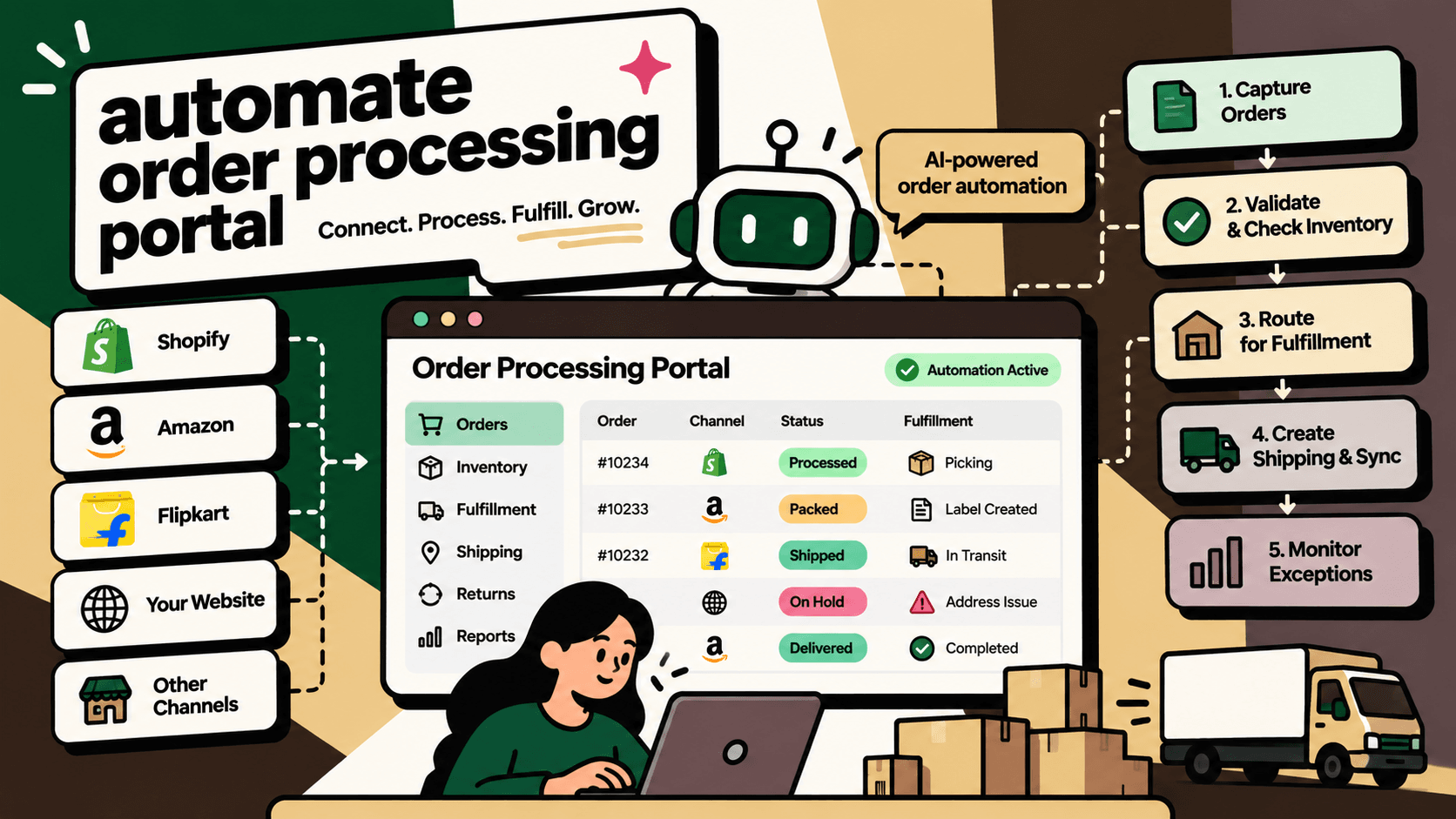
Automated order processing uses software integrations, business rules and, where appropriate, AI to move orders through the operational steps required to fulfill them. These steps can include importing orders, validating order details, checking inventory, allocating stock, routing fulfillment, generating shipping information, updating order status and reconciling transactions.
An automated order processing portal provides a centralized place to monitor these workflows, identify exceptions and coordinate the systems involved. Instead of manually moving information between a storefront, marketplace, spreadsheet, ERP and shipping platform, teams can manage orders through connected processes.
The central principle is simple: automate routine, rule-based order movements while making exceptions visible and actionable. Automation should not mean processing every order blindly. Payment discrepancies, inventory conflicts, suspicious transactions, incomplete addresses and failed integrations still require defined checks and, in some cases, human approval.
For D2C brands and multichannel sellers, the goal is to make order processing more reliable as order volume and channel complexity increase. A portal is useful only when it reflects the actual state of the order across the connected systems, rather than merely displaying a dashboard of disconnected data.
What Is an Order Processing Portal?
An order processing portal is a centralized operational interface for viewing, processing and monitoring orders across supported sales channels. Depending on its design, it may be part of an order management system (OMS), an ERP, a commerce integration platform or a custom-built application.
A portal can provide a single view of incoming orders, inventory availability, fulfillment status, shipping information, exceptions and actions awaiting approval. Its underlying automation layer connects the systems and executes approved workflow steps.
These are distinct responsibilities. The portal helps people monitor and manage operations. The OMS coordinates order lifecycle rules. The ERP may own financial and accounting records. The warehouse management system manages warehouse execution. Shipping platforms and courier systems provide shipment services and tracking events. Integrations allow these systems to exchange information.
Core functions of an automated order processing portal
- Order aggregation: Bring orders from supported storefronts and marketplaces into a common operational view.
- Order validation: Check required fields, payment status, address information and business rules.
- Inventory verification: Confirm stock availability and apply the appropriate reservation or allocation logic.
- Order routing: Direct eligible orders to the appropriate warehouse, fulfillment location or processing queue.
- Shipping coordination: Connect with supported shipping platforms to create shipments, retrieve labels or obtain tracking details where available.
- Status synchronization: Return relevant order and fulfillment updates to connected channels.
- Exception management: Flag failed imports, stock conflicts, payment issues and incomplete transactions for review.
- Operational reporting: Track processing time, order backlog, fulfillment delays, errors and manual intervention.
The exact functions depend on the selected platform and integrations. A product that imports orders does not necessarily support every fulfillment action, and a dashboard does not automatically provide the ability to change an order in the underlying system.
Why Manual Order Processing Becomes a Bottleneck
Manual order processing often works when order volume is low and the business uses only a few systems. As sales channels, warehouses, product variants and fulfillment partners increase, the number of handoffs grows. Each handoff introduces opportunities for delay, duplicate work and inconsistent data.
Orders arrive from multiple channels
A D2C business may receive orders from its own website, marketplaces, social commerce and wholesale customers. Teams may need to sign in to different systems, export files or copy information into an internal tracker. The resulting delay makes it harder to maintain a consistent order view.
Inventory data is fragmented
When stock quantities are maintained separately across marketplaces, warehouse software and spreadsheets, an order may be accepted even though the stock is no longer available. The business then needs to cancel, substitute, transfer or backorder the item, often with additional customer communication.
Fulfillment decisions depend on hidden rules
Warehouse selection may depend on stock location, shipping serviceability, dispatch cutoffs, delivery commitments or channel-specific requirements. When these rules live in employees' knowledge rather than a documented workflow, processing becomes difficult to scale and maintain.
Errors are discovered late
A missing address, failed payment check or rejected shipping request can stop an order after other work has already occurred. Without timely alerts and clear ownership, the order may remain stuck until a customer complains or a team member notices the backlog.
Reporting requires manual reconciliation
Operations teams may spend time comparing order exports, inventory reports, shipment data and financial records. This delays decision-making and makes it difficult to distinguish genuine operational problems from delayed synchronization.
Automating order processing addresses these issues by standardizing repeatable steps, synchronizing supported data and creating explicit paths for failures. It cannot eliminate every exception, but it can make exceptions easier to detect, assign and resolve.
How an Automated Order Processing Workflow Works
A reliable workflow treats order processing as a sequence of validated state changes. Each step should have a clear input, an expected output, a responsible system and a defined response when something fails.
Step 1: Capture the order
The workflow receives an order from a connected storefront, marketplace or other sales channel. It records the source order identifier, line items, quantities, customer information, payment state and relevant channel metadata.
Every order should have a reliable identifier so that retries do not create duplicate internal orders. If an integration sends the same event more than once, the workflow should recognize the existing transaction and avoid processing it as a new sale.
Step 2: Validate the order
Before fulfillment begins, the system checks the conditions required by the business. These may include payment confirmation, required order fields, product eligibility, address completeness and channel-specific restrictions.
Validation rules should be deterministic wherever possible. AI may help extract information from unstructured requests or classify unusual cases, but it should not replace authoritative payment status or other transactional records.
Step 3: Check and reserve inventory
The workflow checks available-to-sell stock in the system designated as the inventory source of truth. It applies reservation rules and prevents multiple orders from claiming the same available units when the architecture supports reliable reservations.
If stock is unavailable or inconsistent, the order should move to a defined exception state. Depending on the business rules, that may mean selecting another eligible warehouse, waiting for replenishment, offering an approved alternative or requesting human review.
Step 4: Route the order for fulfillment
Eligible orders are assigned to the appropriate warehouse or fulfillment location using documented rules. Those rules might consider available stock, warehouse capacity, serviceability, dispatch commitments and the requirements of the sales channel.
The routing process should record why a destination was selected. When no destination meets the requirements, the system should expose the reason rather than silently assigning the order to an unsuitable location.
Step 5: Create the shipment
The order processing system sends the required information to a supported shipping platform or courier integration. Depending on the integration, the workflow may request a shipping service, create a shipment, obtain a label or retrieve a tracking number.
The system should distinguish between a request that was submitted and an action that was confirmed. A timeout does not necessarily mean that the shipment was not created; blindly retrying could create duplicate shipments. Use the available transaction identifiers and provider responses to determine whether it is safe to retry.
Step 6: Synchronize order status
After a confirmed fulfillment event, the workflow updates the appropriate internal and sales-channel records. Status mappings should be explicit because different platforms may use different names or transition rules for similar events.
Do not mark an order as dispatched simply because a shipping request was sent. Use the relevant confirmed event or system response to determine the correct state.
Step 7: Monitor exceptions and reconcile
The portal displays orders that failed validation, encountered inventory conflicts, could not be routed or did not synchronize successfully. Each exception should include a reason, timestamp, relevant source record and next action.
Reconciliation compares the records across systems to identify missing updates, duplicate transactions and unresolved discrepancies. It is particularly important for workflows where an order can be successfully created in one system but fail to update another.
Which Parts of Order Processing Should Be Automated?
Not every task needs AI, and not every task should run without approval. The most reliable design assigns work to the simplest mechanism that can handle it correctly.
| Workflow | Recommended approach | Control required |
|---|---|---|
| Import orders from supported channels | API or native integration automation | Duplicate prevention and import monitoring |
| Validate required fields | Deterministic business rules | Explicit failure reasons and correction workflow |
| Confirm payment status | Authoritative payment or order-system data | Do not infer payment completion from customer messages |
| Reserve inventory | Inventory rules and transactional system logic | Concurrency protection and reconciliation |
| Route orders to warehouses | Configured routing rules | Fallback path when no location qualifies |
| Create shipping requests | Supported carrier or shipping API | Confirmation checks and safe retry logic |
| Classify unusual order issues | AI-assisted classification with rules | Confidence thresholds and escalation |
| Summarize exceptions for operators | AI-assisted summarization | Verify facts against source records |
| Approve unusual refunds or high-risk orders | Human decision supported by workflow rules | Role-based authorization and audit trail |
| Reconcile missing or conflicting records | Deterministic comparisons with exception reporting | Human investigation for unresolved discrepancies |
AI is most useful when the task involves interpreting text, categorizing an exception or summarizing information for a person. Rules and transactional systems should remain responsible for exact conditions, inventory changes, payment confirmation and other state-changing operations.
Automated Order Processing Portal vs. OMS vs. ERP
These terms overlap in practice, but they describe different layers of the solution. A business should understand the distinction before purchasing software or commissioning a custom portal.
| Solution type | Main responsibility | When to consider it |
|---|---|---|
| Order processing portal | Centralized operational view, workflow actions and exception monitoring | Teams need one interface to manage connected order processes |
| Order management system (OMS) | Order lifecycle coordination, allocation, routing and status management, depending on the product | Order orchestration is the primary operational requirement |
| ERP | Broader business records and processes such as finance, purchasing and inventory, depending on configuration | Order processing must align with core business and financial operations |
| Integration platform | Data exchange, transformation and orchestration between applications | Existing systems work individually but do not exchange data reliably |
| Warehouse management system (WMS) | Warehouse-specific execution, such as picking, packing and stock movements | Warehouse processes require dedicated operational control |
A portal can sit on top of an OMS and integration layer, or it can be a feature within an existing platform. The correct architecture depends on the current technology stack, required workflow complexity and the amount of customization the business can maintain.
Order Processing Automation Platforms to Evaluate
The supplied research identifies several platforms and solution providers relevant to ecommerce order processing, multichannel order management and system integration. They are not all direct substitutes for one another. Some focus on order management, some on integration, and others on broader commerce operations.
eVanik
eVanik's order management system is a candidate for sellers evaluating centralized ecommerce order and channel management. Its published resources also include marketplace channel integrations and a developer API resource.
During evaluation, confirm the current supported channels, order and inventory data coverage, available actions, exception handling and API requirements. Test the workflows used by your actual business rather than assuming that every integration supports the same capabilities.
IntelliPaaS
IntelliPaaS ecommerce order processing automation is relevant when the problem involves integrating applications and automating the movement of ecommerce order data between systems.
Consider this category when you already have systems for orders, inventory, fulfillment or finance but need them to exchange information more reliably. Verify connector availability, transformation capabilities, monitoring, retry behavior and the effort required for custom workflows.
Ginesys OMS
Ginesys OMS is a candidate for businesses evaluating order management connected with broader retail and ERP operations.
Assess its fit against your sales channels, fulfillment model, inventory rules and the business records that must stay synchronized. Confirm which functions are supported in the proposed configuration and which require additional integration.
O2M
O2M is identified in the supplied research as a multichannel inventory and order software option for India. It may be relevant when a business needs to coordinate orders and inventory across supported ecommerce channels.
Validate the exact channel coverage, inventory synchronization behavior, order lifecycle functions and reporting required for your operation.
StoreHippo
StoreHippo's order management system is another option to assess when considering a commerce platform with order processing capabilities.
Check whether its order management features fit the current architecture or whether the business requires a separate OMS and integration layer. Confirm the functions available for the specific deployment.
How to compare platforms fairly
Use a requirements matrix rather than a feature-count comparison. For each candidate, record whether the required workflow is available natively, can be configured, needs custom integration or is not supported.
| Evaluation area | Questions to ask | Evidence to request |
|---|---|---|
| Channel coverage | Can it ingest and update orders from every required sales channel? | Connector documentation and a live workflow demonstration |
| Inventory | How are stock reservations, conflicts and synchronization handled? | Test scenarios with concurrent orders and stock changes |
| Fulfillment | Can it route orders and execute the required shipping steps? | Demonstration using actual warehouse and carrier workflows |
| Integration | Are required connectors native, configurable or custom? | API documentation, data mappings and integration scope |
| Exception management | How are failed updates and unusual orders surfaced? | Alerts, logs, retry rules and ownership procedures |
| Reporting | Can operations teams monitor backlog, errors and delays? | Sample reports and metric definitions |
| Total cost | What are the licensing, implementation and maintenance costs? | Written scope, pricing assumptions and support terms |
The platforms listed above are candidates from the supplied research, not a ranked or independently audited shortlist. Confirm current features, commercial terms, integration coverage and regional availability directly with each provider.
How to Build or Implement an Order Processing Portal
Before developing a custom portal, determine whether an existing OMS, ERP or integration platform can handle most of the required workflow. Custom software is justified when there is a clear gap that cannot be addressed efficiently through configuration or supported integrations.
Step 1: Map the existing workflow
Document the order journey from creation to fulfillment, including payment checks, stock allocation, shipping, status updates, cancellations and returns. Identify where people copy data, switch applications, wait for approvals or resolve recurring errors.
For each step, record the source system, input data, expected result, responsible owner and failure path. This prevents the project from becoming a dashboard redesign that leaves the underlying process unchanged.
Step 2: Establish baseline metrics
Measure the current volume and cost of manual work before introducing automation. Useful baseline metrics include the number of orders requiring intervention, order-to-dispatch time, inventory discrepancies, integration failures, cancellation rate, unfulfilled order backlog and time spent reconciling records.
Define the measurement period and calculation method. Separate orders that are simply imported from orders that are validated, allocated, dispatched and confirmed. Otherwise, an increase in automated imports may be mistaken for an improvement in actual fulfillment.
Step 3: Identify the source of truth
For each critical data element, decide which system is authoritative. For example, the storefront may own the original customer order, an inventory system may own available stock, a payment provider may own transaction status, and a shipping provider may own carrier tracking events.
Document how updates flow between these systems and what happens when their records disagree. Without clear ownership, automation can propagate incorrect data faster than a manual process.
Step 4: Prioritize the smallest viable workflow
Start with a high-volume, repeatable process with clear rules and reliable source data. A practical first workflow might import orders, validate required fields, check payment status, verify stock, route eligible orders and flag exceptions.
Avoid starting with every marketplace, warehouse and unusual business rule at once. A smaller workflow makes failures easier to isolate and provides a meaningful test of the integration architecture.
Step 5: Design the integration layer
Confirm the availability of native connectors, APIs, webhooks, scheduled data exchanges and required permissions. Define the fields to exchange, how identifiers are mapped and how often each update should occur.
Include duplicate prevention, safe retries, rate-limit handling, timeout management and reconciliation. A robust integration should be able to detect a partial failure, explain what happened and resume safely without creating duplicate orders or shipments.
Step 6: Define business rules and approval boundaries
Write down the conditions that determine whether an order can proceed automatically. Examples include confirmed payment, valid address, eligible product, sufficient stock and an available fulfillment route.
Specify which exceptions can be resolved automatically and which require human review. High-value orders, unusual payment conditions, disputed transactions and material inventory conflicts may need additional checks depending on the business's risk policy.
Step 7: Build the portal around operational decisions
The portal should make it easy to identify what needs attention. Useful views include new orders, orders awaiting validation, ready-to-fulfill orders, delayed orders, failed integrations and unresolved exceptions.
For each exception, show the relevant order identifier, source system, failure reason, last successful update, recommended next step and assigned owner. Avoid displaying status indicators that imply an action succeeded when the downstream system has not confirmed it.
Step 8: Test normal cases and edge cases
Test the standard order journey as well as duplicate events, missing fields, payment failures, out-of-stock items, partial shipments, cancellations after allocation, carrier API timeouts and conflicting status updates.
Check whether every failure is visible, whether retries are safe and whether a human can resolve the issue without manually reconstructing the entire transaction history.
Step 9: Pilot with a limited scope
Run the workflow with a defined set of channels, products or warehouses. Compare performance with the baseline and review errors, manual intervention, processing time and the quality of exception handling.
Keep a rollback path and make sure operators know how to manage orders that fall outside the pilot's scope. Expand only when the workflow is stable and the measured benefit justifies the next stage.
Step 10: Monitor and maintain
Assign ownership for integration health, failed jobs, access credentials, API changes, rule updates and data reconciliation. Review recurring exceptions to determine whether they require better source data, revised rules or a process change.
Automation needs ongoing monitoring. A workflow that worked during testing can degrade when a marketplace changes an API, a new SKU format is introduced or the business adds a warehouse.
Common Order Processing Automation Failures
Automating a broken process
If the existing workflow has unclear ownership, inconsistent product data or undocumented exceptions, automating it may simply make the problems occur faster. Standardize the process and define system responsibilities before scaling.
Assuming every integration is bidirectional
A connector may import orders without supporting cancellations, inventory adjustments or fulfillment updates. Verify the exact objects, events and actions supported by each connection.
Retrying without duplicate protection
When a request times out, the downstream system may have completed the action even though the response was not received. Repeating the request without checking its status can create duplicate shipments, orders or other transactions.
Using AI for exact transactional decisions
AI can help interpret a customer message or summarize an exception, but it should not invent payment confirmation, infer stock availability or independently alter a financial record. Use authoritative system data and deterministic validation for state changes.
Failing to define exception ownership
An alert is not a resolution. Every exception category needs a responsible team, a next step and an escalation path. Otherwise, the portal may show a growing backlog without making the underlying problem easier to solve.
Measuring automation instead of outcomes
The number of orders processed automatically is an incomplete metric. A workflow may move orders quickly while creating incorrect inventory reservations, delayed shipments or repeat customer contacts. Measure confirmed outcomes and downstream error rates as well as speed.
How to Measure the Business Impact
Evaluate order processing automation against the baseline established before implementation. The most useful metrics reflect accuracy, speed, manual effort and the cost of exceptions.
| Metric | What it measures | Why it matters |
|---|---|---|
| Order processing time | Time from order receipt to a defined processing milestone | Shows whether the workflow moves orders faster |
| Manual intervention rate | Share of orders requiring human correction or action | Indicates how much repetitive work remains |
| Order error rate | Orders with incorrect, incomplete or duplicated processing | Protects fulfillment accuracy and customer experience |
| Inventory discrepancy rate | Frequency of mismatches between relevant inventory records | Helps assess synchronization and reservation quality |
| Integration failure rate | Share of workflow operations that fail or remain unconfirmed | Reveals reliability problems across connected systems |
| Order-to-dispatch time | Elapsed time from order receipt to confirmed dispatch | Connects processing improvements with fulfillment performance |
| Exception resolution time | Time from exception detection to resolution | Shows whether the portal improves operational recovery |
| Total cost per processed order | Relevant processing, software, integration and support costs divided by orders processed | Supports a more complete cost comparison |
Estimate the economics before deployment
A simple planning model is to estimate the manual handling time saved on eligible orders, then subtract the ongoing costs of software, implementation, monitoring, maintenance and human review.
For example, if a business measures the number of orders that can genuinely avoid manual handling and the average time saved per order, it can estimate the gross labor capacity released. The business should then account for exceptions, repeat work, integration failures and the fact that released time does not automatically translate into cash savings.
This is an illustrative evaluation method, not an industry benchmark or a guarantee of financial return. Use measured pilot results to determine whether the investment is justified.
Security, Data Quality and Operational Controls
An order processing portal handles commercially and operationally important information. Depending on the connected systems, it may also process customer names, addresses, order details and payment-related status information.
- Access control: Give users and integrations only the permissions required for their roles.
- Data minimization: Exchange only the fields needed for each workflow.
- Audit logs: Record important state changes, automated actions, approvals and failures.
- Credential management: Store and rotate integration credentials through appropriate security controls.
- Data validation: Check required fields, identifiers, quantities and status transitions before processing.
- Recovery procedures: Define how to resume failed jobs and reconcile uncertain transactions.
- Human approval: Apply approval controls to sensitive or high-risk actions according to business policy.
- Monitoring: Alert the responsible team when workflows fail, records drift or exceptions exceed defined thresholds.
AI features require additional care. Any AI-generated classification or recommendation should be grounded in the relevant records, and important actions should remain constrained by explicit permissions and deterministic business rules.
Where Five Anchor Fits
Five Anchor focuses on AI infrastructure for D2C and ecommerce businesses. Automated order processing is relevant when the challenge extends across marketplace integrations, ERP connections, inventory synchronization, shipping workflows and operational reporting.
A practical engagement can begin with mapping the order lifecycle, identifying the systems that own each record and measuring where manual intervention occurs. The implementation may then connect supported systems, automate repeatable order workflows, define exception handling and create monitoring that shows whether transactions have completed successfully.
Where an existing OMS or ERP already meets the business's core requirements, the priority may be to improve integration and orchestration rather than introduce a replacement system. Where a critical workflow is missing, the business can assess whether configuration, a new platform or a custom portal is the most maintainable option.
Five Anchor's commerce infrastructure services are relevant to marketplace and ERP integrations, order processing automation, inventory synchronization and shipping connections. Its ecommerce intelligence capabilities may also support reporting on order backlogs, operational exceptions and channel performance. The appropriate scope should be based on the existing stack, documented requirements and measured business priorities.
Final Checklist Before Automating Order Processing
- Map the complete order lifecycle and all important exception paths.
- Identify the source of truth for orders, payments, inventory and shipment status.
- Measure manual intervention, processing time, errors and reconciliation effort.
- Choose an OMS, ERP, integration platform or custom portal based on actual workflow gaps.
- Verify native connector coverage and required API permissions.
- Define validation rules, inventory reservation logic and fulfillment routing.
- Implement duplicate prevention, safe retries, logs and reconciliation.
- Set approval requirements and assign owners for unresolved exceptions.
- Pilot with representative channels, orders and edge cases.
- Measure confirmed outcomes and total cost before expanding.
Conclusion
Automating order processing is not simply a matter of connecting a few applications or placing every order on an automated path. It requires a reliable order lifecycle, clear system ownership, validated business rules, dependable integrations and a controlled way to handle exceptions.
For a growing D2C or ecommerce business, start with the workflow that creates the most repetitive work or operational risk. Validate the data, automate the routine steps, make failures visible and measure whether orders move more accurately and efficiently. A centralized portal becomes valuable when it helps the team act on trustworthy information and recover from problems quickly—not merely when it displays more orders on one screen.
Key Takeaways
- •Automated order processing moves orders through validation, inventory checks, allocation, fulfillment, shipping updates and reconciliation with less manual handling.
- •An order processing portal is an operational interface; an OMS, ERP, WMS and integration layer may perform different underlying responsibilities.
- •Inventory synchronization, duplicate prevention and reliable status updates are essential to avoid overselling and incorrect order states.
- •Use deterministic rules and authoritative system data for payment validation, stock reservation and transactional changes.
- •AI is better suited to interpreting unstructured requests, classifying exceptions and summarizing cases than making unverified transactional decisions.
- •Evaluate eVanik, IntelliPaaS, Ginesys OMS, O2M and StoreHippo according to their actual role and verified integration coverage rather than treating them as identical products.
- •A reliable implementation needs safe retries, error monitoring, reconciliation, clear ownership and human escalation paths.
Order Processing Automation Approaches
| Approach | Primary role | Best suited for |
|---|---|---|
| Inventory Sync Frequency | 15–30 min batch polling (high oversell risk) | Sub-second atomic locking (<450ms) |
| Concurrent Drop Resilience | Fails under concurrency; causes negative stock balance | Redis atomic reservation queue guarantees exact counts |
| Error Handling & Retries | Silent failure; manual CSV audit needed | Dead-letter queues with automated exponential retry |
| Fulfillment Routing Speed | 2–4 hours delayed batch export to 3PL warehouse | Instantaneous automated webhook dispatch (<90 sec) |