A Zendesk Epicor integration connects customer support with the operational data stored in an Epicor ERP system. Instead of asking support agents to switch between a ticketing platform and ERP screens, the integration can surface customer, order, inventory, product, shipment, invoice and return information inside the support workflow.
The important design question is not simply how to connect two APIs. It is which customer-service decisions should be automated, which ERP actions should remain deterministic, and where human approval is required.
Epicor Kinetic provides a platform-level Open REST API for structured access to ERP services, data and business logic. Zendesk provides REST APIs and Zendesk Integration Services for building integrations and workflow automation. Epicor Open REST API and Zendesk Integration Services
The result can be a support operation where Zendesk handles the conversation, an integration or AI layer interprets the request and business rules, and Epicor remains the system of record for ERP transactions.
What Is a Zendesk Epicor Integration?
Answer: A Zendesk Epicor integration connects Zendesk customer-support workflows with Epicor ERP data and processes so agents and approved automations can retrieve or act on operational information without manually moving between systems.
Explanation: Zendesk is designed around customer conversations, tickets and support workflows. Epicor Kinetic is designed around ERP processes and operational data. The integration layer bridges those different responsibilities.
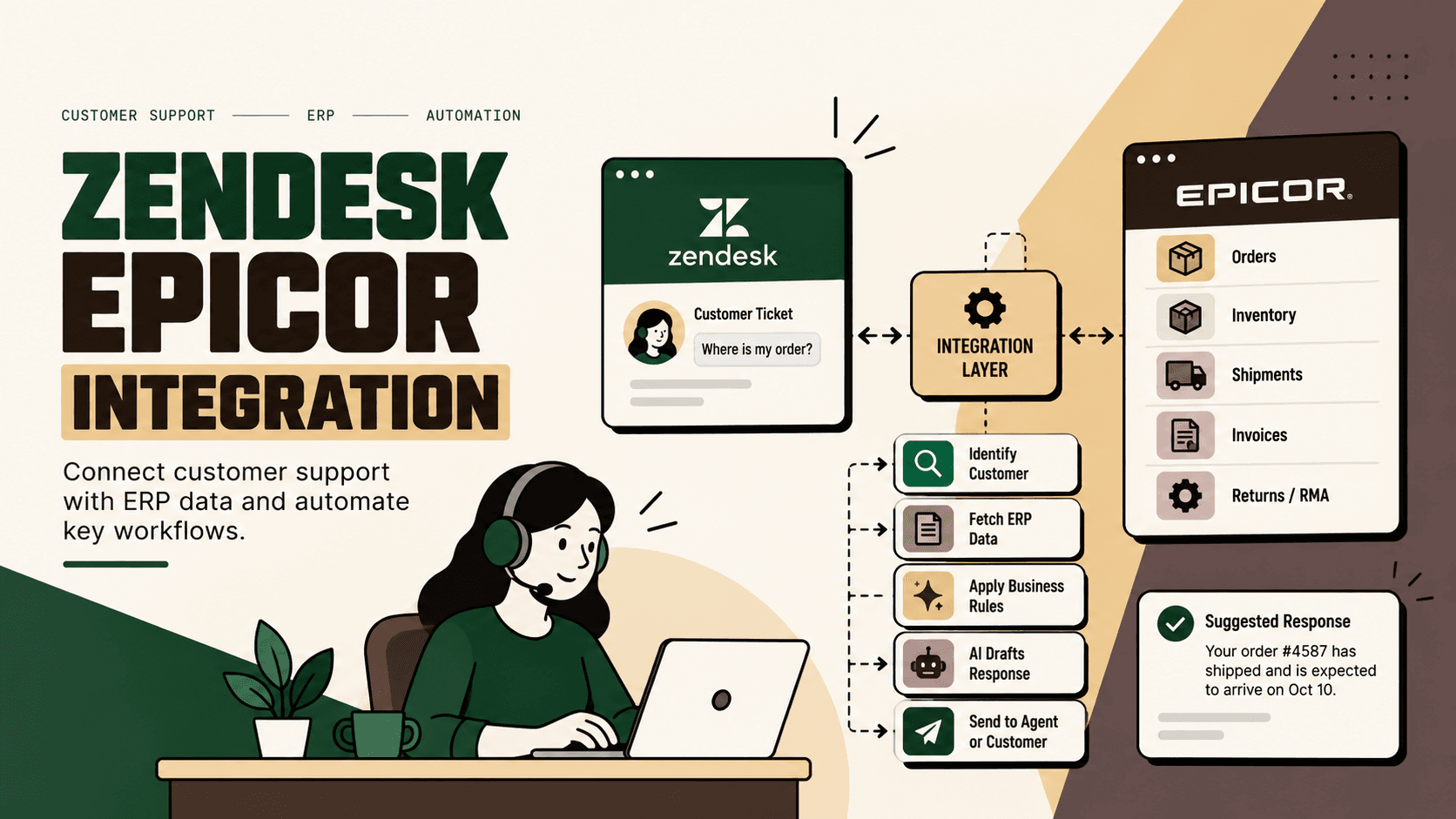
Example: When a customer asks, “Where is my order?”, Zendesk can identify the customer and order number, the integration can query Epicor for the relevant order and fulfillment information, and the resulting status can be returned to the support workflow.
Implication: The value comes from shortening the distance between a customer question and the authoritative operational data needed to answer it.
Action: Start by identifying the five to ten support questions that require ERP data most often. Build those workflows before attempting a broad two-way integration.
Why Connect Zendesk With Epicor?
Support teams often become the human interface between customers and several back-office systems. When an agent receives a question about an order, shipment, invoice, inventory position or return, the answer may exist in Epicor but the conversation is happening in Zendesk.
Without integration, the agent may need to search for the customer, locate the order, inspect its status, interpret ERP fields and then manually copy the answer back into the ticket. That creates unnecessary context switching and introduces opportunities for stale information or transcription errors.
A connected workflow changes the operating model:
- Zendesk captures the customer request.
- The integration identifies the relevant customer, order or product.
- Epicor provides the authoritative ERP data.
- Business rules determine what can be displayed or changed.
- AI can interpret the request or draft a response where appropriate.
- Human agents handle exceptions and higher-risk decisions.
This is particularly useful for businesses where customer support depends heavily on order fulfillment, inventory, shipping, invoices or returns.
What Can Zendesk and Epicor Integration Automate?
The strongest starting point is not “integrate everything.” It is to prioritize workflows according to customer volume, operational effort, error cost and business impact.
| Workflow | Zendesk role | Epicor role |
|---|---|---|
| Customer lookup | Ticket and customer context | Customer master data |
| Order lookup | Customer request | Sales-order data |
| Order status | Agent or customer response | Order and fulfillment status |
| Inventory check | Support request | Inventory availability |
| Product information | Customer question | Part and product data |
| Shipment tracking | Customer communication | Shipment information |
| Invoice query | Ticket and customer context | Invoice or accounts-receivable information |
| Returns and RMA | Return request | RMA and ERP processing |
| Order updates | Approved agent action | ERP transaction |
| Escalation | Ticket routing | ERP status or business rules |
Not every workflow should be fully automated. Read-only lookups are usually easier to automate than financial adjustments, order cancellations or other actions that can materially change an ERP transaction.
How the Zendesk Epicor Integration Architecture Works
A practical architecture separates conversation handling from ERP transaction logic.
Customer → Zendesk → Integration or AI Layer → Epicor Kinetic → Integration Layer → Zendesk
Zendesk can provide the customer and ticket context. An integration layer validates identifiers, applies rules and calls the required Epicor services. Epicor Kinetic remains responsible for the ERP data and business functionality exposed through its API. Epicor describes its Open REST API as providing structured access to ERP services, data and business logic. Epicor Kinetic Open REST API
Zendesk Integration Services can also support event-driven integrations, API calls and authentication management within Zendesk-hosted integration workflows. Zendesk Integration Services documentation
Layer 1: Customer and Ticket Context
The first layer identifies what the customer is asking about. Relevant identifiers can include customer ID, email address, order number, invoice number, product code or RMA reference.
The objective is to establish a reliable key before querying Epicor. An ambiguous customer match should not automatically trigger a sensitive ERP action.
Layer 2: Integration and Orchestration
The orchestration layer translates the support request into an approved system action. It can handle authentication, field mapping, validation, retries, error handling, response formatting and workflow rules.
Layer 3: Epicor Kinetic
Epicor supplies the ERP-side data or transaction. Its REST architecture exposes Kinetic services and functionality programmatically, including business objects, processes, reports, BAQs and Epicor Functions. Epicor Open REST API capabilities
Layer 4: Zendesk Response
The integration returns only the information required by the support workflow. That information can be displayed to an agent, inserted into an internal ticket field, used to trigger a workflow or passed to an AI response layer.
Example: Automating “Where Is My Order?”
Illustrative scenario: A customer opens a Zendesk ticket asking for the status of an order.
- Zendesk receives the customer request.
- The workflow identifies the customer and extracts the order number.
- The integration validates that the order belongs to the customer context.
- The integration calls the appropriate Epicor service.
- Epicor returns the available order and fulfillment information.
- The integration converts the ERP response into a support-friendly structure.
- Zendesk displays the result to the agent or approved automation.
- AI can draft a customer-facing response using the verified ERP information.
- If the data is missing, contradictory or outside the approved workflow, the case is routed to a human.
The key design principle is that AI should not invent the shipment status. The ERP or connected logistics system should provide the operational fact; AI can interpret and communicate that fact.
Where AI Fits Into Zendesk Epicor Integration
AI is most useful when the support request is unstructured but the underlying ERP operation is structured.
For example, customers rarely phrase requests in the exact field names used by an ERP. A customer might write, “Has my replacement shipped yet?” The system needs to understand the intent, identify the relevant order or RMA and then retrieve the correct operational data.
A sensible division of responsibility is:
- AI: intent classification, entity extraction, response drafting and selected exception classification.
- Deterministic integration: authentication, field mapping, API calls, validation, transaction rules and data transformations.
- Epicor: authoritative ERP records and approved ERP transactions.
- Zendesk: customer conversation, ticket context, routing and support workflow.
- Human: ambiguous cases, policy exceptions, sensitive financial decisions and actions requiring judgment.
This avoids a common mistake: putting an AI model directly in charge of ERP actions without sufficiently strict business rules.
Zendesk Integration Services vs an External Integration Layer
There are several architecture patterns. The right choice depends on workflow complexity, number of connected systems, transaction requirements and how much orchestration needs to happen outside Zendesk.
| Approach | Best suited for | Trade-off |
|---|---|---|
| Zendesk Integration Services | Zendesk-centered workflows and event-driven automation | Less suitable when orchestration becomes highly cross-system |
| Custom middleware or integration service | Complex multi-system workflows and custom business logic | Requires more engineering and ongoing ownership |
| Epicor Integration Cloud powered by Jitterbit | Enterprise integration across ERP and external applications | Adds an integration platform that must be designed and governed |
Zendesk documents ZIS as a set of Zendesk-hosted web services for integrating Zendesk with other systems and automating workflows based on events. Zendesk Integration Services
Epicor also positions Epicor Integration Cloud powered by Jitterbit as an API integration platform for connecting cloud, SaaS and on-premises business applications. Epicor Integration Cloud
The decision should therefore be architectural rather than ideological. Use the smallest integration layer that can reliably support the required workflows.
How to Prioritize Zendesk Epicor Automations
A useful practical prioritization model is:
Priority = volume × frequency × manual effort × error cost × revenue impact ÷ implementation complexity
This is a practical decision framework, not an industry-standard formula.
Use it to compare candidate workflows rather than assuming that the most technically impressive automation is the most valuable.
- Measure volume: How often does the support team receive this request?
- Measure effort: How many manual steps are required today?
- Measure error cost: What happens if the agent receives or communicates incorrect information?
- Measure business impact: Does the workflow affect orders, revenue, customer retention or operational capacity?
- Estimate implementation complexity: How many systems, APIs, business rules and edge cases are involved?
High-volume read-only requests such as order status, shipment status and product availability are often strong candidates for an initial pilot. Complex financial adjustments or irreversible ERP changes generally require stronger approval controls.
Implementation Roadmap for Zendesk Epicor Integration
1. Map the Existing Support Workflow
Document how agents currently answer order, inventory, shipment, invoice and return questions. Record every system they open and every manual lookup they perform.
Common failure: Starting with API development before understanding the actual support workflow.
Expected result: A defined list of workflows worth integrating.
2. Establish the Baseline
Measure ticket volume by request type, manual handling time, escalation frequency, response time and rework. If reliable baseline data is unavailable, state that limitation rather than inventing a target.
3. Define System Ownership
Decide which system owns each data element. For example, Epicor may be the authoritative source for ERP order information while Zendesk owns the customer-support conversation and ticket state.
4. Define Rules Before Adding AI
Specify what the system can read, what it can change and which actions require approval. AI should operate inside these constraints.
5. Design the Smallest Viable Workflow
A strong first workflow could be order-status lookup. It has a clear trigger, a defined ERP query, a bounded response and an obvious human fallback.
6. Build Authentication and Security
Use scoped credentials, secure secret storage and an explicit permission model. Zendesk recommends OAuth for API authentication and documents scoped access and token refresh patterns. Zendesk OAuth authentication
Zendesk is also retiring API tokens. Its current documentation states that API tokens will be permanently deactivated on April 30, 2027, so new integration designs should account for OAuth rather than building a long-term dependency on API-token authentication. Zendesk API-token to OAuth migration guidance
7. Validate Data and Edge Cases
Test missing order numbers, duplicate customers, cancelled orders, partially fulfilled orders, multiple shipments, unavailable inventory, invalid identifiers, permission failures, ERP downtime and stale data.
8. Add Human Approval
Read-only workflows can often be automated with relatively low risk. Actions such as cancellations, refunds, order modifications or other material ERP changes should have explicit authorization rules and, where appropriate, human approval.
9. Pilot With One Workflow
Run the integration on a defined workflow before expanding it. Compare the post-pilot metrics against the original baseline.
10. Monitor and Scale
Monitor API failures, authentication failures, incorrect mappings, unresolved requests, escalation rates and workflow latency. Only add additional workflows after the first one is stable.
Data Mapping: The Part That Usually Determines Reliability
An integration can be technically connected and still operationally unreliable if the data mapping is weak.
At minimum, define how the following identifiers move between systems:
- Customer ID
- Email address
- Order number
- Order line
- Product or part number
- Shipment reference
- Invoice number
- RMA or return reference
- Ticket ID
- ERP status
Do not assume that similarly named fields have identical meanings. An ERP status such as “released,” “open” or “complete” may need to be translated into customer-facing language before it appears in Zendesk.
Security and Governance Considerations
A Zendesk Epicor integration crosses customer-support and ERP boundaries, so access should be deliberately constrained.
- Least privilege: Give each integration only the permissions it requires.
- Authentication: Use OAuth or another supported secure authentication mechanism rather than embedding long-lived credentials in workflow logic.
- Data minimization: Return only the ERP information required for the support task.
- Auditability: Record important automated actions and ERP transaction identifiers.
- Human escalation: Route ambiguous or high-impact cases to an agent.
- Failure handling: Make ERP downtime visible instead of allowing an AI system to guess.
Zendesk's current integration documentation describes OAuth-based connections and scoped permissions for integration workflows. Zendesk OAuth connections
What Should Not Be Automated?
Integration projects become risky when automation is treated as an objective rather than a design choice.
Do not automatically authorize every action simply because an API exists.
- Do not let an AI model invent order or shipment status.
- Do not expose sensitive ERP information simply because a customer asks for it.
- Do not allow ambiguous customer identity matches to trigger sensitive actions.
- Do not automate financial or order-changing transactions without explicit rules.
- Do not treat an ERP API failure as proof that the requested transaction failed or succeeded.
- Do not make AI responsible for deterministic business rules that should live in the integration layer.
The goal is not maximum automation. The goal is reliable automation of the right decisions.
Where Five Anchor Fits
For a D2C or ecommerce operation, Zendesk and Epicor are rarely the only systems involved. Customer support may also depend on ecommerce platforms, marketplaces, payment systems, warehouses, shipping carriers, returns platforms and analytics.
This is where the problem becomes broader than a point-to-point Zendesk Epicor connection. The business needs a reliable operational layer that can move context between customer conversations and commerce systems.
Problem: Support agents need operational answers but the relevant data is distributed across support, ERP, inventory and fulfillment systems.
Architecture: Zendesk provides the conversation layer, Epicor provides ERP data and transactions, while an integration and AI layer handles orchestration, validation and approved automation.
Implementation: Five Anchor can approach this as an AI-powered customer-operations workflow: map the support process, connect the ERP and commerce systems, implement API-based workflows, establish guardrails, add human escalation and measure the resulting operational metrics.
Business outcome: The intended outcome is not simply “two systems connected.” It is a support operation where agents can access the right operational context with fewer manual handoffs and where approved repetitive workflows can execute consistently.
This fits Five Anchor's positioning as AI Infrastructure for D2C & E-Commerce, particularly across Commerce Infrastructure and AI-Powered Customer Operations. The integration can become one component of a broader architecture connecting ERP, order processing, inventory, shipping, returns and customer support.
What a Production-Ready Integration Should Include
| Capability | Minimum requirement | Production consideration |
|---|---|---|
| Authentication | Secure API credentials | OAuth, scopes and credential rotation |
| Customer matching | Reliable identifier | Handle duplicates and ambiguous matches |
| API orchestration | Defined requests | Retries, timeouts and error handling |
| Data mapping | Field transformations | Versioned mappings and validation |
| AI layer | Optional interpretation | Guardrails and human escalation |
| Audit trail | Workflow logging | Trace important automated actions |
| Monitoring | Error visibility | Operational alerts and KPI tracking |
Measuring the Business Outcome
The right KPI depends on the workflow being automated. Avoid measuring success only by the number of integrations deployed.
For order-status automation, useful metrics may include the proportion of relevant tickets resolved with ERP data, manual lookup time, escalation rate, response time and integration failure rate.
For returns automation, useful measures may include time to identify the relevant order or RMA, percentage of cases routed correctly, human approval rate and exception volume.
For inventory questions, measure the reliability of inventory responses, unresolved lookup requests and the time required for agents to answer availability questions.
Illustrative scenario: If a workflow currently requires an agent to leave Zendesk, search Epicor, interpret the result and manually write the answer, even a modest reduction in those repeated steps can create meaningful operational capacity at scale. The actual business impact should be calculated from the company's own ticket volume, handling time and labor cost rather than from an assumed industry benchmark.
Common Zendesk Epicor Integration Mistakes
Building a Point-to-Point Connection Without a Workflow Model
Connecting endpoints does not define what happens when data is missing, an order has multiple shipments or the ERP returns an unexpected state.
Using AI Where Rules Are Better
AI is useful for language and ambiguity. It is usually unnecessary for deterministic tasks such as checking whether an order exists or validating whether a required identifier is present.
Ignoring Authentication Changes
Authentication requirements change over time. Zendesk's current API-token retirement schedule makes credential strategy a design concern rather than a deployment detail. Zendesk OAuth migration documentation
Returning Too Much ERP Data
Support agents do not need unrestricted access to every ERP field. Return the minimum context required to resolve the customer request.
Skipping Failure Scenarios
A production workflow must define what happens when Epicor is unavailable, a customer cannot be uniquely identified or the integration receives incomplete data.
Measuring Technical Success Instead of Operational Success
An API call returning HTTP 200 is not the same thing as a customer issue being resolved. Measure the workflow outcome.
Zendesk Epicor Integration: A Practical Decision Framework
Before building, answer these questions:
- Which Zendesk requests require Epicor data?
- Which Epicor fields are authoritative for each request?
- Which workflows are read-only?
- Which workflows can change ERP state?
- Which actions require human approval?
- How will customer and order identity be validated?
- Which integration architecture best fits the number of systems involved?
- How will authentication and credential rotation work?
- What happens when an API or ERP service is unavailable?
- Which KPI will prove that the integration improved the workflow?
If these questions cannot be answered, adding AI will not solve the underlying architecture problem.
Conclusion
A Zendesk Epicor integration is most valuable when it turns ERP data into usable customer-service context and automates clearly defined support workflows.
The technical foundation is available on both sides: Epicor Kinetic exposes ERP services and functionality through its Open REST API, while Zendesk provides APIs and Integration Services for connecting external systems and orchestrating workflows. Epicor Open REST API Zendesk Integration Services
The strongest implementation starts small: choose a high-volume support workflow, establish the baseline, define data ownership, build deterministic integration rules, add AI only where interpretation is useful, protect sensitive ERP actions with guardrails and measure the operational result.
For ecommerce businesses, the larger opportunity is to move from a single Zendesk-to-Epicor connection toward an integrated customer-operations layer connecting support, ERP, inventory, orders, fulfillment and returns. That is the point at which integration becomes infrastructure rather than a collection of isolated automations.
Key Takeaways
- •Zendesk can serve as the customer conversation layer while Epicor remains the ERP system of record.
- •High-value starting workflows include order lookup, shipment status, inventory checks, invoices and returns.
- •AI should interpret customer language and draft responses, not invent ERP facts or bypass transaction controls.
- •OAuth, scoped permissions, validation, error handling, monitoring and human escalation are core production requirements.
- •Five Anchor can extend the integration into a broader AI-powered customer-operations architecture across ERP, commerce, inventory, fulfillment and support.
Zendesk Epicor Integration Architecture Options
| Approach | Best suited for | Primary trade-off |
|---|---|---|
| Inventory Sync Frequency | 15–30 min batch polling (high oversell risk) | Sub-second atomic locking (<450ms) |
| Concurrent Drop Resilience | Fails under concurrency; causes negative stock balance | Redis atomic reservation queue guarantees exact counts |
| Error Handling & Retries | Silent failure; manual CSV audit needed | Dead-letter queues with automated exponential retry |
| Fulfillment Routing Speed | 2–4 hours delayed batch export to 3PL warehouse | Instantaneous automated webhook dispatch (<90 sec) |