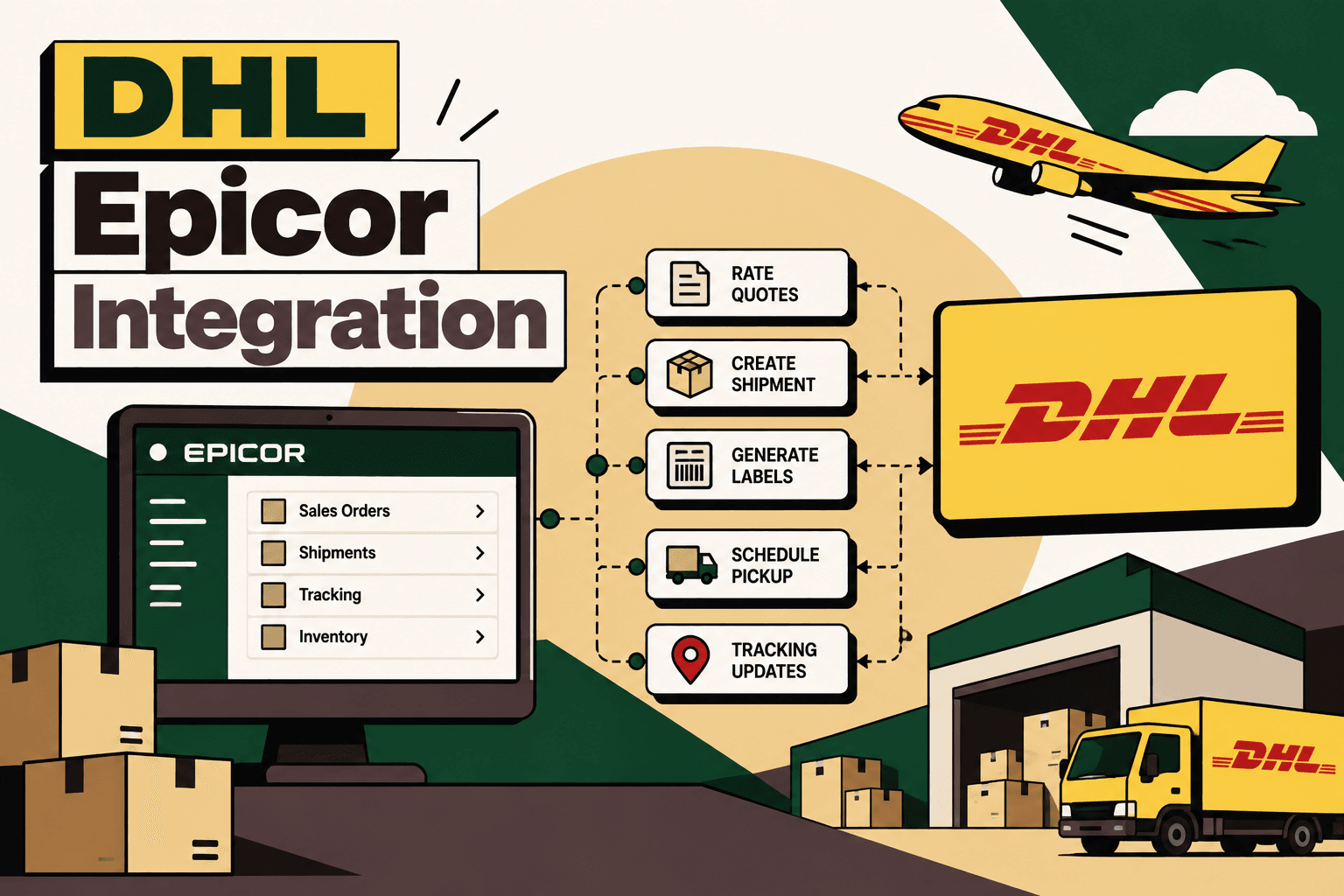
DHL Epicor integration connects ERP order and fulfillment workflows with DHL shipping services so teams can move from manually entering shipment information between systems to a connected process. The practical goal is not simply to make a DHL API call. It is to keep order data, package information, shipping services, labels, tracking events and shipment status synchronized across the fulfillment workflow.
For DHL Express, the MyDHL API provides capabilities including rating, shipment creation, labels, pickup, tracking and address validation. DHL MyDHL API documentation
Epicor also provides shipping capabilities through Quick Ship, which integrates with Epicor ERP platforms and can automate carrier communication, freight information, tracking and carrier-label workflows. Epicor Quick Ship
The right architecture depends on whether the requirement is primarily standard carrier shipping or a broader commerce-infrastructure problem involving multiple sales channels, warehouses, carriers, customer operations and reconciliation.
What Is DHL Epicor Integration?
Answer: DHL Epicor integration is the connection between Epicor ERP and DHL shipping services that allows shipment information to move automatically between order processing, fulfillment and carrier operations.
Explanation: Instead of an employee copying an address, weight, dimensions and shipping method into a separate DHL workflow, Epicor can provide the required shipment data to an integration layer or shipping application. The resulting service, shipment, waybill or tracking information can then be written back into the ERP.
Example: An order is released in Epicor, package information is available, the integration requests an applicable DHL service or rate, the shipment is created, the label is returned, and the DHL tracking or waybill number is stored against the shipment in Epicor.
Implication: The integration becomes part of the fulfillment workflow rather than a separate shipping task.
Action: Before selecting an integration method, map every handoff from order release through delivery and identify which steps require deterministic rules, carrier APIs, system integrations or human approval.
How the DHL–Epicor Workflow Works
A practical architecture is:
Epicor ERP → Integration or Shipping Layer → DHL → Integration or Shipping Layer → Epicor
- Order release: Epicor identifies an order that is ready for fulfillment.
- Shipment data preparation: The integration collects customer, ship-from, ship-to, package, product and shipping-method information.
- Service or rate selection: Where supported by the DHL service being used, the integration can request available services or rates.
- Shipment creation: The integration submits the required shipment information to DHL.
- Label and waybill handling: DHL returns shipment documentation and label information where supported.
- ERP update: Tracking or waybill information and shipment status are written back into Epicor.
- Tracking synchronization: Subsequent carrier events are synchronized so operations and customer-service teams have shipment visibility.
- Delivery and reconciliation: Delivery information can feed downstream customer communication, reporting and reconciliation workflows.
DHL's MyDHL API documentation describes capabilities covering rating, shipment creation, labels, pickup and tracking for DHL Express integrations. DHL Express MyDHL API
What Data Needs to Move Between Epicor and DHL?
A reliable integration starts with a defined data contract. The exact fields depend on the DHL service, Epicor configuration and shipping scenario, but the workflow commonly needs several categories of information.
| Data Category | Typical Information | Why It Matters |
|---|---|---|
| Order | Order number, customer, fulfillment status | Links the carrier transaction to the ERP transaction |
| Address | Ship-from and ship-to details | Required for routing and delivery |
| Package | Weight, dimensions, package count | Supports shipment creation and rating where applicable |
| Service | Requested shipping method or DHL service | Controls service selection |
| Shipment | Shipment identifier and waybill or tracking number | Provides the cross-system shipment reference |
| Documents | Label and applicable shipping documentation | Supports warehouse dispatch |
| Status | Shipment, transit and delivery events | Provides operational and customer visibility |
For international shipments, additional customs and commercial information may be required depending on the shipment and DHL service. DHL's API documentation includes shipment and customs-document capabilities for supported DHL Express workflows. MyDHL API XML documentation
What Can You Automate?
The highest-value DHL Epicor integration is not necessarily the one with the most API calls. It is the one that removes repeated manual decisions and data entry while keeping exceptions visible.
| Epicor Process | Potential DHL Automation | Human Role |
|---|---|---|
| Sales order release | Trigger shipment workflow | Resolve orders that fail validation |
| Shipping method selection | Map ERP method to approved DHL service | Approve unusual service requirements |
| Rate calculation | Request applicable DHL rates where supported | Handle pricing exceptions |
| Packing | Send package count, weight and dimensions | Correct inaccurate package data |
| Shipment confirmation | Create DHL shipment | Review failed or rejected requests |
| Label printing | Retrieve and route DHL label data | Handle printer or document exceptions |
| Dispatch | Trigger supported pickup workflow | Manage operational exceptions |
| Tracking | Synchronize carrier events into ERP | Investigate delayed or ambiguous shipments |
| Delivery | Update delivery status and downstream workflows | Handle disputes or exceptions |
| Returns | Initiate an approved return-shipment workflow | Approve policy exceptions |
Epicor Quick Ship vs Custom DHL Integration
One of the most important architectural decisions is whether to use Epicor's existing shipping capabilities or build a more customized integration layer.
Epicor describes Quick Ship as shipping software with integration to Epicor ERP platforms, including carrier communication, freight information, tracking and carrier-label workflows. Epicor Quick Ship documentation
| Consideration | Epicor Quick Ship | Custom DHL Integration |
|---|---|---|
| Primary fit | Standardized shipping operations | Tailored commerce and logistics workflows |
| Implementation approach | Configured shipping capability | Custom API and orchestration layer |
| DHL workflow | Use supported carrier capabilities | Design DHL-specific workflow behavior |
| Multi-channel orchestration | Depends on surrounding architecture | Can be designed around multiple commerce systems |
| Custom business rules | Constrained by supported configuration | Can implement bespoke routing and exception rules |
| Maintenance | More standardized | Integration team owns monitoring and changes |
The decision should be driven by workflow requirements rather than the assumption that custom integration is automatically better. If standard shipping functionality covers the required process, extending it may be simpler. If the business needs orchestration across multiple channels, warehouses, carriers, returns, customer operations or reconciliation systems, a dedicated integration layer may provide more control.
Where an Integration Layer Adds Value
A direct point-to-point connection can work for a simple environment, but it can become difficult to maintain when more systems are introduced.
Consider an ecommerce operation that has Shopify or another storefront, marketplaces, Epicor, a WMS, DHL and additional carriers. A direct connection between every system creates multiple dependencies. A central orchestration layer can instead normalize orders, shipment data, status events and exceptions.
Illustrative architecture:
Sales Channels → Order Orchestration → Epicor / WMS → Shipping Orchestration → DHL and Other Carriers → Tracking & Reconciliation → Customer Operations
The advantage is not simply technical elegance. It gives the business a place to implement common rules for routing, validation, retries, exception handling and downstream synchronization.
What Should Be Rules, AI or Human Decision-Making?
Not every part of DHL Epicor integration requires AI. In fact, predictable shipping transactions should generally be handled with deterministic rules and API workflows.
| Decision Type | Recommended Approach | Reason |
|---|---|---|
| Map Epicor shipping method to DHL service | Deterministic rule | Predictable and auditable |
| Validate required shipment fields | Deterministic rule | Known validation conditions |
| Retry a transient API failure | Automation rule | Can be standardized |
| Classify unusual operational messages | AI-assisted | Language and context may vary |
| Decide whether a high-value shipment needs review | Rule plus human approval | Business risk may justify oversight |
| Investigate an ambiguous delivery exception | AI-assisted analysis plus human escalation | Requires context and judgment |
Five Anchor POV: AI is most useful around the deterministic shipping workflow, not as a replacement for it. A well-designed architecture can use rules for transaction integrity, APIs for system actions, AI for interpreting exceptions and humans for decisions where financial, compliance or customer impact is material.
How to Prioritize DHL–Epicor Automation Opportunities
A practical prioritization model is:
Volume × Frequency × Manual Effort × Error Cost × Revenue Impact ÷ Implementation Complexity
This is a practical framework, not an industry-standard formula. Its purpose is to compare candidate workflows consistently.
For example, automatically copying tracking numbers from DHL into Epicor may have high volume and frequency with relatively low implementation complexity. It is usually a stronger early candidate than an unusual international-shipping exception that occurs only a few times per month.
Implementation Roadmap
1. Map the Current Workflow
Document the trigger, inputs, systems, decisions, actions, exceptions, human handoffs and final output. Start with the actual process used by warehouse and fulfillment teams rather than the process documented in an old procedure manual.
2. Establish a Baseline
Measure shipment volume, manual handling time, error frequency, failed transactions, tracking-update delays and operational cost. Without a baseline, it is difficult to determine whether the integration improved the process.
3. Define the Data Contract
List the Epicor fields required to create a shipment and the DHL responses that must be persisted in Epicor. Include identifiers that allow a transaction to be traced across both systems.
4. Define Business Rules
Document shipping-service mappings, package rules, validation requirements, retry policies, exception thresholds and approval requirements before implementation.
5. Select the Integration Pattern
For standard requirements, evaluate Epicor's existing shipping capabilities. For specialized workflows, consider an integration or orchestration layer that can connect Epicor with DHL and other systems.
Epicor also provides an integration platform intended to connect business applications and data across workflows. Epicor iPaaS
6. Build Guardrails
Use validation, authentication, permissions, idempotency controls, retry behavior, logging, monitoring and exception queues. A shipment should not be duplicated simply because an API response was delayed and the integration retried the request.
7. Pilot One Workflow
Start with one high-volume, relatively low-risk process such as shipment creation and tracking synchronization. Validate the complete lifecycle before expanding into returns, complex international shipments or multi-carrier routing.
8. Measure the Result
Track processing time, manual touches, failed transactions, error rates, tracking visibility, exception volume and operational cost. If the workflow affects customer experience, also measure response time and customer-contact volume.
9. Scale Carefully
Once the core workflow is stable, add additional carriers, warehouses, sales channels, returns and customer-service workflows. Each expansion should preserve transaction traceability and clear ownership of exceptions.
Common Failure Points in DHL Epicor Integration
Incomplete Master Data
Shipping automation cannot compensate for missing or inconsistent addresses, package dimensions, weights, service mappings or product information. Data quality should be treated as an integration dependency, not a later cleanup task.
Weak Error Handling
An integration that only handles successful API responses will fail operationally. Define what happens when authentication fails, required fields are missing, a carrier request is rejected, a timeout occurs or a downstream system is unavailable.
Duplicate Shipments
Retries need idempotency controls and transaction identifiers. Otherwise, a timeout can cause an integration to repeat an operation that actually succeeded.
No Operational Monitoring
Teams need visibility into failed messages, delayed synchronization, unusual response patterns and unresolved exceptions. Logs that developers can read are not enough; operations teams need actionable exception queues.
Over-Automating Exceptions
Not every unusual shipment should be automatically resolved. High-value orders, international documentation problems, address ambiguity and policy exceptions may require human review.
Security and Maintenance Considerations
DHL and Epicor integration involves commercially sensitive order and customer information. Access should be limited to the systems and actions required by the workflow.
- Use secure authentication and credential management.
- Limit API permissions where the platform supports granular access.
- Encrypt sensitive information in transit and protect it at rest according to the organization's security requirements.
- Log transaction identifiers and operational events without unnecessarily exposing sensitive customer information.
- Monitor API failures, latency and authentication errors.
- Maintain mappings as Epicor, DHL services and business rules change.
- Test changes against duplicate-shipment and retry scenarios before production deployment.
DHL maintains an API catalog and developer documentation for its different services, so the exact API capability should be confirmed against the DHL service and region being implemented. DHL API Catalog
Where Five Anchor Fits
For a business that needs more than a basic carrier connection, DHL Epicor integration can become part of a broader commerce-infrastructure layer.
Five Anchor's Commerce Infrastructure practice is aligned with this type of problem: ERP integration, marketplace and commerce integrations, order processing automation, inventory synchronization, warehouse and shipping integrations, financial automation and custom AI workflows.
The implementation should start with the operational problem rather than the technology label: map the Epicor workflow, identify DHL and warehouse dependencies, define the system of record for each data element, implement the integration, add guardrails and human escalation, then measure the operational result.
For a larger D2C architecture, the same layer can be extended beyond Epicor and DHL to connect commerce channels, WMS platforms, additional carriers, customer-support workflows and operational reporting. That is where an integration stops being a single carrier connector and becomes reusable commerce infrastructure.
Key Business Outcomes to Measure
The business case for DHL Epicor integration should be measured through operational outcomes rather than the number of APIs connected.
- Reduction in manual shipment data entry.
- Reduction in shipping and tracking errors.
- Faster shipment processing.
- Higher percentage of shipments with synchronized tracking information.
- Lower exception-resolution time.
- Reduced duplicate or failed shipment transactions.
- Improved visibility for fulfillment and customer-service teams.
- Lower operational cost per shipment where the workflow eliminates manual work.
Illustrative scenario: If a fulfillment team handles 500 shipments per day and removes five minutes of repetitive manual handling from each shipment, the theoretical manual workload represented by that step is approximately 41.7 hours per day. Actual savings would depend on the existing process, automation coverage, exception rate and whether the released capacity can be redeployed.
Conclusion
DHL Epicor integration works best when it is treated as a fulfillment workflow rather than a simple API connection. Epicor provides the order and operational context, DHL provides carrier services and shipment events, and an integration layer coordinates the exchange of information between them.
The first implementation should focus on reliable data flow: order release, shipment creation, label handling, tracking synchronization and exception management. Once that foundation is stable, the architecture can support broader workflows across warehouses, ecommerce channels, additional carriers, returns and customer operations.
The key design principle is simple: automate predictable transactions, use AI selectively where interpretation adds value, and keep humans responsible for decisions that carry meaningful operational or financial risk.
Key Takeaways
- •DHL Epicor integration should synchronize order, package, shipment, label and tracking data rather than create a standalone shipping workflow.
- •DHL Express MyDHL APIs support capabilities including rating, shipment creation, labels, pickup, tracking and address validation.
- •Epicor Quick Ship may be appropriate for standardized shipping requirements, while custom integration provides more control for specialized orchestration.
- •Predictable shipping decisions should normally use deterministic rules; AI is better suited to selected exception-handling and interpretation workflows.
- •A reliable implementation requires data validation, idempotency, retries, monitoring, exception handling and measurable operational KPIs.
Epicor Quick Ship vs Custom DHL Integration
| Consideration | Epicor Quick Ship | Custom DHL Integration |
|---|---|---|
| Inventory Sync Frequency | 15–30 min batch polling (high oversell risk) | Sub-second atomic locking (<450ms) |
| Concurrent Drop Resilience | Fails under concurrency; causes negative stock balance | Redis atomic reservation queue guarantees exact counts |
| Error Handling & Retries | Silent failure; manual CSV audit needed | Dead-letter queues with automated exponential retry |
| Fulfillment Routing Speed | 2–4 hours delayed batch export to 3PL warehouse | Instantaneous automated webhook dispatch (<90 sec) |