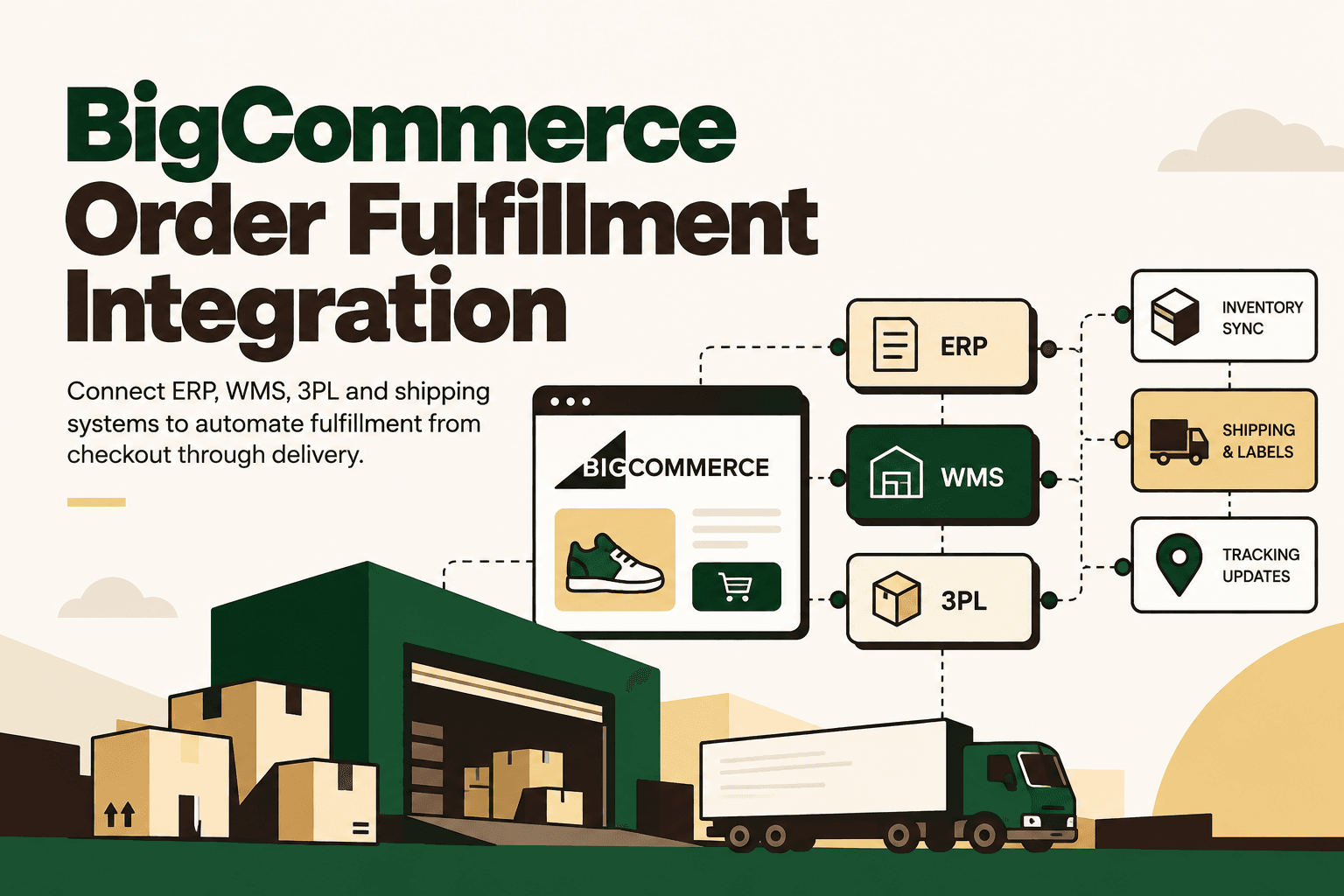
BigCommerce order fulfillment integration connects the storefront to the operational systems that actually move an order: ERP, OMS, inventory, warehouse management, 3PL and shipping platforms. The goal is not simply to move an order from one system to another. It is to keep inventory, fulfillment status, shipments and tracking information synchronized as the order moves through the operation.
BigCommerce provides APIs and integration capabilities for orders, shipments, shipping and enterprise systems. Its documentation also describes integrations for ERP workflows and multi-location fulfillment. BigCommerce ERP Solutions documentation
For a growing ecommerce operation, the practical architecture is usually:
BigCommerce Store → Order Management → Inventory / ERP / WMS → 3PL or Carrier → Tracking → Customer
The important question is therefore not whether BigCommerce can connect to another system. It is how orders, inventory, fulfillment decisions, shipment events and exceptions should move between the systems already running the business.
What Is BigCommerce Order Fulfillment Integration?
BigCommerce order fulfillment integration is the connection between a BigCommerce storefront and the systems responsible for inventory, order processing, warehouse operations, shipping and delivery. A properly designed integration can synchronize orders from BigCommerce into an ERP, OMS or WMS, validate inventory, route orders to an appropriate fulfillment location, create shipments and return tracking information to BigCommerce.
BigCommerce provides order APIs as well as shipment endpoints for creating, retrieving and managing shipment information. BigCommerce Orders documentation and BigCommerce Create Order Shipment documentation
In practical terms, the integration creates a data path from checkout to delivery rather than leaving operations teams to manually re-enter information between systems.
Why BigCommerce Fulfillment Integrations Become Necessary
A BigCommerce store can handle the ecommerce transaction, but fulfillment usually depends on systems outside the storefront. Inventory may live in an ERP. Available stock may be managed by a WMS. Orders may be routed through an OMS. Shipping labels may be generated by a carrier platform or 3PL. Customer-service teams may use another application to answer tracking questions.
Without integration, the same order can become a sequence of manual handoffs:
- An order is exported from BigCommerce.
- An employee enters or imports it into the ERP or warehouse system.
- Inventory is checked manually.
- A warehouse or 3PL receives fulfillment instructions.
- A shipment is created.
- The tracking number is copied back into BigCommerce.
- Customer support checks another system when a customer asks about delivery.
- Operations reconciles orders, shipments and inventory afterward.
Each individual task may appear manageable. The operational problem is the dependency chain. More orders, SKUs, warehouses, fulfillment locations and carriers increase the number of places where data can become inconsistent.
How BigCommerce Order Fulfillment Integration Works
The core workflow can be broken into six stages.
1. Capture the BigCommerce order
When a customer completes checkout, the order becomes an input to the fulfillment workflow. The integration can transfer the relevant order information to an OMS, ERP, WMS or other operational system.
The exact data model depends on the architecture, but commonly includes the order identifier, products, quantities, customer and delivery information, payment or order status and shipping method.
Operational objective: create one reliable fulfillment record without requiring employees to re-enter the order.
2. Validate inventory
The next step is determining whether the required inventory is available and where it should be fulfilled from. BigCommerce documentation describes inventory management across multiple locations and fulfillment-related workflows. BigCommerce order and fulfillment documentation
For a business with multiple warehouses, inventory validation should consider more than a single total-stock number. Relevant inputs can include location, available quantity, reserved inventory, fulfillment restrictions, shipping destination and service-level requirements.
Operational objective: make the inventory decision using the authoritative inventory source rather than stale or manually maintained information.
3. Route the order
Once inventory is known, the workflow can determine where the order should be fulfilled. Routing rules can consider warehouse availability, customer location, shipping method, inventory position, 3PL coverage and other business rules.
For simple operations, deterministic rules are often sufficient. For example, an order going to a particular region may always be routed to a designated warehouse. More complex operations may require an orchestration layer that evaluates several contextual inputs before selecting a fulfillment path.
Important distinction: AI is not automatically required for order routing. If the decision can be expressed reliably as fixed business rules, deterministic automation is generally easier to validate and maintain. AI becomes more relevant when the workflow requires interpretation, exception classification, recommendation or contextual reasoning.
4. Send fulfillment instructions
The selected warehouse, OMS, WMS or 3PL receives the information needed to pick, pack and dispatch the order.
This is where integration quality matters. Product identifiers, quantities, shipping instructions and order references need consistent mapping between systems. If SKU identifiers differ between BigCommerce and the warehouse, the integration needs an explicit mapping strategy rather than assuming that the systems use identical identifiers.
Operational objective: convert the ecommerce order into an operational fulfillment instruction without introducing data ambiguity.
5. Create the shipment and synchronize tracking
After fulfillment, shipment information needs to move back into BigCommerce. BigCommerce provides APIs for creating and retrieving order shipments, including shipment-related tracking information. BigCommerce Create Order Shipment API
Depending on the integration, shipment data can include tracking numbers, shipping providers, carriers and tracking links. This creates the bridge between the warehouse's operational event and the customer's order-status experience.
Operational objective: make shipment status visible to the commerce and customer-support layers without manual copying.
6. Monitor exceptions and reconcile the workflow
Not every order will move through the normal path. Inventory can be unavailable. A payment state can prevent fulfillment. A warehouse can reject an order. A shipment can fail. A carrier can return an unexpected status.
These exceptions should be designed into the integration rather than treated as an afterthought.
A useful architecture records the state of the order as it moves between systems and creates an explicit exception path when the expected event does not occur.
What Can Be Automated in a BigCommerce Fulfillment Integration?
| Workflow | What the integration can automate |
|---|---|
| Order import | Move BigCommerce order data into an OMS, ERP or WMS |
| Inventory synchronization | Synchronize available inventory between operational systems and BigCommerce |
| Order routing | Select a fulfillment location using defined business rules |
| Pick and pack | Send fulfillment instructions to the warehouse workflow |
| Shipping | Connect fulfillment events with carrier or 3PL workflows |
| Shipment creation | Create shipment records against BigCommerce orders |
| Tracking synchronization | Return carrier and tracking information to BigCommerce |
| Multi-location fulfillment | Support fulfillment from different locations where the operating model requires it |
| Exception handling | Flag stock, payment, fulfillment or integration failures |
| Reconciliation | Compare orders, shipments and inventory records across systems |
BigCommerce also documents support for multiple shipments associated with an order, which is relevant when fulfillment is split across locations. BigCommerce Shipping documentation
BigCommerce + ERP + WMS + 3PL: The Full Architecture
For a more complex ecommerce operation, BigCommerce is one component of a larger fulfillment architecture.
BigCommerce
↓
Order Management / Integration Layer
↓
ERP + Inventory + WMS
↓
3PL / Warehouse / Shipping Carrier
↓
Shipment + Tracking Events
↓
BigCommerce + Customer Support
The integration layer becomes particularly important when the business has multiple operational systems. Instead of creating a separate point-to-point connection for every system, an orchestration layer can establish a controlled flow of data and business rules.
BigCommerce explicitly supports ERP integration through APIs, and its platform includes app and integration capabilities for connecting external systems. BigCommerce Apps and Integrations documentation
BigCommerce Fulfillment Integration: Connector or Custom Integration?
The right implementation depends on the complexity of the operation. A standard connector can be appropriate when the workflow is predictable and the required systems already have compatible integration capabilities. Custom integration becomes more relevant when the business has unusual routing rules, multiple fulfillment providers, custom reconciliation or complex ERP and warehouse requirements.
| Requirement | Existing Connector | Custom Integration |
|---|---|---|
| Standard order synchronization | Often appropriate | May be unnecessary |
| Basic inventory synchronization | Often appropriate | Useful when business rules are unusual |
| Multiple ERP or fulfillment systems | May require several connectors | Can centralize orchestration |
| Complex routing rules | Depends on connector capabilities | Provides more control over business logic |
| Custom reconciliation | May be limited | Can be designed around finance and operations requirements |
| AI-assisted operational workflows | Depends on available APIs and extensions | Can incorporate AI, rules and human approval into the architecture |
The decision should start with the workflow rather than the technology. If a connector covers the required data objects, events and business rules, custom development may add unnecessary complexity. If the operation contains several systems and exceptions that do not fit the connector's model, a custom orchestration layer may provide more control.
Where AI Fits Into BigCommerce Fulfillment
AI can sit above the integration layer rather than replacing the underlying APIs, inventory systems or warehouse software.
BigCommerce → AI Order Orchestration → ERP / OMS / WMS / Inventory → 3PL / Carrier → Tracking
The AI layer can be useful for tasks that require interpretation or contextual decision-making. Examples include classifying fulfillment exceptions, identifying unusual order patterns, summarizing operational issues and recommending a fulfillment path when multiple contextual factors need to be considered.
BigCommerce also provides webhook and integration capabilities that can help connected applications react to store events. BigCommerce integrations getting started documentation
However, the underlying architecture still needs deterministic controls. Inventory availability should come from an authoritative inventory system. Business policies should be represented as explicit rules. High-impact actions should have appropriate permissions and, where necessary, human approval.
What AI Should Not Do
- Invent inventory availability.
- Override documented fulfillment policies without authorization.
- Issue refunds or make other high-impact financial decisions without appropriate controls.
- Change inventory records without validation.
- Replace simple trigger-condition-action automation when deterministic rules are sufficient.
- Operate with unrestricted write access across ERP, WMS and commerce systems.
The objective is not to maximize the number of AI actions. It is to improve the reliability and efficiency of the fulfillment workflow.
Human Oversight Still Matters
A mature fulfillment integration should distinguish between normal orders and exceptions.
Routine orders can follow deterministic workflows. Lower-risk exceptions can be classified automatically. Higher-risk situations can be routed to a human with the relevant order, inventory and shipment context already assembled.
| Decision type | Recommended control | Reason |
|---|---|---|
| Standard order import | Automated | Predictable system-to-system transfer |
| Inventory synchronization | Automated with validation | Requires reliable source-of-truth rules |
| Standard fulfillment routing | Rules-based automation | Business logic can usually be made explicit |
| Unusual routing exception | AI recommendation plus approval where needed | Context may require interpretation |
| High-value order exception | Human approval | Higher financial and customer impact |
| Failed fulfillment event | Automated detection plus escalation | System should surface the issue without hiding it |
Implementation Playbook for BigCommerce Fulfillment Integration
A reliable implementation starts with the workflow rather than the integration tool.
- Map the workflow. Document triggers, inputs, systems, decisions, actions, exceptions, human handoffs and outputs.
- Establish a baseline. Measure order-processing time, manual touches, inventory reconciliation time, fulfillment exceptions, shipment delays and operational effort.
- Prioritize the workflow. A practical prioritization model is volume × frequency × manual effort × error cost × revenue impact ÷ implementation complexity. This is a practical framework, not an industry-standard formula.
- Classify each step. Decide whether it should use deterministic automation, AI assistance, human approval or remain human-only.
- Define system ownership. Decide which system is authoritative for orders, inventory, product data, shipment status and financial records.
- Connect the systems. Use supported APIs, webhooks and integration mechanisms to connect BigCommerce with ERP, OMS, WMS, 3PL and carrier systems.
- Build guardrails. Define permissions, validation rules, approval thresholds, retry behavior, logging, monitoring and exception handling.
- Pilot one workflow. Start with a high-volume, relatively low-risk process such as order synchronization, tracking updates or standard fulfillment routing.
- Measure the outcome. Track processing time, manual touches, exception rate, synchronization failures and operational cost before expanding.
- Scale selectively. Extend the architecture to additional warehouses, fulfillment providers, marketplaces or AI-assisted workflows only after the core flow is reliable.
Data Mapping Is the Hidden Integration Problem
Many fulfillment projects are described as API integrations, but the difficult work is often data mapping and ownership.
A BigCommerce SKU may need to map to an ERP item code and a warehouse SKU. A BigCommerce order status may not have a one-to-one equivalent in the WMS. A carrier status may need to be translated into a customer-facing shipment state.
Before development begins, define mappings for at least:
- Order identifiers
- SKU and product identifiers
- Quantities and units
- Warehouse and fulfillment-location identifiers
- Order status
- Payment status
- Shipment status
- Carrier and tracking information
- Cancellation and return states
- Error and exception states
Also define the source of truth for every critical object. Otherwise, two-way synchronization can create conflicting updates rather than eliminating them.
Common BigCommerce Fulfillment Integration Failure Points
Inventory is synchronized too slowly
If inventory updates lag behind actual warehouse availability, customers can see stock that cannot be fulfilled. The integration needs an appropriate event and synchronization strategy for the business's inventory velocity.
SKU mappings are inconsistent
If product identifiers do not map consistently across BigCommerce, ERP and WMS, orders can be routed incorrectly or fail during fulfillment.
Shipment status is treated as a single event
Shipping is a sequence of states rather than simply a tracking-number update. The integration should define how shipment creation, tracking, carrier events, delivery and exceptions are represented.
Exceptions are not designed into the workflow
A workflow that only handles successful orders is incomplete. Failed API calls, unavailable stock, invalid addresses, rejected warehouse requests and unexpected carrier responses need explicit paths.
AI is added before the data architecture is stable
An AI layer cannot compensate for incorrect inventory, inconsistent identifiers or missing shipment data. AI should sit on top of reliable operational data and controlled workflows.
How Five Anchor Fits Into BigCommerce Fulfillment Integration
For businesses using BigCommerce alongside ERP, inventory, warehouse and shipping systems, the relevant Five Anchor service area is Commerce Infrastructure. It covers the type of integration work required to connect commerce platforms with ERP, inventory, order-processing and warehouse or shipping workflows.
The implementation can be structured around the actual operational problem: map the current BigCommerce fulfillment flow, identify where orders or inventory require manual intervention, establish system ownership, connect the required platforms, automate predictable steps and add AI only where contextual reasoning creates additional value.
For a more complex operation, Five Anchor can also design an orchestration layer that connects BigCommerce with ERP, OMS, WMS and 3PL systems while adding validation, human escalation and measurement around the workflow. The emphasis is on infrastructure and workflow reliability rather than adding an isolated AI interface.
How to Measure the Business Outcome
The integration should be measured against the operational problem it was designed to solve.
| Area | Useful KPI |
|---|---|
| Order processing | Order-processing time and manual touches per order |
| Inventory | Inventory synchronization failures and reconciliation time |
| Fulfillment | Fulfillment exception rate and processing time |
| Shipping | Shipment creation time and tracking synchronization failures |
| Operations | Manual hours spent coordinating fulfillment |
| Customer experience | Order-status contacts and shipment-related support volume |
| Integration reliability | Failed transactions, retry volume and unresolved exceptions |
Illustrative scenario: If an operations employee spends five minutes manually reviewing each of 1,000 orders per day, that represents approximately 83.3 hours of manual handling per day. Automating the repetitive review does not automatically mean that the equivalent labor cost disappears. The business may instead create capacity for exception management, merchandising, customer operations or growth. The business case should therefore distinguish direct cost reduction from capacity creation.
BigCommerce Fulfillment Integration Checklist
Before implementing an integration, confirm that the architecture answers these questions:
- Which system owns the order?
- Which system owns inventory availability?
- How are BigCommerce SKUs mapped to ERP and WMS identifiers?
- How are fulfillment locations represented?
- How are orders routed between warehouses and 3PLs?
- How are shipment records created?
- How are tracking numbers returned to BigCommerce?
- How are partial or split shipments handled?
- What happens when inventory is unavailable?
- What happens when an API call fails?
- Which actions can run automatically?
- Which actions require human approval?
- How are integration events logged and monitored?
- How are failed transactions retried?
- Which KPIs will determine whether the integration is working?
The Bottom Line
BigCommerce order fulfillment integration is best understood as an operational architecture, not a simple connector.
The storefront captures the order. The integration layer moves the right data to the right operational system. Inventory systems establish availability. ERP, OMS and WMS platforms coordinate fulfillment. Warehouses and 3PLs execute the physical work. Shipping systems generate delivery events. BigCommerce receives shipment and tracking information that can be used in the customer-facing experience.
The strongest implementations make ownership, data mapping, business rules, exceptions and human approval explicit.
AI can add another layer of value when fulfillment decisions require classification, interpretation, anomaly detection or contextual recommendations. But predictable transactions should remain deterministic, and high-impact decisions should retain appropriate controls.
For growing ecommerce businesses, the practical objective is simple: connect BigCommerce to the systems that fulfill the promise made at checkout, then measure whether the resulting workflow reduces manual coordination, errors and operational friction.
Key Takeaways
- •BigCommerce fulfillment integration connects orders with ERP, OMS, inventory, WMS, 3PL and shipping systems.
- •A reliable workflow covers order capture, inventory validation, routing, fulfillment, shipment creation, tracking and exception handling.
- •BigCommerce provides APIs for orders and shipment management and supports integration with ERP and multi-location fulfillment workflows.
- •Existing connectors can suit standard workflows, while custom integration is more relevant for complex routing, multiple operational systems and custom reconciliation.
- •AI is most useful for contextual decisions and exception handling; deterministic automation should handle predictable transactions.
- •Inventory, SKU mappings, system ownership, permissions, retries and exception paths should be defined before deployment.
- •Five Anchor's Commerce Infrastructure service is relevant to BigCommerce ERP, inventory, warehouse, shipping and order-processing integration.
BigCommerce Fulfillment Integration Approaches
| Requirement | Existing Connector | Custom Integration |
|---|---|---|
| Inventory Sync Frequency | 15–30 min batch polling (high oversell risk) | Sub-second atomic locking (<450ms) |
| Concurrent Drop Resilience | Fails under concurrency; causes negative stock balance | Redis atomic reservation queue guarantees exact counts |
| Error Handling & Retries | Silent failure; manual CSV audit needed | Dead-letter queues with automated exponential retry |
| Fulfillment Routing Speed | 2–4 hours delayed batch export to 3PL warehouse | Instantaneous automated webhook dispatch (<90 sec) |