Sending a customer a tracking link feels like the end of the post-purchase communication workflow.
For many ecommerce brands, it is where another support problem begins.
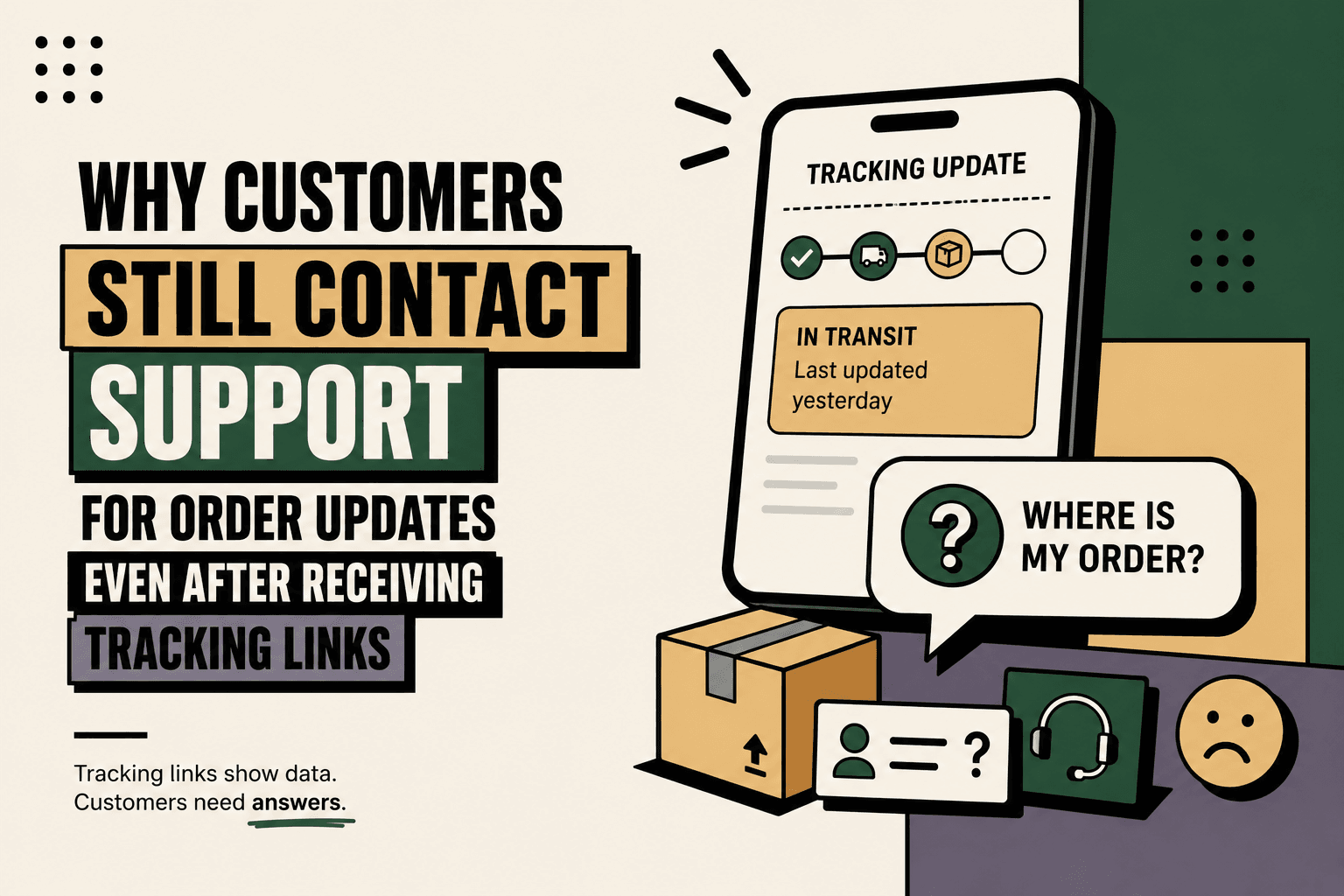
The customer clicks the link and sees a carrier status such as “In transit,” “Arrived at facility,” or “Shipment exception.” The information may be accurate, but it does not necessarily answer the question the customer actually has.
They want to know: Where is my order? When will it arrive? Is it delayed? What should I do next?
This is the problem behind WISMO, or “Where Is My Order?” support requests. Salesforce describes WISMO as customer inquiries about order status or delivery. Salesforce on WISMO
The operational lesson is simple: tracking is a data-delivery problem, but WISMO is an information-and-confidence problem.
A Tracking Link Is Not the Same as an Answer
Answer: Customers continue contacting support after receiving tracking links because the link can provide shipment data without giving customers enough context to understand what that data means.
Explanation: A tracking number identifies a shipment. It does not necessarily explain the current delivery stage, expected arrival time, delay risk, carrier exception or required customer action.
Example: A customer sees “In transit — last updated yesterday.” They still may not know whether the package is moving normally, delayed or likely to arrive tomorrow.
Implication: Sending another tracking link can send the customer back to the same uncertainty.
Action: Design post-purchase support around the customer's question rather than around the existence of a tracking URL.
Why WISMO Tickets Continue After Tracking Is Sent
1. Customers Want an ETA, Not a Tracking Number
The most important question after an order ships is often not “What is my tracking number?” It is “When will I receive it?”
Baymard's ecommerce UX research found that 50% of respondents considered order tracking the most important account feature. Its research also identifies expected delivery information as an important part of an effective order-tracking experience. Baymard Institute: Order Tracking UX
A tracking number answers which shipment.
An ETA answers when the customer should expect it.
If customers have to open a carrier website, interpret shipment events and calculate the likely arrival themselves, the ecommerce brand has technically provided tracking but has not necessarily provided useful post-purchase information.
2. Carrier Statuses Are Written for Logistics Systems
Carrier tracking information is optimized around operational events. Customers think in outcomes.
| Carrier status | Customer question |
|---|---|
| In transit | Is it moving normally? |
| Arrived at facility | Is it close to delivery? |
| Shipment exception | Is my delivery delayed? |
| Out for delivery | Will it arrive today? |
| Delivered | Where was it delivered? |
The operational event and the customer answer are therefore different pieces of information.
Five Anchor POV: A strong post-purchase workflow should translate operational events into customer-facing explanations. The goal is not to hide carrier data. It is to make that data understandable and actionable.
3. Tracking Data May Not Update When the Customer Expects
A customer may click a tracking link and see that the latest shipment event occurred many hours earlier.
From the customer's perspective, the package can appear stuck even when the underlying shipment is still progressing.
Salesforce identifies outdated tracking information and unclear delivery estimates as factors that can contribute to WISMO contacts. Salesforce on WISMO
That creates a predictable sequence:
- The customer receives a tracking link.
- The customer checks it.
- The status has not changed.
- The customer becomes uncertain.
- The customer contacts support.
- The support agent checks the same tracking system.
- The agent sends another status update.
The support team has not solved a complex problem. It has become an additional interface for information that already exists elsewhere.
4. Customers Want to Know Whether a Delay Is Normal
“In transit” is ambiguous.
A shipment can remain in transit while progressing normally. It can also remain in transit while experiencing a delay.
The customer usually does not know which situation applies.
A useful post-purchase support workflow therefore needs more than raw status data.
It needs context such as:
- Latest known shipment event
- Time of the latest update
- Expected delivery date
- Current delivery stage
- Known carrier exception
- Whether the delivery estimate has changed
- Whether the customer needs to take action
Without this context, customers often use support as the interpretation layer.
5. Customers Want Confidence, Not Just Information
This is the deeper reason WISMO persists.
A customer asking “Where is my order?” may actually be asking:
- “Should I still expect it today?”
- “Has something gone wrong?”
- “Do I need to contact someone?”
- “Should I wait or take action?”
- “Can I trust the delivery estimate?”
The support ticket is therefore often a request for confidence.
Providing a tracking number without providing enough context leaves the customer responsible for interpreting logistics information themselves.
The Information a Better Tracking Experience Needs
Baymard's research identifies six important order-tracking details that ecommerce sites should provide directly within the order-tracking experience:
- Expected delivery date
- Order status progress
- Carrier name
- Linked tracking number
- Detailed shipping history
- Package contents summary
Baymard's research discusses these elements as important components of a usable order-tracking experience. Baymard Institute: Order Tracking UX
Expected Delivery Date
Customers should not have to infer an arrival date from a sequence of carrier events.
Show the current expected delivery date prominently and update it when the underlying information changes.
If the system cannot provide a reliable ETA, the interface should make that uncertainty explicit rather than implying false precision.
Order Status Progress
A clear progression helps customers understand whether the order is being processed, shipped, out for delivery or delivered.
This is useful even before the package enters the carrier network because customers still want to know whether the order is moving through fulfillment.
Carrier Name
The carrier matters because customers may use that information to understand the delivery process and identify the appropriate logistics provider.
It also removes another unnecessary question: “Who is delivering my package?”
Linked Tracking Number
If customers need detailed carrier information, the tracking number should be directly usable.
Making customers copy a tracking number and search for the carrier adds unnecessary friction.
Detailed Shipping History
A detailed history can answer the question behind “Where is my order?” by showing how the package reached its current state.
It can also help customers understand whether the shipment is progressing normally.
Package Contents
This becomes important when customers have multiple orders or when an order ships in multiple packages.
The customer should be able to determine which items are associated with the shipment being tracked.
Why Sending Customers to Carrier Websites Can Increase Friction
A common post-purchase architecture looks like this:
Order confirmation → Shipping email → Tracking link → Carrier website
That architecture is functional, but it can create a fragmented customer experience.
The customer leaves the ecommerce environment, encounters a logistics-oriented interface and may then need to return to the merchant's website to find order details, initiate a return or contact support.
Baymard's research specifically examines the role of integrated tracking information and the problems created when important shipment information is missing from the ecommerce experience. Baymard Institute: Order Tracking UX
This creates a useful distinction:
| Tracking approach | Customer experience |
|---|---|
| Tracking number only | Customer interprets logistics data |
| Carrier tracking link | Customer leaves the ecommerce experience |
| Integrated tracking page | Customer sees order context and shipment status together |
| Conversational tracking | Customer asks a question and receives a contextual answer |
The strongest approach does not necessarily eliminate the carrier tracking page. It makes the carrier page optional rather than necessary for basic answers.
Tracking Pages Should Become Decision Interfaces
A useful tracking experience should answer more than “What is the latest status?” It should help the customer decide what to do next.
Example:
Order status: Out for delivery
Expected: Today
Latest update: Package reached the local delivery facility
Next step: No action required
Compare that with:
Order status: Shipment exception
Expected: Delivery estimate may change
Latest update: Carrier reported a delivery exception
Next step: Follow the defined escalation process if the shipment does not update within the appropriate window
The second version turns a vague status into a decision path.
Where AI Support Agents Fit
AI becomes useful when customers do not want to navigate a tracking interface themselves.
Instead of requiring customers to interpret a tracking page, an AI support agent can retrieve approved order and shipment information and answer questions conversationally.
The workflow can look like this:
- Identify: Determine which order the customer is asking about.
- Authenticate: Confirm that the customer is authorized to receive order-specific information.
- Retrieve: Pull current order, fulfillment and shipment data.
- Interpret: Translate operational events into understandable language.
- Answer: Provide the current status, expected timing and relevant next step.
- Escalate: Route exceptions that require human intervention.
- Record: Log the conversation and outcome.
This can happen through website chat, WhatsApp, email or other approved customer channels.
Five Anchor POV: The important architectural shift is from “send the tracking link” to “make the order state queryable through a customer-facing workflow.” The AI agent is not the source of truth. Shopify, the ERP, OMS, warehouse or carrier systems remain the source systems; the agent interprets approved data and communicates it.
Rules First, AI Where Interpretation Is Needed
Not every WISMO workflow needs an AI agent.
If a customer asks for a simple order status and the answer is deterministic, a rules-based workflow may be sufficient.
AI becomes more useful when the customer asks something like:
- “It says delayed. What does that mean?”
- “My package hasn't moved since Tuesday. Should I be worried?”
- “Is it still coming today?”
- “Why does the carrier say delivered but I don't have it?”
- “Which item from my order is arriving tomorrow?”
These questions require interpretation and context rather than merely retrieving a field.
Human vs Automation Decision Matrix
| Situation | Recommended handling |
|---|---|
| Simple status request | Deterministic automation |
| ETA request | Automated retrieval and response |
| Carrier status explanation | AI-assisted interpretation |
| Known delivery delay | Automated explanation with defined rules |
| Delivered but customer cannot locate package | AI triage plus human escalation |
| Lost or high-value shipment | Human approval or intervention |
The objective is controlled automation, not maximum automation.
Proactive Communication Can Prevent the Ticket Before It Exists
The most efficient WISMO ticket is the one the customer never needs to create.
That requires moving from reactive tracking to proactive communication.
Instead of waiting for customers to ask about a delayed shipment, the workflow can detect a relevant event and communicate it.
A simplified workflow could be:
Carrier event → Rule evaluation → Customer notification → Updated ETA → Support escalation if required
Examples include:
- Shipment has not received a scan within a defined monitoring window.
- Expected delivery date changes.
- Carrier reports a delivery exception.
- Package reaches the local delivery facility.
- Package is out for delivery.
- Package is marked delivered.
The communication should be proportional to the event. Not every scan requires a message.
The goal is to communicate when the information changes the customer's expectation or decision.
The Post-Purchase Support Architecture
A reliable WISMO reduction strategy connects the systems that know different parts of the order story.
Commerce platform → Order system → Fulfillment → Warehouse or 3PL → Carrier → Customer operations
The customer-facing layer then sits across those systems.
For example:
- Shopify provides order context.
- The order or ERP system provides operational state.
- The warehouse or 3PL provides fulfillment state.
- The carrier provides shipment events.
- The support layer combines those signals.
- The customer receives a contextual answer through the appropriate channel.
This architecture matters because a support agent cannot reliably answer “Where is my order?” if it can see only a partial version of the order state.
Implementation: How to Build a Better WISMO Workflow
1. Map the Current Workflow
Document what happens from shipment creation to customer delivery.
Include:
- Order system
- Fulfillment system
- Warehouse or 3PL
- Carrier
- Tracking page
- Customer communication
- Support system
- Human escalation
Then identify every point where a customer can become uncertain.
2. Establish a Baseline
Measure the current volume of order-status contacts.
Useful metrics include:
- WISMO ticket volume
- WISMO share of support contacts
- Average handling time
- First-response time
- Resolution time
- Repeat contacts for the same order
- Shipment exception volume
- Delivery-delay contacts
Without a baseline, it is difficult to determine whether a new tracking experience actually improved operations.
3. Identify the Real Questions
Do not group every order-status contact into one category.
Classify questions such as:
- Where is my order?
- When will it arrive?
- Why has tracking not updated?
- Is my order delayed?
- Why was delivery attempted?
- Where was my package delivered?
- Why does tracking say delivered when I do not have it?
This creates a better foundation for automation.
4. Separate Rules From AI
Define which decisions can be deterministic.
For example, if a carrier reports “out for delivery,” the system can use a predefined response structure.
If the customer asks an ambiguous question about a delivery exception, AI can interpret the request while operating within defined boundaries.
5. Connect the Required Data Sources
At minimum, the customer-facing workflow needs access to the data required to answer the actual questions.
Depending on the operation, this may include Shopify, ERP or OMS data, warehouse or 3PL information, carrier events and the customer support platform.
The integration should define which system is authoritative for each data point.
6. Add Guardrails
Order-specific automation should include:
- Customer authentication
- Order identity verification
- Permission controls
- Data freshness checks
- Fallback behavior
- Human escalation
- Conversation logging
- Monitoring for integration failures
An AI agent should never invent a delivery estimate because a carrier feed is missing.
If the data is unavailable, the correct behavior is to say that current shipment information is unavailable and route the issue appropriately.
7. Start With the Smallest Viable Workflow
A practical first workflow might cover only:
Order status + ETA + tracking + delivery exceptions.
Once that workflow is reliable, returns, exchanges, address changes and other post-purchase operations can be added.
8. Measure Ticket Deflection Carefully
A reduction in WISMO tickets is useful, but it should not be the only metric.
A good system should also be evaluated for:
- Answer accuracy
- Customer satisfaction
- Repeat contacts
- Human escalation rate
- Average handling time
- Resolution time
- Data freshness
- Exception detection
Reducing tickets by giving customers incorrect answers is not operational improvement.
What Not to Automate
Some post-purchase situations should remain human-led or require human approval.
- Potentially lost high-value shipments
- Fraud-sensitive situations
- Disputed delivery claims
- Complex compensation decisions
- Repeated failed delivery attempts requiring judgment
- Cases involving unusual carrier behavior
Automation should remove predictable work while preserving human judgment where the cost of an incorrect decision is high.
Illustrative Scenario: Turning a WISMO Question Into a Workflow
Illustrative scenario: A customer sends, “My tracking hasn't changed since yesterday. Is my order still coming tomorrow?”
A weak workflow returns a generic tracking link.
A stronger workflow:
- Identifies the customer's order.
- Checks the latest carrier event.
- Checks the current delivery estimate.
- Checks whether an exception exists.
- Explains the latest state in plain language.
- Provides the expected delivery window if available.
- Explains what happens if the shipment does not update within the defined threshold.
- Escalates if the shipment meets the business's exception criteria.
The difference is not primarily the AI model.
The difference is the workflow architecture behind the answer.
How Five Anchor Could Implement This
Problem: Customers repeatedly contact support because tracking links expose shipment information without answering the operational question behind the contact.
Architecture: The post-purchase support layer connects commerce, order, fulfillment, shipping and customer-operation systems so the customer-facing workflow can access the relevant order state.
Implementation: Five Anchor's AI-powered customer operations capability can be applied to customer self-service, AI chat operations, automated customer communication and ticket automation. The implementation can include workflow mapping, system integrations, event handling, guardrails and human escalation.
Business outcome: The intended outcome is a support workflow that resolves predictable order-status questions automatically while routing genuine delivery exceptions to human teams with relevant context already attached.
The important distinction is that the AI agent is not simply answering questions from a knowledge base. It is connected to the operational workflow that determines the current state of the order.
The Better Model: From Tracking Links to Conversational Order Visibility
Tracking links are useful. They are simply not sufficient for every post-purchase question.
The customer does not necessarily want a tracking number, a carrier website or a list of logistics events.
They want an answer.
Where is my order?
When will it arrive?
Is something wrong?
What should I do next?
A strong ecommerce operation therefore treats order tracking as a customer-information workflow rather than a link-generation task.
The progression is:
Tracking data → Context → Interpretation → Answer → Action → Escalation when required
That is the difference between giving customers access to shipment data and actually giving them post-purchase visibility.
For ecommerce brands, the practical goal is not to eliminate every order-status question. It is to make routine questions answerable without a human while making genuinely difficult cases easier for the support team to resolve.
Key Takeaways
- •A tracking link provides shipment data, but customers usually want an understandable answer about where the order is and when it will arrive.
- •WISMO often results from uncertainty rather than a complete absence of tracking information.
- •A useful tracking experience should expose the expected delivery date, order progress, carrier, tracking number, shipping history and package context.
- •Carrier events should be translated into customer-friendly explanations instead of simply exposing logistics terminology.
- •Proactive notifications can prevent some order-status contacts before customers need to ask.
- •Rules are appropriate for predictable shipment states; AI is more useful for interpreting natural-language questions and exceptions.
- •Order-specific AI support requires reliable integrations, authentication, data freshness checks, guardrails and human escalation.
Tracking Link vs Conversational Order Visibility
| Dimension | Tracking Link | Conversational Order Visibility |
|---|---|---|
| Inventory Sync Frequency | 15–30 min batch polling (high oversell risk) | Sub-second atomic locking (<450ms) |
| Concurrent Drop Resilience | Fails under concurrency; causes negative stock balance | Redis atomic reservation queue guarantees exact counts |
| Error Handling & Retries | Silent failure; manual CSV audit needed | Dead-letter queues with automated exponential retry |
| Fulfillment Routing Speed | 2–4 hours delayed batch export to 3PL warehouse | Instantaneous automated webhook dispatch (<90 sec) |