Support teams using an ERP such as SYSPRO often deal with the same operational problem: customer issues arrive through different channels, but resolving them requires information from the ERP, CRM, service records, orders, products and internal workflows.
A customer might report that a replacement part has not arrived. Another may ask about a warranty claim. Someone else may report an issue with an order or service request. In each case, a support employee may need to identify the customer, find the relevant record, understand the issue, determine priority, assign the ticket and coordinate the next action.
SYSPRO automated support tickets can address parts of this process through native CRM capabilities, workflow automation and integration services. An AI layer can extend the workflow by interpreting incoming messages, retrieving relevant SYSPRO data, creating or updating tickets, assigning priority and routing cases to the appropriate team.
The supplied research identifies SYSPRO CRM ticket routing and escalation, service-ticket history, a natural-language knowledge base, SYSPRO Workflow Services, APIs and OData as important building blocks for this type of automation. :contentReference[oaicite:0]{index=0}
What Is SYSPRO Automated Support Ticket Processing?
Answer: SYSPRO automated support ticket processing is a workflow in which support requests are captured, classified, prioritized, routed and followed up using SYSPRO CRM, workflow capabilities, integrations and, where appropriate, AI.
The automation can cover different levels of the support process. A basic workflow may automatically route tickets according to predefined rules. A more advanced workflow can use AI to interpret a customer's message, retrieve relevant ERP information, determine the appropriate ticket category and priority, and then trigger the correct workflow.
The important distinction is between automating ticket administration and automating support resolution. Ticket administration includes classification, assignment and escalation. Resolution requires access to the operational information needed to understand and address the customer's problem.
What SYSPRO Already Supports
The supplied research identifies several SYSPRO capabilities that can form the foundation for support-ticket automation. :contentReference[oaicite:1]{index=1}
Automatic Ticket Routing and Escalation
SYSPRO CRM can route and escalate service tickets automatically based on user-defined rules. This provides a deterministic foundation for assigning incoming support cases to the appropriate queues or teams.
For example, a ticket related to a particular product, customer or service category can follow a predefined routing rule instead of requiring a support coordinator to assign it manually.
Service-Ticket History
SYSPRO CRM can associate service tickets with customer accounts, serialized or lot-traceable products, warranties, appointments, tasks, notes and documents. This creates a richer context for the support team than an isolated ticket description.
That context also matters when AI is introduced. An AI support workflow can use the relevant customer and service information to interpret an incoming request rather than treating every message as an independent conversation.
Knowledge-Based Resolution
The research identifies a natural-language knowledge base in SYSPRO CRM that can be used to search previous problem resolutions and similar tickets. This can support agents when they investigate recurring issues.
Workflow Automation
SYSPRO Workflow Services provides a mechanism for creating and managing business-process workflows around SYSPRO events. The research also identifies the ability to expose workflows through SOAP and REST endpoints. :contentReference[oaicite:2]{index=2}
External Integration
SYSPRO provides integration capabilities including APIs and OData services. The supplied research identifies these as mechanisms through which third-party applications can access SYSPRO data and connect support workflows to ERP information. :contentReference[oaicite:3]{index=3}
Where AI Fits Into SYSPRO Ticket Automation
AI is most useful when the incoming request is expressed in natural language and the business needs to interpret it before a structured workflow can begin.
A traditional rules-based workflow might require a customer or employee to select a predefined category. An AI layer can interpret the message itself.
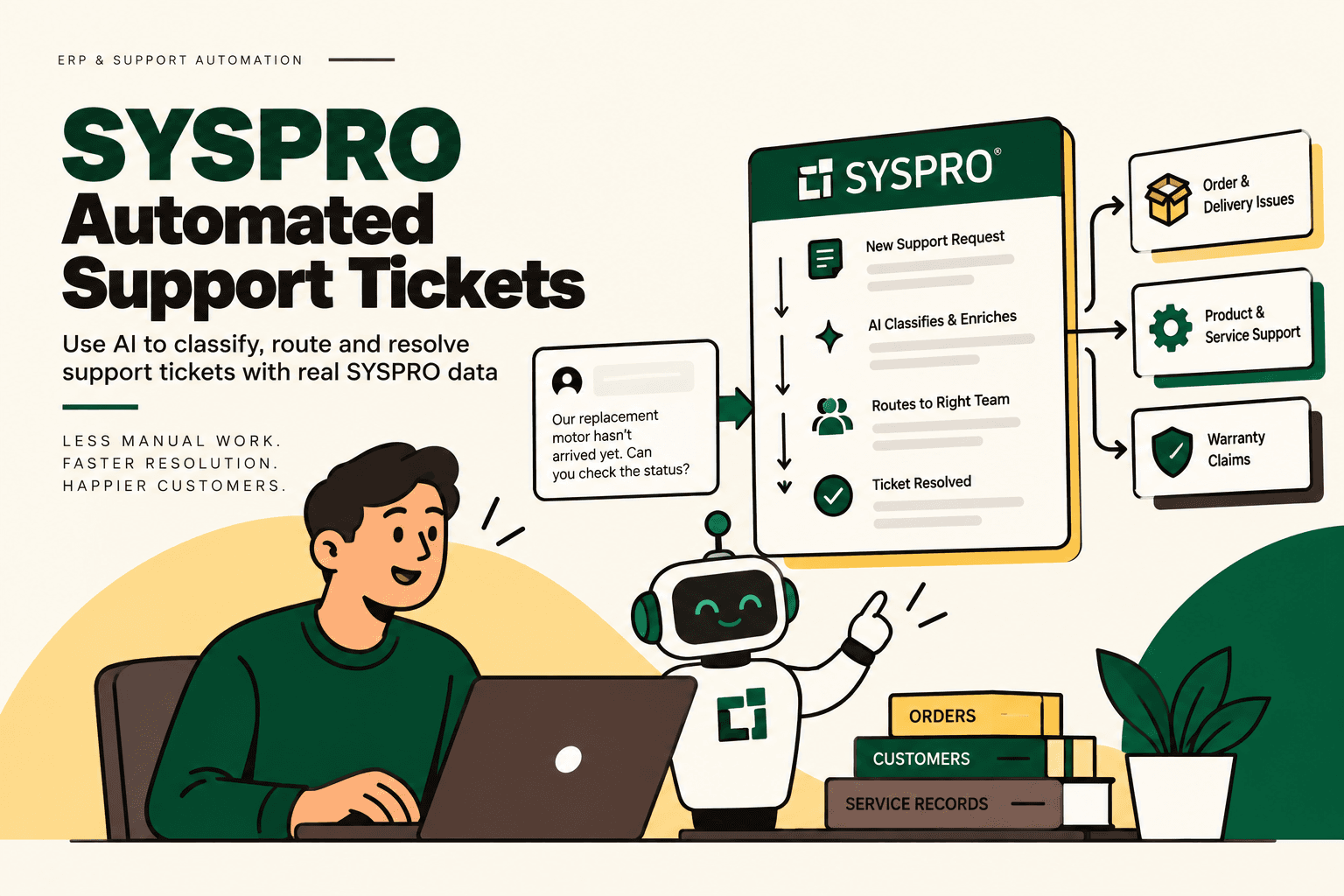
Example: A customer writes, “Our replacement motor hasn't arrived yet.”
An AI support workflow could interpret the request as a delivery or service issue, identify the customer and relevant order or service record, retrieve available information from SYSPRO, determine the appropriate ticket category and priority, create or update the service ticket and route it to the appropriate support queue.
The supplied research describes this workflow as:
Customer message → AI classifies issue → retrieves SYSPRO data → creates or updates ticket → assigns priority → routes to correct team → sends response → escalates when required → closes after resolution. :contentReference[oaicite:4]{index=4}
This is a workflow design rather than a claim that every step is automatically available in every SYSPRO deployment. The actual implementation depends on the customer's configuration, integrations, permissions and business rules.
Why Automated Ticket Triage Matters
Ticket triage is often a hidden source of support workload. Before an issue can be resolved, someone may need to determine what the request is about, how urgent it is, which customer or product is involved and which team should handle it.
Automating that first layer can reduce repetitive administrative work and make the support queue more structured.
The supplied research notes that SYSPRO support tickets use a classification from 1, described as critical, to 5, described as a usability issue. This creates a structured classification model that can potentially be incorporated into an automated triage workflow. :contentReference[oaicite:5]{index=5}
The practical advantage is that AI does not have to invent a new prioritization system. It can interpret the customer's message and map it to an existing business classification framework.
How an AI-Powered SYSPRO Support Workflow Works
A practical architecture can be represented as:
Customer Message → AI Intent Detection → Customer and SYSPRO Data → Ticket Classification → Priority → Workflow → Assignment → Human Escalation
1. Capture the Support Request
The request may originate from an email, website form, support portal, chat or another connected channel.
The first requirement is to bring the request into a consistent workflow where it can be classified and tracked.
2. Identify the Customer and Context
The system determines which customer, order, product, service record or existing ticket is relevant.
This is where ERP and CRM integration becomes important. Without access to the underlying records, an AI model may understand the language but lack the operational context required for accurate triage.
3. Classify the Issue
The AI interprets the customer's message and identifies the likely issue category.
Examples could include delivery problems, warranty questions, product issues, service requests, order problems or other categories defined by the organization.
4. Assign Priority
The workflow maps the issue to the organization's priority or classification rules.
SYSPRO's documented ticket classification provides a structured basis for this process, while the final business rules should be determined by the organization's support operation.
5. Create or Update the Ticket
The workflow creates a new service ticket or updates an existing one where the incoming message belongs to an existing case.
This prevents duplicate cases and preserves the history of the customer issue.
6. Route the Ticket
The ticket is assigned to the appropriate team or queue according to defined routing rules.
Routing may depend on issue category, customer, product, service area, geography, priority or another operational attribute.
7. Send an Appropriate Response
For supported low-risk requests, the workflow may send an acknowledgement or relevant information. Requests that require investigation can receive a status message while remaining in the appropriate queue.
8. Escalate Exceptions
Cases that exceed defined thresholds, lack sufficient information or require human judgment should be escalated rather than forced through an automated resolution path.
9. Close After Resolution
Once the issue is resolved and the required workflow conditions are satisfied, the ticket can move through the organization's normal closure process.
SYSPRO CRM vs AI Support Automation
| Feature | SYSPRO CRM and Rules | AI-Enhanced Support Workflow |
|---|---|---|
| Ticket creation | Can be handled through configured processes | Can interpret natural-language requests before creating or updating a ticket |
| Ticket routing | Rule-based routing and escalation | AI classification can feed routing rules |
| Priority | Uses configured classifications and rules | AI can interpret the request and map it to existing classifications |
| Customer context | CRM and service records | AI can retrieve relevant context through connected systems |
| Knowledge lookup | Natural-language knowledge base | AI can use approved knowledge and retrieved records within a controlled workflow |
| External systems | Integration services and APIs | AI workflow can coordinate information across connected systems |
| Human escalation | Configured escalation rules | AI can identify selected exceptions and route them with context |
The distinction is not that AI replaces SYSPRO CRM. The AI layer can sit around existing CRM and workflow capabilities to interpret unstructured customer requests and initiate structured processes.
SYSPRO Workflow Services as the Automation Layer
SYSPRO Workflow Services is particularly relevant when support automation needs to trigger business processes rather than simply generate text.
The supplied research identifies SYSPRO Workflow Services as a way to create and manage business processes and communicate with workflows running on the server. :contentReference[oaicite:6]{index=6}
That creates an important architectural separation:
- AI: interprets the customer's request.
- Rules: determine which conditions apply.
- Workflow: executes the defined business process.
- SYSPRO: remains a source of ERP and service information.
- Human: handles exceptions and decisions that should not be automated.
This approach is safer than allowing a language model to independently decide what operational changes should occur.
Connecting AI Support to SYSPRO Data
Support automation becomes substantially more useful when the AI can retrieve the operational context behind the ticket.
The supplied research identifies SYSPRO OData and developer integration capabilities as mechanisms for connecting external applications with SYSPRO data. :contentReference[oaicite:7]{index=7}
A connected support workflow might therefore retrieve information such as customer records, orders, products, service information or other authorized ERP data before determining the next step.
The exact data exposed should be defined by the implementation and access controls. Not every ERP record should automatically become available to an AI support agent.
What Should AI Automate and What Should Stay Human?
Automating ticket processing does not mean allowing AI to make every support decision.
| Task | AI or Automation Role | Human Role |
|---|---|---|
| Read incoming message | Interpret intent and extract relevant information | Review when confidence is insufficient |
| Ticket classification | Suggest or assign category based on configured rules | Handle ambiguous classifications |
| Priority assignment | Map request to existing priority framework | Override when business context requires it |
| Ticket routing | Apply configured routing rules | Resolve unusual ownership cases |
| ERP lookup | Retrieve authorized information | Investigate conflicting or incomplete records |
| Standard acknowledgement | Generate approved response | Review sensitive communications |
| Complex resolution | Collect context and recommend next step | Make the final decision |
The objective is controlled automation, not maximum autonomy.
Common SYSPRO Support Automation Use Cases
Delivery and Replacement Issues
A customer can report that a replacement part has not arrived. The AI can identify the issue, locate the relevant customer and service context, retrieve available information and route the case appropriately.
The supplied research uses a replacement motor that has not arrived as an example of this type of workflow. :contentReference[oaicite:8]{index=8}
Warranty Questions
Warranty-related tickets can be associated with the customer, product and relevant service records. An automated workflow can classify the request and route it to the correct service process.
Product Service Issues
When a customer reports a product problem, AI can extract the symptoms from the message and use available product or service context to determine the appropriate category.
Existing Ticket Updates
Customers frequently respond to an existing support conversation rather than creating a completely new issue. An AI workflow can identify the existing case and update it rather than creating unnecessary duplicates.
Priority-Based Escalation
When a request meets defined priority conditions, the workflow can route or escalate it according to the organization's existing rules.
How to Implement SYSPRO Ticket Automation
1. Map the Current Support Workflow
Document how a support request currently moves from arrival to resolution.
Identify every manual step: reading the request, identifying the customer, searching SYSPRO, categorizing the issue, assigning priority, routing the ticket, communicating with the customer and closing the case.
2. Establish Baseline Metrics
Measure current ticket volume, average handling time, first-response time, escalation rate, resolution time, reassignment rate and repeat-contact rate.
These metrics provide the baseline against which automation should be evaluated.
3. Define Ticket Taxonomy
Document the categories, priorities, teams and escalation rules already used by the support operation.
Do not start by asking AI to invent the taxonomy. Start with the business process that already exists.
4. Identify SYSPRO Data Sources
Determine which customer, product, order, service, warranty and ticket information is required for each support intent.
Then identify the appropriate SYSPRO integration or data-access mechanism.
5. Separate AI From Deterministic Rules
Use AI where natural language interpretation is useful. Use deterministic rules where the business logic is explicit.
For example, AI can interpret “the replacement motor hasn't arrived,” while a rule can determine which queue handles replacement-delivery issues.
6. Add Guardrails
Define what the AI can read, what it can create or update, which actions require approval and when the workflow must escalate to a human.
7. Start With One Ticket Category
A focused pilot can use a high-volume, relatively predictable category such as delivery or service-status requests.
This allows the organization to evaluate classification accuracy, routing accuracy and exception handling before expanding the workflow.
8. Measure the Pilot
Track classification accuracy, routing accuracy, response time, handling time, escalation rate, duplicate-ticket rate and human correction rate.
9. Expand Gradually
Once the first workflow is stable, add other categories according to their volume, manual effort, error cost, business impact and implementation complexity.
A practical prioritization framework is volume × frequency × manual effort × error cost × revenue impact ÷ implementation complexity. This is a practical framework, not an industry-standard formula.
Where AI Can Fail in Support Ticket Automation
Incorrect Classification
An AI model can misunderstand a vague customer description. The workflow should therefore include confidence thresholds and human review for uncertain cases.
Incomplete ERP Data
If the relevant customer, order or service information is missing or outdated, the AI cannot reliably resolve the issue simply by generating better language.
Incorrect Routing
A classification mistake can send a ticket to the wrong team and increase resolution time. Routing should remain governed by explicit business rules.
Over-Automation
Not every ticket should be resolved automatically. Complex service issues, unusual warranty situations and sensitive customer cases may require human judgment.
Uncontrolled Write Access
AI should not receive broad permissions to modify ERP or CRM records simply because the integration makes those actions technically possible.
Read access, ticket creation and operational changes should be separated and governed independently.
How to Measure SYSPRO Ticket Automation ROI
ROI should be calculated from the support workflow rather than from a generic AI claim.
Useful inputs include:
- Monthly ticket volume
- Percentage of tickets in the automated category
- Average manual handling time
- Average reassignment time
- Escalation rate
- Duplicate-ticket rate
- Resolution time
- Implementation cost
- Integration and maintenance cost
Illustrative calculation: If a support team handles 2,000 tickets per month and spends an average of five minutes on initial triage, the initial triage workload represents approximately 166.7 hours per month. An automated triage workflow may reduce some of that manual effort, but the actual savings should be calculated from measured classification accuracy, exception rates and ongoing system costs.
This is an illustrative calculation, not a claim about typical SYSPRO customer performance.
Where Five Anchor Fits
Problem: SYSPRO may contain valuable customer, order, product and service information, but support workflows can still involve manual interpretation, ticket creation, routing and escalation.
Solution: Five Anchor's AI Infrastructure for D2C & E-Commerce positioning is relevant when the goal is to connect AI-driven customer operations with underlying business systems rather than deploy an isolated chatbot.
Implementation: The workflow can begin with support-process mapping and baseline measurement, followed by SYSPRO integration, AI-based intent classification, ticket automation, routing rules, guardrails, human escalation and monitoring.
Business outcome: The objective is to reduce repetitive ticket administration, improve routing consistency and give support teams better operational context while keeping humans responsible for exceptions.
Five Anchor's AI-Powered Customer Operations capabilities are particularly relevant to the customer-support side of this architecture, while its Commerce Infrastructure approach aligns with the underlying integration and workflow layer. The exact implementation should be defined around the organization's existing SYSPRO environment and support process.
SYSPRO and AI: A Broader Direction
The supplied research also identifies SYSPRO's AI initiatives, including its Sidekick AI Knowledge Assistant, and a current SYSPRO Torque page describing an AI execution platform connected to a SYSPRO environment. :contentReference[oaicite:9]{index=9}
This points to a broader distinction between AI that helps users find information and AI that participates in business workflows.
For support operations, the second category is particularly important. The value comes from connecting customer language to structured business processes: identify the issue, retrieve context, classify the ticket, apply the existing rules, route it and escalate when required.
Frequently Asked Questions
What is SYSPRO ticket automation?
SYSPRO ticket automation uses SYSPRO CRM, workflow capabilities, rules and integrations to automate parts of service-ticket processing such as classification, routing, escalation and workflow execution.
Can AI create support tickets in SYSPRO?
An AI support workflow can be designed to create or update tickets when the required SYSPRO integration and permissions are available. The exact capability depends on the organization's SYSPRO configuration and integration architecture.
Can SYSPRO automatically route support tickets?
The supplied research states that SYSPRO CRM can route and escalate service tickets automatically based on user-defined rules. :contentReference[oaicite:10]{index=10}
Can AI prioritize SYSPRO support tickets?
AI can interpret an incoming support message and map it to an organization's existing priority framework. The supplied research identifies a SYSPRO ticket classification from 1, described as critical, to 5, described as a usability issue, which can provide a structured basis for automated triage. :contentReference[oaicite:11]{index=11}
Does SYSPRO support integrations for AI ticket automation?
The supplied research identifies SYSPRO APIs, OData and developer integration capabilities that can allow external applications to access SYSPRO data and connect it to support workflows. :contentReference[oaicite:12]{index=12}
Should every SYSPRO support ticket be automated?
No. Automation should focus on workflows that are sufficiently repetitive, measurable and well-defined. Complex, sensitive or ambiguous cases should retain a human escalation path.
Conclusion
SYSPRO automated support tickets are best understood as a combination of ERP data, CRM processes, workflow automation, business rules and, where useful, AI.
SYSPRO already provides important building blocks: CRM-based service-ticket management, automatic routing and escalation, knowledge-based resolution, Workflow Services and integration capabilities. The AI layer can add another capability by interpreting natural-language customer requests and turning them into structured support workflows.
The practical architecture is straightforward: capture the customer message, identify the issue, retrieve relevant SYSPRO context, classify and prioritize the ticket, route it according to business rules, communicate the appropriate response and escalate exceptions to a human.
For organizations evaluating this approach, the starting point should not be “How much of support can AI replace?” It should be “Which support-ticket workflows are repetitive, measurable and safe to automate?”
That question leads to a more reliable implementation: map the workflow, establish the baseline, connect the right SYSPRO data, keep business rules explicit, constrain AI permissions, pilot one category and measure the operational result before scaling.
Research basis: This article is based on the supplied AI/search-query research for SYSPRO automated support tickets. :contentReference[oaicite:13]{index=13}
Key Takeaways
- •SYSPRO CRM provides a foundation for automated service-ticket routing and escalation using configured rules.
- •AI can add a natural-language interpretation layer that converts customer messages into structured ticket workflows.
- •SYSPRO Workflow Services can provide the workflow layer for business-process automation.
- •SYSPRO APIs and OData can support connections between external support applications and ERP data.
- •Existing ticket classifications can provide a structured basis for automated AI-assisted triage.
- •Human escalation, permissions and deterministic business rules should remain part of the architecture.
SYSPRO CRM and Rules vs AI-Enhanced Support Workflow
| Feature | SYSPRO CRM and Rules | AI-Enhanced Support Workflow |
|---|---|---|
| Inventory Sync Frequency | 15–30 min batch polling (high oversell risk) | Sub-second atomic locking (<450ms) |
| Concurrent Drop Resilience | Fails under concurrency; causes negative stock balance | Redis atomic reservation queue guarantees exact counts |
| Error Handling & Retries | Silent failure; manual CSV audit needed | Dead-letter queues with automated exponential retry |
| Fulfillment Routing Speed | 2–4 hours delayed batch export to 3PL warehouse |