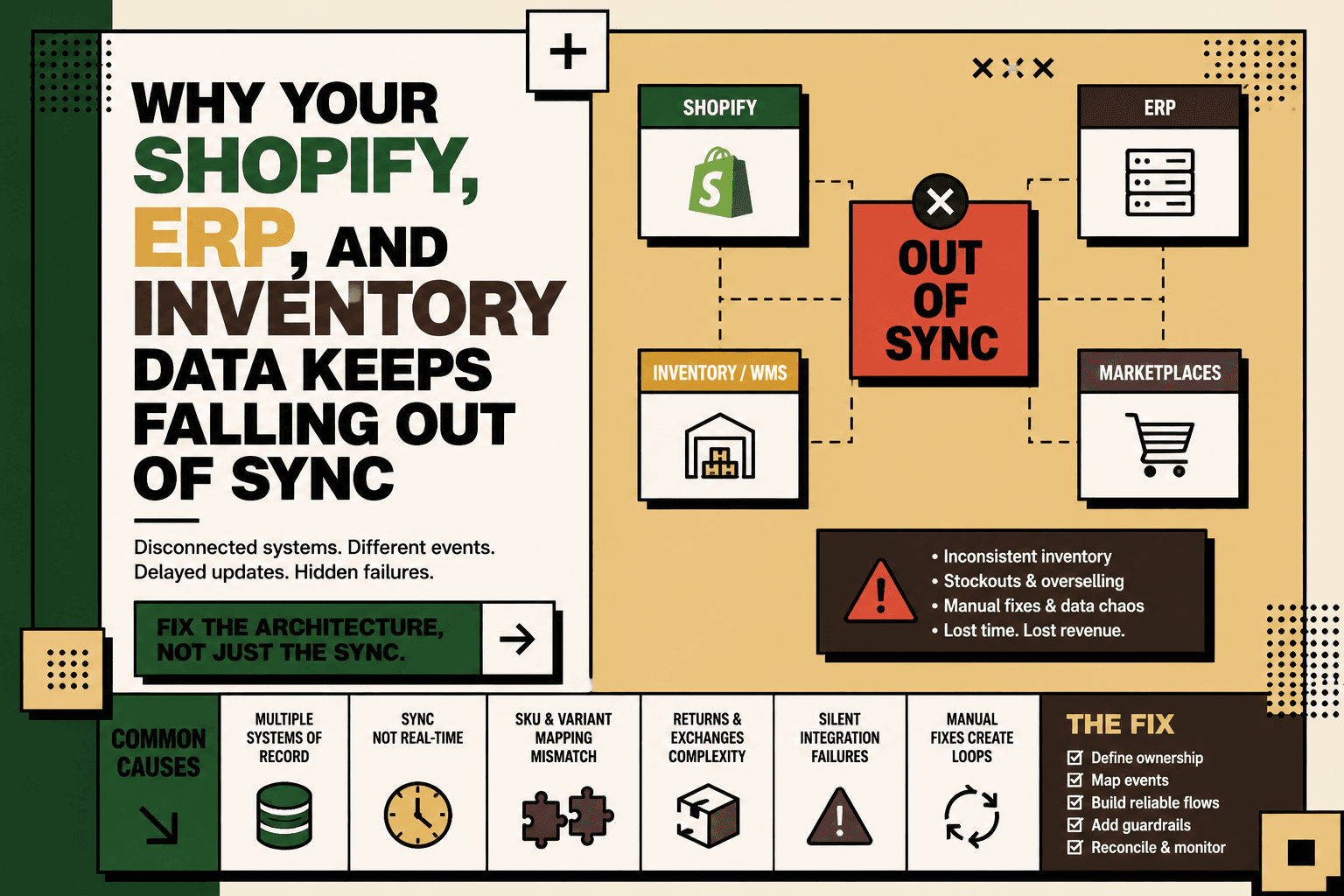
If Shopify says you have 12 units available, your ERP says 8, and the warehouse says 5, the problem is rarely that one system is simply “wrong.” The deeper problem is that several systems are maintaining different versions of the same operational truth.
Shopify identifies disconnected systems, delayed synchronization, inconsistent identifiers, manual adjustments, broken integrations, and unclear ownership of data as common causes of ecommerce data and inventory problems. Shopify's guide to ecommerce data-management problems
The short answer: Shopify, ERP, and inventory data falls out of sync when systems do not share a clearly defined source of truth, event model, identifier mapping, synchronization mechanism, and reconciliation process. Adding another connector may move data between systems, but it does not automatically solve those architectural problems.
The practical fix is to treat synchronization as an operational infrastructure problem: define ownership, map the workflow, establish reliable data flows, handle failures explicitly, reconcile continuously, and use AI only where interpretation or exception handling actually benefits from it.
Why Shopify and ERP Inventory Data Falls Out of Sync
A typical D2C commerce stack may contain Shopify, marketplaces, an ERP, inventory software, a warehouse management system or 3PL, shipping platforms, returns workflows, customer support tools, and analytics.
Each system has a legitimate reason to exist. The problem starts when the same business event is represented differently across those systems.
For example, a customer purchase might be recorded in Shopify when the order is placed, in the ERP when the order is imported, and in the warehouse when the item is picked. If the architecture does not define how those events affect available, committed, picked, returned, or sellable inventory, the systems can legitimately produce different numbers.
Shopify's current guidance on ERP and commerce integration emphasizes defining data flows and responsibilities between systems rather than assuming that every system should own every piece of data. Shopify ERP system guidance
1. You Have Multiple Systems of Record
Answer: Inventory becomes unreliable when Shopify, the ERP, warehouse, marketplace, or another application can independently change the same inventory value without a clearly defined ownership model.
Consider a simplified stack:
| System | Typical responsibility |
|---|---|
| Shopify | Storefront, orders, customer-facing availability |
| ERP | Business operations, purchasing, financial and operational records |
| WMS or 3PL | Physical stock, receiving, picking, packing and fulfillment |
| Marketplace | Channel-specific listings and orders |
| Analytics | Reporting and operational visibility |
These systems do not necessarily need to contain identical data at every moment. They do need clearly defined responsibilities.
For example, the warehouse may be authoritative for physically received stock, while the commerce layer may calculate sellable inventory after reservations, safety stock, or channel allocation. The important question is not “Which system has the number?” but “Which system is authoritative for this particular data state?”
Five Anchor POV: The most important architectural decision is often not the integration technology. It is the ownership model. If two systems are allowed to make independent decisions about the same inventory state, the integration is forced to resolve a business conflict that should have been resolved in the operating model first.
2. Your Inventory Sync Is Not Actually Real-Time
Answer: A synchronization process can be technically functional while still producing stale inventory because data moves in batches, polling intervals, scheduled jobs, or delayed queues.
Imagine this sequence:
- 10:01 — A customer purchases the last available unit on Shopify.
- 10:02 — Shopify records the order and changes its inventory state.
- 10:07 — The ERP receives the order.
- 10:15 — Another channel receives the updated availability.
During that window, disagreement between systems is not necessarily a software defect. It is synchronization latency.
The architectural question is therefore not simply whether systems “sync.” It is whether the synchronization latency is acceptable for the business process.
Shopify notes delayed synchronization as one contributor to ecommerce inventory inaccuracies, particularly when transaction volume increases. Shopify data-management guidance
Illustrative scenario: If a product has only a few sellable units remaining and multiple sales channels are allowed to sell against the same pool, even a short synchronization delay can create an overselling risk. The exact exposure depends on order velocity, channel count, available stock, reservation logic, and synchronization latency.
3. Your SKU and Variant Mappings Do Not Match
Answer: Systems cannot reliably synchronize inventory when they do not agree that two records represent the same product.
One system might identify a product as TSHIRT-BLK-M, another as TSH-BLACK-M, and a warehouse as an internal numeric identifier. The integration needs a reliable mapping between those identifiers.
The problem becomes more complex with:
- Product variants
- Bundles and kits
- Multipacks
- Substitutions
- Different units of measure
- Parent and child products
- Channel-specific product records
Shopify identifies inconsistent product identifiers, SKU structures, variants, and bundle definitions as sources of ecommerce data inconsistency. Shopify data-management guidance
A synchronization layer should therefore contain an explicit mapping model rather than relying on every connected application to independently interpret product identity.
4. Returns and Exchanges Follow a Different Path
Returns are a common source of inventory divergence because the customer-facing transaction and the physical inventory event occur at different points in the workflow.
A customer may initiate a return in Shopify. The warehouse may receive the item days later. A quality check may then determine whether it is sellable, damaged, quarantined, or eligible for refurbishment.
If one system marks the return as received while another continues to treat the item as unavailable, inventory will diverge.
The same issue can occur with:
- Cancelled orders
- Damaged products
- Lost stock
- Quality-control holds
- Safety stock
- Exchanges
- Partial returns
Shopify's inventory documentation distinguishes inventory adjustments and different inventory states, reinforcing the need for consistent handling of inventory events across connected systems. Shopify Help Center: Adjusting inventory quantities
5. Different Systems Reduce Inventory at Different Events
This is one of the most important causes of inventory drift because each system can be behaving correctly according to its own rules.
Consider three possible rules:
- Shopify reduces availability when an order is placed.
- The ERP reduces inventory when the order is imported.
- The warehouse reduces physical inventory when the item is picked.
If the integration treats all three events as independent deductions, the same commercial transaction can appear to consume inventory multiple times.
The solution is to define the event model explicitly.
| Event | Possible inventory meaning |
|---|---|
| Order placed | Demand or reservation created |
| Order cancelled | Reservation released |
| Item picked | Physical stock committed or removed from location |
| Item returned | Returned quantity received |
| Quality approved | Returned quantity becomes sellable |
| Stock adjustment | Physical or operational correction |
Shopify's ERP guidance highlights the importance of defined data flows between commerce and ERP systems, particularly for inventory and order events. Shopify cloud ERP guidance
6. Your Integration Fails Silently
Answer: A synchronization failure is operationally dangerous when the system does not make the failure visible, retry it safely, or create an actionable exception.
Typical failure points include:
- API rate limits
- Failed API requests
- Expired credentials
- Incorrect field mappings
- Timeouts
- Missing or duplicated events
- Changed platform behavior
- Webhook failures
- Unhandled edge cases
The dangerous version of a failed integration is not necessarily an obvious error. It is a workflow that appears healthy while some events have quietly stopped moving.
Shopify identifies broken integrations, API limitations, mismatched fields, undocumented mappings, and insufficient monitoring among recurring data-management problems. Shopify data-management guidance
A production-grade synchronization workflow should therefore record successful events, failed events, retry attempts, unresolved exceptions, and reconciliation differences.
7. Manual Fixes Create a Synchronization Loop
The most expensive part of a broken integration is often the manual workaround that develops around it.
The pattern looks like this:
- Synchronization fails.
- An operations employee changes inventory in Shopify.
- The ERP still contains the previous value.
- The next synchronization job sends the ERP value back.
- The employee corrects Shopify again.
At that point, the operations team has effectively become part of the integration architecture.
Spreadsheets, CSV exports, manual imports, Slack messages, and ad hoc corrections are symptoms that the system lacks a dependable operational recovery path. Shopify identifies manual exports and fragmented systems as contributors to data silos and inconsistent information. Shopify data-management guidance
The Real Problem Is Usually the Architecture
Connecting Shopify to an ERP is not the same thing as designing a reliable commerce data architecture.
A durable synchronization model needs explicit answers to seven questions:
- Which system owns each data domain?
- Which events create or change inventory?
- Which direction does each data flow?
- How are products, SKUs, variants, locations, and orders mapped?
- What happens when an event fails?
- How are conflicting values resolved?
- How is the system reconciled after an error?
Shopify describes several ERP integration approaches, including direct connectors, middleware or iPaaS, partner-led integrations, and API-led architectures. The appropriate approach depends on the complexity and requirements of the commerce operation. Shopify ERP integration guidance
What a Better Shopify-ERP Inventory Architecture Looks Like
A more reliable model separates the responsibilities of commerce applications from the infrastructure responsible for coordination.
Shopify + Marketplaces
↓
Commerce Integration and Orchestration Layer
↓
ERP + Inventory + WMS + 3PL
↓
Shipping + Returns + Customer Operations
The integration layer does more than transport fields. It can provide:
- Data mapping
- Event routing
- Validation
- Transformation
- Idempotency controls
- Retry handling
- Exception queues
- Audit logging
- Reconciliation
- Monitoring
Five Anchor POV: The integration layer should be treated as operational infrastructure, not as a collection of invisible connectors. Its job is to make business events move predictably, expose failures, and preserve a coherent view of what happened across systems.
What “In Sync” Should Actually Mean
A common mistake is defining synchronization as “the numbers are identical.” That is too simplistic.
Different systems may legitimately hold different inventory states. Physical stock, reserved stock, available-to-sell stock, damaged stock, and stock in transit are not interchangeable concepts.
A better definition is:
Systems are in sync when each system contains the correct representation of the business state it owns, and the relationships between those states are predictable, traceable, and reconcilable.
That means a warehouse can own physical stock while Shopify displays a calculated sellable quantity, provided the relationship between those values is explicit.
How to Diagnose Shopify ERP Sync Problems
Before replacing your connector, diagnose the workflow.
Step 1: Map the Complete Inventory Flow
Document every trigger, input, system, decision, action, exception, human handoff, and output.
Do not map only “Shopify to ERP.” Map the full operational chain:
Order → Reservation → ERP → Warehouse → Pick → Ship → Return → Inspection → Restock → Reconciliation
Then identify where marketplaces, procurement, customer support, and financial systems enter the workflow.
Step 2: Establish a Baseline
Measure the current system before changing it.
- Order volume
- Inventory adjustment frequency
- Synchronization latency
- Failed event count
- Manual correction volume
- Inventory discrepancy rate
- Exception resolution time
- Revenue leakage attributable to stock errors, where measurable
The goal is to distinguish an occasional operational correction from a systemic synchronization problem.
Step 3: Identify the Source of Truth by Data Domain
Create a simple ownership matrix.
| Data domain | Primary owner | Other systems |
|---|---|---|
| Product master | Defined master system | Consume mapped data |
| Order | Commerce or order-management system | ERP, WMS, analytics |
| Physical stock | Warehouse or inventory system | Commerce, ERP, analytics |
| Sellable availability | Defined commerce inventory service | Channels and storefront |
| Financial reconciliation | ERP or finance system | Commerce and reporting |
The exact owner will differ by architecture. What matters is that the ownership is explicit.
Step 4: Separate Rules, AI, and Human Decisions
Not every synchronization problem needs AI.
| Decision type | Best approach | Example |
|---|---|---|
| Deterministic | Rules and automation | Map SKU A to SKU B |
| High-volume structured | Automation | Send inventory event to approved channel |
| Ambiguous | AI plus validation | Classify an unstructured supplier update |
| High-impact exception | Human approval | Override a material inventory discrepancy |
| Sensitive or irreversible | Human-only or tightly governed automation | Approve a major stock adjustment |
AI is most useful when the workflow contains unstructured information, ambiguous classifications, or large numbers of exceptions. Predictable data movement should usually remain deterministic.
How to Build a Reliable Inventory Sync Workflow
1. Map
Document triggers, inputs, systems, decisions, actions, exceptions, human handoffs, and outputs.
2. Baseline
Measure volume, frequency, manual effort, latency, error rate, exception rate, and business impact.
3. Prioritize
A practical way to prioritize automation candidates is:
Volume × frequency × manual effort × error cost × revenue impact ÷ implementation complexity
This is a practical prioritization model, not an industry-standard formula.
4. Classify
Decide which steps belong to deterministic automation, AI assistance, human approval, or human-only handling.
5. Connect
Use APIs, webhooks, queues, orchestration, or appropriate integration platforms to connect Shopify, marketplaces, ERP, inventory, warehouse, shipping, returns, support, and analytics.
6. Add Guardrails
Define validation rules, permissions, approval thresholds, retries, fallbacks, logging, monitoring, and exception handling.
7. Pilot
Start with one high-volume, low-risk workflow rather than attempting to rebuild the entire commerce architecture at once.
8. Measure
Track processing time, synchronization latency, manual corrections, discrepancy rate, exception resolution time, operational cost, and relevant revenue leakage.
9. Scale
Expand only after the initial workflow is demonstrably reliable.
Where Five Anchor Fits
For a D2C business experiencing recurring Shopify, ERP, inventory, warehouse, and marketplace discrepancies, the relevant solution is usually broader than an inventory-sync app.
Problem: Multiple systems contain overlapping operational data and updates are not consistently coordinated.
Architecture: Establish data ownership, mapping, event flows, orchestration, validation, monitoring, and reconciliation.
Implementation: Five Anchor's commerce infrastructure work can connect Shopify and marketplace channels with ERP, inventory, warehouse, shipping, and other operational systems, while adding custom automation and AI workflows where interpretation or exception handling is useful.
Business outcome: The target is not simply “faster syncing.” It is a more dependable operational view of orders, inventory, fulfillment, and exceptions, with less reliance on manual reconciliation.
Five Anchor's broader ecommerce intelligence layer can also turn synchronized operational data into inventory intelligence, SKU health, reorder visibility, marketplace performance, automated MIS, and operational dashboards. Shopify's discussion of commerce data integration
What Not to Do
- Do not add connectors without defining ownership. More connections can increase the number of failure paths.
- Do not make every system writable. Shared ownership creates conflict resolution problems.
- Do not treat batch synchronization as real-time. Measure and design around the actual latency.
- Do not use AI for deterministic transformations. Rules are usually easier to test and govern.
- Do not hide exceptions. A visible exception is safer than a silent data mismatch.
- Do not rely on spreadsheets as permanent reconciliation infrastructure. They may be useful for investigation, but recurring manual correction indicates an architectural problem.
- Do not automate irreversible decisions without controls. High-impact inventory and financial actions need validation and appropriate approval.
How to Know Whether Your Integration Is Healthy
A healthy commerce integration should make it possible to answer operational questions without manually checking five systems.
- Where did this inventory number come from?
- Which system owns this value?
- When was the last successful synchronization?
- Which events failed?
- Were failed events retried?
- Which SKUs have mapping problems?
- Which inventory differences require human attention?
- Can we reconcile Shopify, ERP, and warehouse data automatically?
- Can we identify whether a discrepancy is a real physical difference or a synchronization issue?
If your team cannot answer these questions, the problem is probably larger than a single broken sync job.
The Business Cost of Staying Out of Sync
Inventory synchronization problems create more than technical inconvenience. They can affect customer promises, operational workload, purchasing decisions, fulfillment accuracy, reporting, and management visibility.
The correct business case should therefore be based on your own baseline rather than a generic industry ROI claim.
Illustrative scenario: Suppose a team manually investigates 40 inventory discrepancies each week and spends 15 minutes resolving each one. That represents 10 hours of investigation time per week. If each discrepancy also creates downstream customer-service or fulfillment work, the true operational burden is higher. This example is illustrative and should be replaced with measured internal data when evaluating an actual project.
A useful business measurement framework is to track:
- Manual reconciliation hours
- Inventory discrepancy frequency
- Order exceptions
- Overselling incidents
- Stockout-related lost sales, where measurable
- Exception resolution time
- Synchronization latency
- Operational cost
- Customer-impacting fulfillment errors
The Key Insight: Fix the Architecture, Not Just the Sync
Shopify, an ERP, a warehouse system, and marketplaces can all be good systems while still producing unreliable operational data when their relationships are poorly designed.
The durable solution is to define the commerce operating model first and then implement the integration architecture around it.
That means deciding who owns each data domain, which events change inventory, how identifiers map, how data moves, what happens when synchronization fails, how exceptions are approved, and how discrepancies are reconciled.
Five Anchor POV: The goal of commerce integration should not be to make every system show the same number. The goal is to make every system show the correct state for the responsibility it owns, while the overall architecture provides one trustworthy operational picture.
Once that foundation exists, automation and AI become much more useful. Deterministic workflows can move data reliably, AI can interpret ambiguous information and classify exceptions, and humans can remain responsible for decisions that require judgment or accountability.
The bottom line: If your Shopify, ERP, warehouse, and inventory data keeps falling out of sync, adding another sync tool may only treat the symptom. Start with ownership, event definitions, mappings, failure handling, reconciliation, and measurement. Then build the smallest reliable integration layer that makes those rules executable.
Key Takeaways
- •Inventory discrepancies usually come from architecture and workflow ownership problems rather than one system being inherently wrong.
- •Define a source of truth for each data domain and distinguish physical, reserved, available, and sellable inventory states.
- •SKU and variant mapping must be explicit across Shopify, ERP, warehouse, marketplace, and other systems.
- •Reliable synchronization requires event ownership, appropriate latency, retries, monitoring, exception handling, and reconciliation.
- •Use deterministic automation for predictable data movement, AI for interpretation and exception classification, and humans for high-impact approvals.
- •Measure synchronization health using discrepancy rate, manual corrections, latency, failed events, exception resolution time, and business impact.
- •A commerce integration layer can provide the orchestration, mapping, validation, monitoring, and reconciliation needed to make fragmented systems operate as one coordinated infrastructure.
Inventory Synchronization Approaches
| Point-to-Point Sync | Orchestrated Integration Layer | AI-Assisted Operations |
|---|---|---|
| Inventory Sync Frequency | 15–30 min batch polling (high oversell risk) | Sub-second atomic locking (<450ms) |
| Concurrent Drop Resilience | Fails under concurrency; causes negative stock balance | Redis atomic reservation queue guarantees exact counts |
| Error Handling & Retries | Silent failure; manual CSV audit needed | Dead-letter queues with automated exponential retry |
| Fulfillment Routing Speed | 2–4 hours delayed batch export to 3PL warehouse |