MySQL Zendesk Integration: What You Actually Need to Connect
A MySQL Zendesk integration connects operational data stored in MySQL with the customer support workflows running in Zendesk. The goal is not simply to make two systems exchange records. The useful goal is to give support agents the right customer, order, payment and fulfillment context without forcing them to search across separate systems.
For an ecommerce or D2C business, that can mean a Zendesk agent sees a customer's latest order, payment status and shipment status while handling a ticket. It can also mean support activity is written back to an operational database so customer-service data can be analyzed alongside orders and revenue.
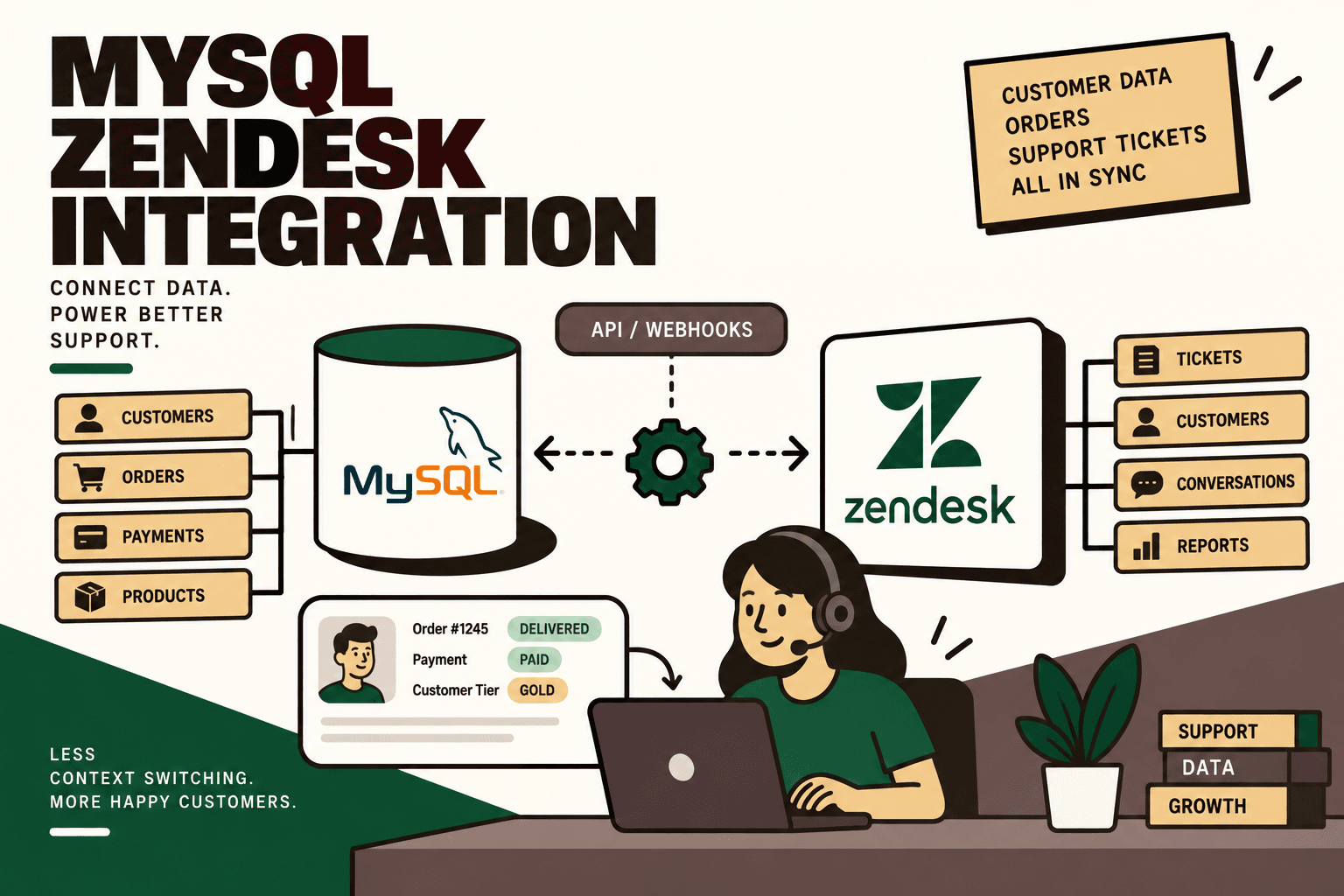
There is not one universal native MySQL-to-Zendesk synchronization pattern for an arbitrary MySQL database. A common architecture uses an API, webhook or middleware layer between the systems. MySQL provides connectors for application environments including Python, Node.js, Java, PHP and .NET, while Zendesk exposes REST APIs and integration capabilities for tickets, users, events and webhooks. MySQL Connectors and APIs Zendesk API Reference
Quick Answer
Yes, MySQL can be integrated with Zendesk. The most flexible architecture is usually MySQL → integration layer → Zendesk, with Zendesk webhooks or APIs triggering workflows and the integration layer querying or updating MySQL as required.
Common use cases include customer lookup, ticket enrichment, customer creation or synchronization, order-status support, writing Zendesk ticket data back to MySQL, customer-event synchronization and combined support-and-commerce analytics.
For D2C businesses, the integration becomes more valuable when MySQL contains operational information such as orders, subscriptions, payments, shipments or customer records. Instead of asking agents to switch between systems, the integration can make selected operational data available within the support workflow.
What Is a MySQL Zendesk Integration?
MySQL is a relational database. It is commonly used to store structured application and business data. Zendesk is a customer-service platform where teams manage tickets, users and customer interactions.
The integration creates a controlled connection between those environments.
| System | Typical responsibility | Example data |
|---|---|---|
| MySQL | Operational data storage | Customers, orders, payments, subscriptions, shipments |
| Integration layer | Orchestration and transformation | Authentication, mapping, validation, business rules, retries |
| Zendesk | Customer support workflow | Tickets, users, custom fields, events and support activity |
The integration layer is important because MySQL and Zendesk do not necessarily share the same identifiers, data model or business rules. The layer can translate between the two systems instead of forcing either system to become responsible for the other's data model.
Why Connect MySQL to Zendesk?
The strongest business case is usually context.
A support agent may receive a message that says, “My order has not arrived.” The ticket itself may contain an email address or order number, but that information does not necessarily explain what happened operationally.
The relevant context could be:
- Customer record
- Order number
- Order date
- Order status
- Payment status
- Shipment status
- Tracking information
- Subscription status
- Customer tier
- Previous support interactions
If this information is already stored in MySQL, the integration can retrieve the relevant subset and make it available to Zendesk.
The result is a workflow where the agent works from the support system while the operational system remains the source of truth for the underlying business data.
How the MySQL Zendesk Architecture Works
A practical architecture looks like this:
MySQL database → integration service → Zendesk API
For event-driven workflows, the direction can also begin in Zendesk:
Zendesk trigger → webhook → integration service → MySQL query → Zendesk API
Zendesk documents webhooks as a way to send HTTP requests in response to activity in Zendesk. Zendesk also documents webhook event types and monitoring capabilities. Zendesk Webhooks Creating and Monitoring Webhooks
The integration service might be implemented with Node.js, Python, another application stack, an orchestration platform or a managed middleware solution. The supplied research identifies these as practical options rather than requiring one specific technology. :contentReference[oaicite:0]{index=0}
Why not connect Zendesk directly to the database?
A direct database connection can create security, governance and maintenance problems if the support platform is allowed unrestricted access to the operational database.
A controlled API layer can expose only the information required by the support workflow. For example, instead of exposing an entire orders table, the integration API could accept an order identifier and return only the approved customer-facing fields.
This also gives the business a place to enforce permissions, validation, logging and business rules.
What Can You Automate?
A MySQL Zendesk integration can support several different workflows. The right scope depends on where support teams spend time and which data is authoritative in MySQL.
| Workflow | How it works | Business purpose |
|---|---|---|
| Customer lookup | Retrieve customer information from MySQL using Zendesk requester data | Give agents customer context |
| Ticket enrichment | Fetch order, payment or shipment information and associate it with the ticket | Reduce system switching |
| Customer synchronization | Create or update Zendesk users from approved MySQL records | Keep customer records aligned |
| Ticket synchronization | Store ticket identifiers and selected support fields in MySQL | Connect support data with operational reporting |
| Order support | Use customer or order identifiers to retrieve order information | Speed up order-related support |
| Support analytics | Combine Zendesk support data with MySQL business data | Analyze support alongside operational metrics |
| Customer events | Send selected business events into Zendesk | Build a broader customer interaction timeline |
Zendesk's Tickets API supports programmatic ticket management, while its Events API can associate programmatic events with customers. Zendesk Tickets API Zendesk Events API
The Most Useful Ecommerce Workflow: Ticket Enrichment
For D2C businesses, ticket enrichment is often a logical starting point because it addresses a specific support bottleneck without requiring every business process to be moved into Zendesk.
A typical workflow is:
- A customer creates a Zendesk ticket.
- Zendesk identifies the requester.
- A trigger sends an HTTP request through a webhook.
- The integration layer receives the ticket identifier and approved requester information.
- The integration layer queries MySQL using a customer identifier or order identifier.
- The integration validates the returned information.
- The integration sends the required customer context to Zendesk.
- The agent sees the relevant operational information while handling the ticket.
Zendesk webhooks are designed to send HTTP requests based on activity, making this type of event-driven architecture possible. Zendesk Webhooks API
Illustrative scenario
Illustrative scenario: A customer opens a ticket using the email address associated with an order. The integration receives the ticket event, looks up the customer in MySQL and retrieves the relevant order and fulfillment fields. Zendesk can then be updated with approved information such as order ID, order status, payment status and shipment status.
The important point is that the scenario does not require the support agent to manually search the database. It also does not require MySQL to become the support system.
Customer Lookup: Email, Customer ID or Order ID?
The lookup key is one of the most important implementation decisions.
Email is convenient, but it is not always a reliable unique business identifier. Customers can change email addresses, share addresses or have multiple records depending on the application's data model.
Where possible, a stable internal customer identifier or order identifier should be used. The integration can then use Zendesk fields to carry that identifier between systems.
| Lookup key | Potential advantage | Potential issue |
|---|---|---|
| Usually available from support requests | May not uniquely identify the intended business record | |
| Customer ID | Stable internal identifier | Must be available to Zendesk or discoverable safely |
| Order ID | Directly connects the support request to a transaction | May not be present in every ticket |
| External customer ID | Useful for multi-system architectures | Requires consistent mapping across systems |
Five Anchor POV: The support workflow should not depend on fuzzy identity matching when a stable identifier is available. Define the identity model first, then build the API and field mappings around it.
Using Zendesk Custom Fields
Zendesk custom fields can provide a structured place for selected MySQL-derived context.
Potential fields include:
- Customer ID
- Order ID
- Order status
- Payment status
- Shipment status
- Subscription status
- Customer tier
The fields should contain information that is useful to the support workflow rather than becoming a copy of the entire MySQL record.
Keeping the Zendesk representation focused has two advantages. First, agents get a cleaner support interface. Second, the integration has fewer fields to synchronize and maintain.
Writing Zendesk Data Back to MySQL
The integration does not have to be one-way.
A second architecture is:
Zendesk → integration layer → MySQL
For example, selected support information can be stored in MySQL for analytics or operational reporting. That could include ticket ID, status, priority, timestamps or resolution-related information, depending on the business's data model and reporting requirements.
This can make it possible to combine support data with operational data.
For example:
- Orders by customer segment
- Support volume by product
- Tickets associated with order status
- Support demand by subscription status
- Returns-related ticket volume
- Support workload by order lifecycle stage
The integration should not blindly copy every Zendesk field into MySQL. Define which support data is operationally useful and which system owns each field.
Using the Zendesk Events API
Zendesk's Events API is designed to build a timeline of customer interactions from different sources. This can be useful when business events stored outside Zendesk need to become part of the customer context. Zendesk Events API
Potential business events can include purchases or other customer-service interactions, depending on the integration design and Zendesk capabilities being used.
The distinction between ticket fields and customer events is useful:
- Ticket fields: structured context directly relevant to a support case.
- Customer events: activities that contribute to a broader customer interaction timeline.
That distinction helps prevent the ticket from becoming a dumping ground for operational data.
Real-Time MySQL Zendesk Integration
When support information changes frequently, event-driven integration is usually more appropriate than repeatedly polling the database for every possible change.
A real-time support workflow can look like this:
Zendesk ticket created
↓
Zendesk trigger
↓
Webhook
↓
Integration API
↓
MySQL lookup
↓
Validation and transformation
↓
Zendesk API update
Zendesk documents webhook authentication and monitoring mechanisms, which should be considered part of the production architecture rather than an optional add-on. Zendesk Webhook Monitoring
Polling vs Event-Driven Integration
| Approach | How it works | Consideration |
|---|---|---|
| Polling | Integration periodically checks for changed records | Simple for some systems but can create unnecessary database queries and synchronization delay |
| Webhook-driven | An event triggers an HTTP request | Useful when near-real-time reactions are required |
| Scheduled batch | Records are synchronized at defined intervals | Useful when real-time updates are not required |
| Hybrid | Events handle important changes while scheduled reconciliation checks consistency | Useful when reliability and reconciliation both matter |
There is no requirement that every workflow be real time. If a customer tier changes once per day, a batch process may be sufficient. If a support agent needs current shipment status, a more immediate lookup may be appropriate.
MySQL Connectors and the Integration Layer
MySQL provides official connectors and APIs for application development across multiple programming languages. This means the integration service can use a conventional application layer to query MySQL and communicate with Zendesk. MySQL Connectors and APIs Documentation
The integration layer should perform more than a database query. It should handle:
- Authentication
- Input validation
- Identifier mapping
- Database queries
- Response transformation
- Zendesk API calls
- Retries
- Logging
- Error handling
- Rate and volume controls
- Access permissions
This is what turns a database connection into an operational integration.
Another Architecture: MySQL REST Service
MySQL REST Service can expose MySQL data through REST endpoints. This creates another possible architecture in which Zendesk or an integration layer communicates with an HTTPS API rather than connecting directly to the database. MySQL REST Service REST APIs
The conceptual flow becomes:
Zendesk → HTTPS API → MySQL REST Service → MySQL database
This approach can be useful when an organization already uses MySQL REST Service and wants to expose carefully selected database objects through an API-oriented architecture. It should still be evaluated against a custom application service or middleware layer based on security, business logic and operational requirements.
Security: Do Not Give Zendesk Unrestricted Database Access
Customer support integrations can involve personal information, order details, payment-related information and other sensitive operational data. The architecture should therefore expose only the minimum information required by the support workflow.
Important controls include:
- Least privilege: give the integration only the database and Zendesk permissions it needs.
- API authentication: protect credentials, tokens and secrets.
- Input validation: validate identifiers before querying MySQL.
- Parameterized queries: prevent user-controlled input from becoming unsafe SQL.
- Data minimization: return only fields required by Zendesk.
- Audit logging: record important integration activity.
- Encryption: protect data in transit and apply appropriate controls to stored credentials.
- Failure isolation: prevent a Zendesk or integration failure from corrupting operational records.
Zendesk documents OAuth and other authentication mechanisms for API access. Zendesk Security and Authentication
Handling API Failures and Database Failures
A production integration must assume that something will eventually fail.
Possible failures include:
- Zendesk API errors
- Database connection failures
- Network timeouts
- Invalid customer identifiers
- Missing orders
- Unexpected database values
- Authentication failures
- Temporary service interruptions
- Duplicate webhook delivery
The correct response depends on the failure.
A temporary network failure can usually be retried. A missing customer record may require a controlled exception. An invalid identifier should not be retried indefinitely.
This is why an integration needs explicit error classification rather than one generic retry rule.
Idempotency and Duplicate Events
Webhook and API workflows should be designed so that processing the same event more than once does not create an unintended duplicate action.
Illustrative scenario: A Zendesk event causes the integration to create or update a record in MySQL. The first request succeeds, but the response is lost before the integration confirms success. A retry then occurs. Without duplicate detection, the second attempt could create an unwanted duplicate record.
A robust implementation should use stable external identifiers and idempotent operations wherever the workflow requires them.
MySQL + Zendesk for D2C Customer Operations
The integration becomes particularly useful when MySQL is part of a broader ecommerce architecture.
A D2C environment might look like:
Shopify / ecommerce channels
↓
Orders / ERP / MySQL operational data
↓
Integration layer
↓
Zendesk
↓
Support agents or AI support workflows
The important design principle is that Zendesk does not need to become the operational system of record for orders. It can become the customer-service interface that retrieves trusted information from the systems where that information is maintained.
For a question such as “Where is my order?”, the support workflow can retrieve the current operational information rather than requiring an agent to manually check multiple systems.
Five Anchor POV: For D2C operations, the real opportunity is not simply connecting MySQL to Zendesk. It is creating a reliable customer-operations layer where commerce, order and fulfillment data can be surfaced inside support workflows, with clear ownership and controlled access.
Where AI Fits Into the MySQL Zendesk Workflow
AI can be added after the underlying integration is reliable.
It can assist with tasks such as:
- Summarizing customer and order context
- Classifying support tickets
- Identifying the likely reason for contact
- Retrieving approved operational information
- Drafting responses using verified data
- Prioritizing tickets based on defined rules and context
- Summarizing recurring support issues
- Identifying patterns across support and operational data
However, AI should not replace deterministic controls for predictable operations.
For example, the workflow for retrieving an order status should normally be deterministic:
Ticket → customer/order identifier → MySQL lookup → validated status → Zendesk.
AI can then interpret or summarize that verified result for an agent or customer.
This separation reduces the risk of an AI system inventing operational information when a source-of-truth lookup is available.
What Should Be Automated First?
Use the workflow rather than the technology as the starting point.
- Map: document how agents currently find customer and order information.
- Baseline: measure ticket volume, lookup frequency, manual time, response time and error rate.
- Prioritize: identify the repetitive workflow with meaningful operational impact.
- Classify: decide which steps should be deterministic automation, AI-assisted, human-approved or human-only.
- Connect: build the MySQL and Zendesk integration through APIs, webhooks or orchestration.
- Guardrail: define authentication, permissions, validation, retries, logging and exception handling.
- Pilot: start with one high-volume, low-risk workflow.
- Measure: compare results with the baseline.
- Scale: expand only after the workflow is reliable.
This implementation sequence follows the supplied Five Anchor implementation playbook. :contentReference[oaicite:1]{index=1}
How to Prioritize MySQL Zendesk Automation
A practical prioritization model is:
volume × frequency × manual effort × error cost × revenue impact ÷ implementation complexity.
This is a practical framework, not an industry-standard formula.
For example, an order-status lookup that agents perform repeatedly throughout the day may deserve earlier attention than a rare administrative workflow. A complex automation that affects a small number of tickets may not justify the same implementation effort as a simple workflow affecting thousands of tickets.
What Should Stay Human?
Automation should not mean removing human judgment from every support interaction.
Human approval may remain appropriate for:
- Refunds above a defined threshold
- Unusual payment disputes
- Account ownership conflicts
- Complex complaints
- Policy exceptions
- High-value customer escalations
- Ambiguous identity matches
- Cases where the operational data is contradictory
The integration should make these cases easier to investigate rather than automatically making an irreversible decision.
Common MySQL Zendesk Integration Mistakes
1. Treating email as the only identity key
Email is convenient, but the business should define a stable identity model where possible.
2. Exposing the whole database
Zendesk should receive only the information required by the workflow. A narrow API is easier to secure and maintain than unrestricted database access.
3. Synchronizing everything
More synchronized fields do not automatically create a better support workflow. Start with the information agents actually need.
4. Ignoring data ownership
MySQL should remain authoritative for the operational fields it owns. Zendesk should not silently become the source of truth for those values.
5. Building only the happy path
Test missing customers, missing orders, duplicate events, API failures, database downtime and unexpected data.
6. Skipping monitoring
A failed integration can leave support teams working with stale information. Monitoring should identify failed events and delayed workflows.
7. Adding AI before the data layer is reliable
An AI workflow cannot reliably answer questions if the underlying customer and order data is incomplete, stale or incorrectly mapped.
How to Measure the Integration
The integration should be measured through operational outcomes rather than simply counting successful API requests.
| Metric | What it measures |
|---|---|
| Manual lookup rate | How often agents still need to search outside Zendesk |
| Ticket enrichment success rate | How often the required customer context is retrieved successfully |
| Integration failure rate | How often workflows require technical intervention |
| Response time | Whether agents receive operational context quickly enough |
| Exception volume | How many cases require manual investigation |
| Data accuracy | Whether Zendesk context matches the authoritative operational source |
| Ticket handling time | Whether the workflow reduces repetitive investigation effort |
| Support resolution metrics | Whether better operational context changes relevant support outcomes |
The correct baseline depends on the organization's current support process. Avoid assuming a particular percentage improvement without measuring the existing workflow first.
How Five Anchor Can Fit Into the Architecture
Five Anchor's positioning is AI Infrastructure for D2C & E-Commerce, with services spanning commerce infrastructure, AI-powered customer operations and ecommerce intelligence. Its commerce and customer-operations capabilities are relevant when a MySQL-to-Zendesk integration is part of a larger D2C workflow rather than an isolated database connection. :contentReference[oaicite:2]{index=2}
A practical implementation can begin with workflow mapping, followed by system and data ownership analysis, API and webhook architecture, integration development, validation and exception handling. Once the operational data layer is dependable, AI can be introduced for ticket classification, customer-context summarization, self-service or approved customer communications.
The important sequence is problem → architecture → implementation → measurement. The technology should follow the workflow rather than becoming the objective itself.
Implementation Checklist
Before putting a MySQL Zendesk integration into production, confirm:
- Which MySQL tables or views are required
- Which Zendesk objects need to be read or updated
- Which system owns each data field
- Which identifier connects the customer across systems
- Which events trigger the integration
- Which fields are safe to expose to support agents
- How API authentication is handled
- How database credentials are protected
- How duplicate events are detected
- How retries work
- How missing records are handled
- How errors are logged
- How failed workflows reach a human operator
- How the integration is monitored
- How data consistency is periodically reconciled
Final Takeaway
A MySQL Zendesk integration is most valuable when it turns operational data into usable customer-service context.
The core architecture is straightforward: MySQL stores operational information, an integration layer handles orchestration and business logic, and Zendesk provides the customer-support interface. Zendesk webhooks and APIs can trigger and execute workflows, while MySQL connectors or REST capabilities provide ways for applications to access database information. Zendesk Webhooks MySQL Connectors
The harder part is designing the workflow correctly: stable customer identity, clear system ownership, limited data exposure, reliable error handling, idempotency, monitoring and human escalation.
For ecommerce and D2C businesses, a strong starting point is customer lookup and ticket enrichment. Once that workflow is reliable, the architecture can expand into customer events, support analytics, order workflows and AI-assisted customer operations.
The objective is not to copy MySQL into Zendesk. It is to connect the systems so that the right information reaches the right support workflow at the right time.
Key Takeaways
- •MySQL and Zendesk are typically connected through an API, webhook or middleware layer rather than unrestricted direct database access.
- •The strongest ecommerce use case is often ticket enrichment, where Zendesk retrieves approved order, payment and fulfillment context from MySQL.
- •Zendesk webhooks can trigger HTTP requests from support activity, while the Tickets API and Events API support programmatic customer-service workflows.
- •MySQL provides connectors and API capabilities that allow an application layer to read and write database data.
- •Stable customer or order identifiers are preferable to relying exclusively on email matching.
- •Security, least privilege, validation, idempotency, retries, logging and monitoring are core production requirements.
- •AI should interpret or summarize verified operational data rather than replace deterministic source-of-truth lookups.
MySQL Zendesk Integration Approaches
| Factor | Approach | Primary Consideration |
|---|---|---|
| Inventory Sync Frequency | 15–30 min batch polling (high oversell risk) | Sub-second atomic locking (<450ms) |
| Concurrent Drop Resilience | Fails under concurrency; causes negative stock balance | Redis atomic reservation queue guarantees exact counts |
| Error Handling & Retries | Silent failure; manual CSV audit needed | Dead-letter queues with automated exponential retry |
| Fulfillment Routing Speed | 2–4 hours delayed batch export to 3PL warehouse | Instantaneous automated webhook dispatch (<90 sec) |