Manufacturing support is rarely a simple conversation between a customer and a support agent. A customer asking about an order may require sales-account data from a CRM, order status from an ERP, serial-number information, warranty eligibility, shipment data, service history and, sometimes, a technician escalation.
That is why choosing a live chat platform for manufacturing should not start with the chat widget. The more important question is whether the platform can connect the conversation to the operational systems that contain the answer.
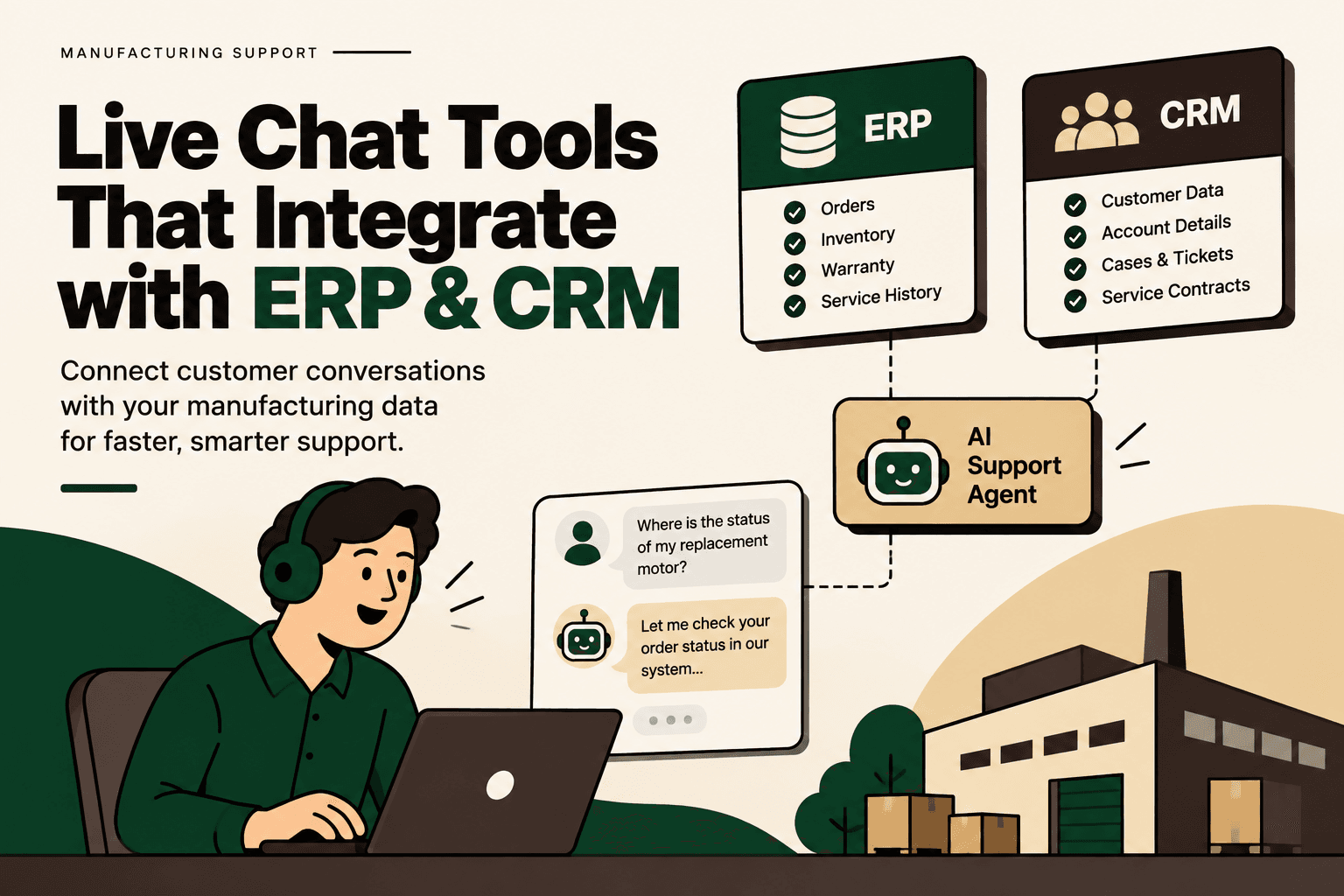
For manufacturing organizations, the relevant architecture is often live chat → customer identification → CRM → ERP or operational system → service workflow → human escalation. The chat platform becomes the conversational layer, while the ERP, CRM, warranty, logistics and service systems remain the systems of record.
This guide compares the main platforms identified in the supplied research and explains where each fits, what integration questions to ask, and how to design an ERP-connected manufacturing support workflow.
Which live chat tools integrate with ERP systems and major CRMs for manufacturing?
The main platforms identified in the research are Zendesk, Intercom, Freshdesk/Freshchat, Salesforce Service Cloud with Agentforce, and Microsoft Dynamics 365 Customer Service. They differ in where they place the center of gravity: traditional ticketing, AI-assisted conversations, integrated support suites, enterprise CRM, or the Microsoft business application ecosystem.
| Tool | CRM and support capability | ERP and enterprise integration path |
|---|---|---|
| Zendesk | Live support, ticketing and Salesforce integration with customer and ticket context | APIs, marketplace applications and integration layers for ERP data |
| Intercom | Conversational support, AI-assisted service and Salesforce integration | Business-system integrations, APIs and data connectors |
| Freshdesk / Freshchat | Chat, ticketing and connections with Freshsales and Salesforce | Marketplace applications, APIs and custom integration paths |
| Salesforce Service Cloud / Agentforce | Native CRM, chat, messaging, case management and AI-assisted service | MuleSoft and integration capabilities for SAP and other enterprise systems |
| Dynamics 365 Customer Service | Native Dynamics customer service, live chat, case management and AI capabilities | Power Platform, Microsoft ecosystem integrations and extensibility |
The important distinction is that CRM integration and ERP integration are not the same thing. A platform may have a native Salesforce connector while requiring an API, middleware platform or custom integration to retrieve information from SAP, Oracle, SYSPRO, Epicor or another ERP.
Why manufacturing support needs more than a live chat widget
A conventional live chat workflow might look like this: a customer opens a website chat, an agent reads the question, searches for the account, opens another system, checks an order or service record, and then replies.
That process becomes difficult when support volume grows because the answer is distributed across multiple systems. The conversation itself may exist in the helpdesk, customer ownership may exist in the CRM, order information may exist in the ERP, warranty data may exist elsewhere, and shipment information may come from a logistics platform.
The operational objective is therefore not simply to make chat faster. It is to reduce unnecessary system switching while preserving access controls, data accuracy and human judgment.
A useful manufacturing support workflow is:
- Identify the customer and account.
- Retrieve relevant CRM information.
- Retrieve the specific order, product, serial number or service record.
- Apply business rules such as warranty, entitlement or escalation requirements.
- Answer the customer using verified operational data.
- Create or update a support case when required.
- Escalate to a technician or specialist when the issue exceeds the approved automation boundary.
- Record the interaction so future agents have the necessary context.
This is the difference between a chat tool with CRM integration and an AI-enabled manufacturing support layer.
1. Zendesk for manufacturing support
Zendesk is a natural fit when the primary requirement is structured customer support, ticketing, escalation and service history, with CRM information available alongside the support workflow.
Zendesk provides a Salesforce integration that can expose customer information inside Zendesk and make Zendesk ticket information available within Salesforce. Its documentation describes synchronization for accounts, contacts and tickets, along with the ability to view, create and edit support tickets from Salesforce.
Zendesk documentation on connecting Salesforce to Zendesk
For manufacturing, that can support a workflow such as:
Customer → Zendesk chat → identify account → retrieve CRM context → retrieve ERP or service information → create ticket → assign support team → escalate technician → update customer.
Zendesk also documents ticket synchronization from Zendesk into Salesforce cases. Required fields can be mapped, triggers can be configured, and organizations and requesters can be matched between systems.
Zendesk documentation on ticket synchronization with Salesforce
Where Zendesk fits: manufacturers that want a dedicated support and ticketing layer while keeping CRM and ERP systems as operational sources of truth.
Important limitation: connecting Zendesk to Salesforce does not automatically mean Zendesk has native access to every ERP object. If the support agent needs serial numbers, inventory, warranty status, sales orders or production information from an ERP, an additional integration layer may be necessary.
Zendesk Marketplace and integrations
2. Intercom for AI-powered manufacturing support
Intercom is more conversational in its orientation and becomes particularly relevant when the goal is to combine live chat with AI-assisted customer support.
Intercom provides a Salesforce integration that allows support teams to view Salesforce information alongside conversations. Its current documentation describes access to account, contact and case information, creation of Salesforce cases from conversations, and workflow-driven case creation.
Intercom Salesforce app documentation
Intercom also supports data synchronization and mapping between Salesforce and Intercom records. This can reduce the need for an agent to leave the conversation simply to understand who the customer is or what account they belong to.
Intercom Salesforce integration documentation
For manufacturing, the more interesting architecture is conversational rather than purely ticket-driven.
Illustrative scenario: A customer asks, “Where is the replacement motor for our machine?” The support system identifies the customer and account, retrieves the relevant service or order record, checks shipment information through an approved integration, and returns the available status. If the required information is missing or the request falls outside the approved workflow, the conversation is routed to a human.
The research also identified Intercom's broad integration ecosystem and data connectors as relevant when connecting conversational support to external business systems. That makes the platform useful when the support architecture extends beyond a CRM into operational applications.
Where Intercom fits: organizations prioritizing conversational support, AI-assisted service and customer self-service while connecting chat to CRM and operational data.
3. Freshdesk and Freshchat for manufacturing support
Freshworks separates conversational engagement, support and CRM into connected products. The research identified Freshchat for conversational support, Freshdesk for ticketing and Freshsales for CRM.
Freshdesk documentation describes connections between chat and CRM accounts, including workflows that connect customer conversations with support records. Freshworks also provides a Salesforce connector for Freshdesk.
Freshdesk chat and CRM integration documentation
Freshdesk Salesforce Connector documentation
For a manufacturer, the resulting workflow could cover customer-account lookup, support ticket creation, warranty requests, technical escalation and CRM visibility.
- Customer starts a conversation.
- Customer or account is identified.
- Relevant CRM information is displayed.
- Conversation becomes a support ticket when appropriate.
- Operational data is retrieved from ERP or another connected system.
- Warranty or service rules are checked.
- Technical issues are escalated to the correct team.
Where Freshdesk/Freshchat fits: manufacturers that want a connected support stack combining chat, helpdesk and CRM functions without necessarily making the CRM itself the entire service architecture.
4. Salesforce Service Cloud and Agentforce
Salesforce takes a different approach because customer service, CRM and digital engagement can exist within the same broader platform.
Salesforce's digital engagement capabilities include web and in-app chat, messaging channels, AI-assisted support and omnichannel routing. Its service platform is designed to bring customer interactions and service cases into a shared CRM environment.
Salesforce Digital Customer Engagement and Live Chat
For manufacturing organizations, the integration architecture becomes especially relevant when Salesforce is already part of the enterprise stack. Salesforce documents Manufacturing Cloud integrations through MuleSoft, including prebuilt integration applications for customer, product and sales-order synchronization between Salesforce and SAP.
Salesforce MuleSoft Direct Integrations for Manufacturing Cloud
This means an enterprise support architecture can look like:
Website or messaging channel → Salesforce Service Cloud / Agentforce → CRM and customer context → MuleSoft → SAP or other operational systems → service workflow.
Salesforce also explicitly describes integration options for external systems, including MuleSoft and integration partners where direct integration is not available.
Salesforce Digital Channels integration documentation
Where Salesforce fits: manufacturers that already operate a Salesforce-centered customer and service architecture and need chat, case management, CRM context and enterprise integration in a connected environment.
5. Microsoft Dynamics 365 Customer Service
Dynamics 365 Customer Service is another important option when the organization already operates within the Microsoft business application ecosystem.
Microsoft documents first-party chat capabilities for Dynamics 365 Customer Service. The platform supports live chat, case management, knowledge management, routing and AI-assisted customer service capabilities.
Microsoft Learn: Dynamics 365 Customer Service chat
Dynamics 365 Contact Center also supports live chat and provides contextual customer identification, routing and case creation capabilities.
Microsoft Learn: Dynamics 365 Contact Center
For organizations using Microsoft Power Platform, Power Automate can extend Dynamics 365 Customer Service workflows into other applications and services.
Microsoft Learn: Power Automate integration
Where Dynamics 365 fits: manufacturers that already rely heavily on Microsoft applications, Dynamics 365, Power Platform and related enterprise services.
Live chat versus an integrated manufacturing support layer
The biggest mistake in evaluating these platforms is comparing chat features alone. A manufacturing support team does not primarily need another place to type messages. It needs a controlled way to access operational context.
| Requirement | Basic live chat approach | Integrated support architecture |
|---|---|---|
| Customer identification | Email or manual lookup | CRM-linked customer and account context |
| Order questions | Agent searches ERP manually | Approved ERP data retrieval |
| Warranty questions | Agent checks policy and records manually | Warranty rules and records exposed through workflow |
| Ticket creation | Agent creates ticket after conversation | Rules or AI can create or update approved cases |
| Technical escalation | Manual assignment | Routing based on issue, account, product or skill |
| AI support | Answer generation without operational context | AI grounded in approved knowledge and business data |
| Human oversight | Manual intervention after uncertainty | Defined escalation and approval thresholds |
What ERP data should a manufacturing live chat system access?
The answer depends on the use case, but a useful starting point is to identify the minimum data required to resolve common support requests.
- Customer and account: account ID, contacts, account owner, service tier and relevant commercial context.
- Sales order: order number, order status, promised date, quantities and relevant line items.
- Product: SKU, model, product family and applicable documentation.
- Serial number: serialized equipment and installed-product information where applicable.
- Inventory: available stock or replenishment status when relevant to the customer's request.
- Shipment: carrier, tracking status and expected delivery information.
- Warranty: warranty status, entitlement and expiration information.
- RMA or return: return authorization, status and related product information.
- Service contract: entitlement, coverage and service-level information.
- Service history: previous cases, technician activity and documented resolutions.
- Production or order status: only where the business permits customer-facing access to that information.
The goal should not be to expose the entire ERP to an AI agent. It should be to expose the smallest set of approved records and fields needed for a defined support workflow.
How to choose between the platforms
Instead of asking which tool is universally best, evaluate the architecture around your existing systems.
If your priority is dedicated support and ticketing
Zendesk and Freshdesk are relevant when support operations, ticket management, escalation and service workflows are the center of the requirement. Both can connect to CRM data, while ERP connectivity can be built through APIs, marketplace applications or an integration layer.
If your priority is AI-first conversational support
Intercom is relevant when conversations, customer context and AI-assisted service are central to the experience. Its Salesforce integration can provide customer and case context within the conversation, while broader integrations and data connectors can extend the architecture.
If your organization is Salesforce-centric
Salesforce Service Cloud and Agentforce provide a native route for chat, service cases, CRM context and AI-assisted support. Manufacturing organizations using SAP can also consider the documented Salesforce and MuleSoft integration path.
If your organization is Microsoft-centric
Dynamics 365 Customer Service provides first-party chat and customer service capabilities within the Microsoft ecosystem. Power Platform can extend workflows into other systems.
The integration layer matters more than the chat vendor
A manufacturing organization should not assume that a missing native ERP connector makes a platform unusable. In many enterprise architectures, the integration layer is what makes the conversational experience possible.
A typical pattern is:
Customer → Live Chat → AI or Support Agent → Integration Layer → CRM / ERP / WMS / Shipping / Warranty → Approved Response or Human Escalation
The integration layer can expose specific functions rather than unrestricted database access. For example, instead of giving an AI agent direct access to an ERP database, the organization can expose controlled operations such as getOrderStatus, getWarrantyStatus, getShipmentStatus or createSupportCase.
This approach makes permissions, validation, logging and monitoring easier to manage.
Salesforce's documented Manufacturing Cloud and MuleSoft architecture is one example of this broader integration-layer model, with integration applications connecting customer, product and sales-order information to SAP.
Salesforce MuleSoft Direct for Manufacturing Cloud
What should AI handle, and what should remain human?
AI should not automatically receive permission to perform every action that a support agent can perform.
A practical manufacturing support architecture separates work into four categories:
| Decision type | Recommended handling | Example |
|---|---|---|
| Deterministic | Rules and automation | Look up shipment status for a known order |
| Contextual but low risk | AI with approved data | Explain an order status using verified ERP information |
| High-impact decision | AI prepares, human approves | Approve a warranty exception or commercial credit |
| Safety-critical or ambiguous | Human-only | Technical diagnosis involving safety or uncertain equipment conditions |
This separation matters because manufacturing support can involve equipment, contractual obligations, warranty exposure, production schedules and customer commitments. A fluent AI response is not evidence that the underlying decision is correct.
How to implement ERP-connected live chat for manufacturing
The implementation should start with a workflow rather than a software license.
- Map the workflow. Document the trigger, customer input, systems consulted, decisions, actions, exceptions, human handoffs and final output.
- Establish a baseline. Measure ticket volume, response time, manual handling time, error rate, escalation rate and other relevant operational metrics.
- Identify bottlenecks. Determine whether the problem is information retrieval, ticket routing, repetitive communication, ERP lookup, warranty validation or another step.
- Classify each step. Decide whether it should be deterministic automation, AI-assisted, human approval or human-only.
- Connect the required systems. Use APIs, webhooks and an orchestration layer where appropriate rather than giving the chat platform unrestricted access to enterprise databases.
- Add guardrails. Define permissions, validation rules, approval thresholds, fallback behavior, retry handling, logging and monitoring.
- Pilot one workflow. Start with a high-volume, lower-risk use case such as order-status questions or basic case creation.
- Measure the workflow. Track response time, ticket deflection, processing time, error reduction, customer satisfaction, operational cost and escalation rates.
- Scale gradually. Add warranty, returns, service history, technical documentation and other workflows only after the first workflow is reliable.
This implementation sequence follows a practical automation model: map → baseline → prioritize → classify → connect → guardrail → pilot → measure → scale.
How to prioritize manufacturing support automations
Not every support process deserves an AI agent. A useful practical prioritization model is:
volume × frequency × manual effort × error cost × revenue impact ÷ implementation complexity
This is a practical framework, not an industry-standard formula.
A high-volume workflow that requires repetitive ERP lookups and has clear rules may be an excellent automation candidate. A low-volume workflow involving complex engineering judgment may not justify the same level of automation.
Example: Order-status questions may be relatively straightforward to automate if the order identifier can be reliably matched and the ERP provides a clear status field. A question such as whether a machine failure should be covered under a complex warranty clause may require human review even if AI can gather the relevant records.
Security and data governance are part of the support architecture
ERP-connected support introduces a different risk profile from a standalone chat widget. The system may have access to customer records, orders, pricing, warranty information, service history and internal operational data.
At minimum, the architecture should define:
- Which systems the support layer can access.
- Which fields can be retrieved.
- Which actions the AI can execute.
- Which actions require human approval.
- How customer identity is verified.
- How permissions are inherited or enforced.
- How API calls and AI actions are logged.
- How failed integrations are handled.
- How stale or conflicting data is identified.
- How sensitive information is prevented from appearing in customer-facing responses.
The objective is not maximum system access. It is minimum necessary access for a clearly defined business workflow.
What Five Anchor could implement around this architecture
Five Anchor POV: The important infrastructure is not the chat window itself. It is the connection between the conversational layer and the systems that actually contain the operational truth.
Five Anchor is positioned as AI Infrastructure for D2C & E-Commerce, with services spanning commerce infrastructure, AI-powered customer operations and operational intelligence. For manufacturers that also operate ecommerce or direct customer channels, the same architecture can extend across ERP, CRM, order processing, customer support and fulfillment.
For example, a Five Anchor implementation could start by mapping a support workflow, identifying which ERP and CRM records are required, exposing controlled API functions, connecting the conversational layer, adding AI classification and response generation, and defining human escalation for exceptions.
The relevant service areas are ERP integrations, custom AI workflows, AI chat operations, customer self-service and ticket automation. The objective is not to replace the manufacturing systems already in place. It is to create a controlled operational layer that lets customer conversations interact with those systems.
A practical reference architecture
For a manufacturer evaluating live chat, CRM and ERP integration, the following architecture is a useful starting point:
Customer
↓
Website / WhatsApp / Live Chat
↓
AI Support Agent or Human Support Platform
↓
CRM: account, contact, case and service context
↓
Integration Layer: APIs, webhooks and orchestration
↓
ERP: orders, products, inventory and financial context
↓
WMS / Shipping / Warranty / Service Systems
↓
Human escalation where required
The architecture can be implemented with different products depending on the existing technology estate. Zendesk, Intercom, Freshdesk, Salesforce and Dynamics 365 can each occupy different positions in the conversational and service layer. The integration layer determines how reliably operational data reaches that layer.
Questions to ask vendors before buying
A manufacturing support evaluation should go beyond asking whether a vendor supports live chat.
- Can the platform identify a customer against our CRM account?
- Can it retrieve order information from our ERP?
- Can it work with serial numbers and warranty records?
- Can it create or update support cases automatically?
- Can we expose only approved ERP fields rather than the entire database?
- Does the integration support APIs and webhooks?
- Can we introduce an integration layer such as MuleSoft, Power Automate or a custom API?
- Can conversations be routed based on product, issue type, customer tier or technician skill?
- Can AI responses be grounded in approved company knowledge?
- Can high-impact actions require human approval?
- How are failed API calls and stale data handled?
- Can the system log AI decisions and integration actions?
- Can we test the workflow in a sandbox before production?
- Which data is synchronized, and how frequently?
- What happens when the ERP or CRM is unavailable?
Final takeaway
The right live chat platform for manufacturing is determined less by the chat interface and more by how well the platform fits the company's operational architecture.
Zendesk is relevant when structured support, ticketing and CRM context are central. Intercom is relevant when conversational and AI-assisted support are central. Freshdesk and Freshchat provide a connected chat, helpdesk and CRM approach. Salesforce Service Cloud and Agentforce are particularly relevant when Salesforce is already the enterprise customer-service platform and manufacturing systems need to connect through an integration layer. Dynamics 365 Customer Service is relevant for organizations centered on Microsoft's business application ecosystem.
The deeper decision is architectural: what customer data, ERP data, service history and business rules should be available to the support layer, which actions can be automated, and where must a human remain in control?
When those questions are answered first, the live chat platform becomes one component of a larger manufacturing support system rather than another isolated software tool.
Key Takeaways
- •Manufacturing live chat should connect conversations to CRM, ERP, warranty, shipment and service context rather than operate as an isolated chat widget.
- •Zendesk, Intercom, Freshdesk/Freshchat, Salesforce Service Cloud with Agentforce, and Dynamics 365 Customer Service address different parts of the manufacturing support architecture.
- •CRM integration does not automatically mean native ERP integration; SAP, Oracle, SYSPRO, Epicor and other ERP environments may require APIs or an integration layer.
- •AI should retrieve and explain approved operational data, while high-impact, safety-sensitive or ambiguous decisions should remain subject to human approval.
- •A practical implementation sequence is map, baseline, prioritize, classify, connect, guardrail, pilot, measure and scale.
- •The most important vendor questions concern data access, permissions, workflow actions, API capabilities, escalation, monitoring and failure handling.
Live Chat Platforms for Manufacturing Support
| Tool | CRM / Support Capability | ERP / Enterprise Integration Path |
|---|---|---|
| Inventory Sync Frequency | 15–30 min batch polling (high oversell risk) | Sub-second atomic locking (<450ms) |
| Concurrent Drop Resilience | Fails under concurrency; causes negative stock balance | Redis atomic reservation queue guarantees exact counts |
| Error Handling & Retries | Silent failure; manual CSV audit needed | Dead-letter queues with automated exponential retry |
| Fulfillment Routing Speed | 2–4 hours delayed batch export to 3PL warehouse |