Direct Store Delivery (DSD) operations sit in an awkward middle ground between automation and real-world exceptions. Routine orders can often be processed, routed and dispatched systematically. But customers change quantities, inventory becomes unavailable, prices require approval, deliveries are held, returns appear at the last minute and drivers encounter situations that were not present when the route was planned.
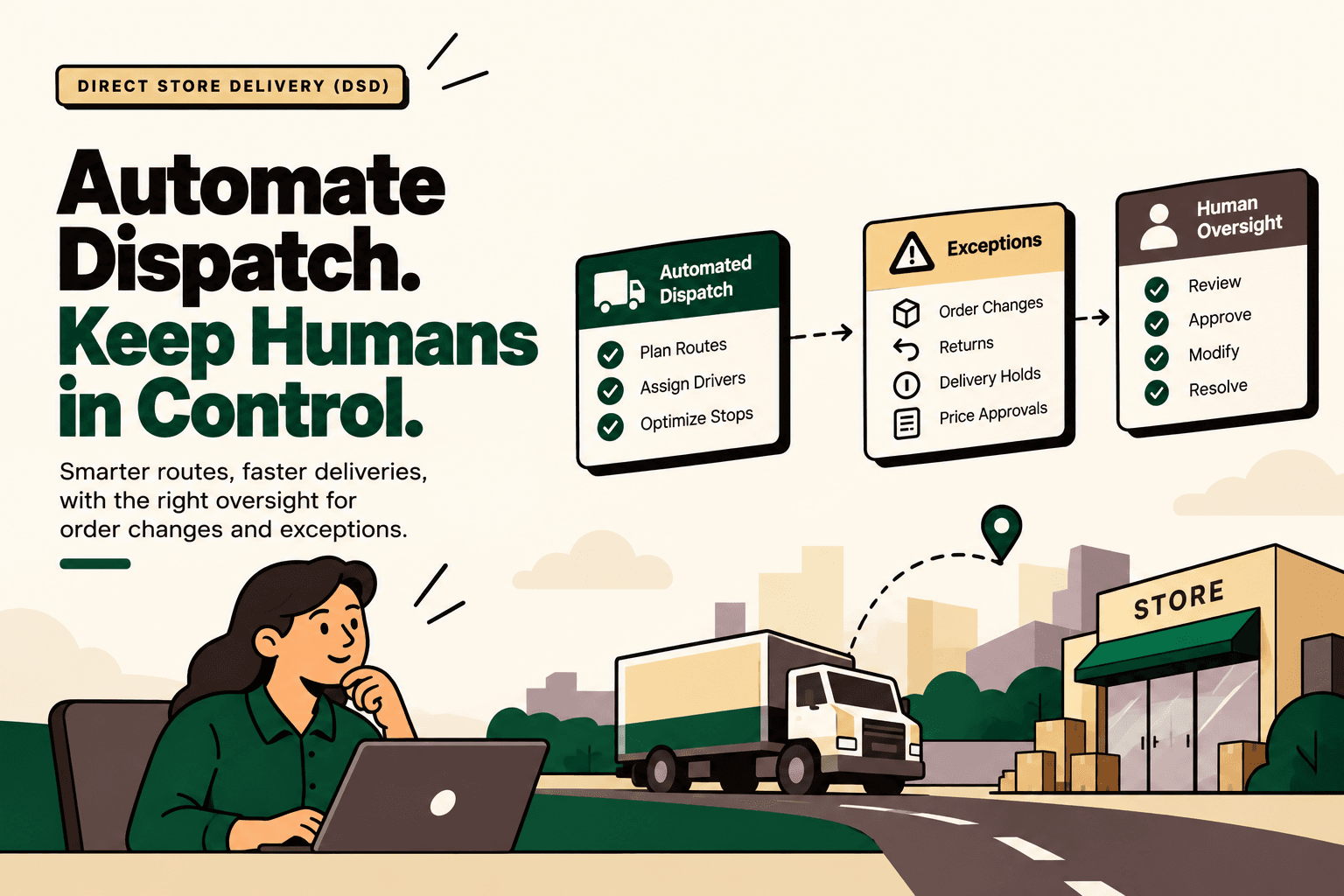
That makes fully autonomous dispatch an imperfect operating model for many DSD businesses. The more practical architecture is automate the predictable workflow, identify exceptions early, and keep a human decision point where the business rules or consequences become material.
The supplied research identifies several DSD platforms that support this model, including Salesforce Consumer Goods Cloud DSD, Seamdeck, IDS Cartage & DSD, Orderwerks, SimplyDepo and Oracle Retail DSD. :contentReference[oaicite:0]{index=0}
This guide compares those approaches and explains how to design a dispatch workflow where software handles routine execution while people retain control over order changes and exceptions.
What are direct store delivery tools?
Direct Store Delivery software manages the operational workflow of delivering products directly to retail stores or other customer locations rather than routing every delivery through a conventional distribution model.
A DSD platform may cover some combination of ordering, inventory, route planning, dispatch, mobile delivery execution, proof of delivery, returns, invoicing and route accounting. More advanced systems also provide approval workflows and exception handling.
In a conventional workflow, a dispatcher or operations employee may manually review orders, build routes, communicate with drivers, process changes and resolve discrepancies. DSD software moves many of those repeatable activities into a connected workflow.
The important distinction is that automation does not have to mean removing the operator. A well-designed system can automatically process normal orders while stopping unusual transactions before they create an operational or commercial problem.
Which DSD tools automate dispatch while keeping human oversight?
The research points to six relevant platforms, with different approaches to dispatch automation and human control.
| Tool | Dispatch and DSD automation | Human oversight and exceptions |
|---|---|---|
| Salesforce Consumer Goods Cloud DSD | Tour and route planning, DSD order processing, delivery execution, van sales, returns and inventory | Approval processes can hold DSD orders before they reach Ready status |
| Seamdeck DSD | Ordering, production, pick/pack, routing, delivery and invoicing | Designed around DSD edge cases, approvals, order cutoffs and exceptions |
| IDS Cartage & DSD | Dispatch board, route execution and driver workflows | Supports holds, exchanges, returns and tracked exceptions with operational control |
| Orderwerks | Route accounting, mobile ordering, delivery, proof of delivery and inventory | Operational controls and offline workflows support field teams |
| SimplyDepo | Route planning, mobile ordering, delivery, payment and proof of delivery | Back-office visibility provides oversight of field activity and delivery outcomes |
| Oracle Retail DSD | Direct store delivery and discrepancy processing | Discrepancy checks can be configured and authorized users can override them |
The key difference is not simply how much each platform automates. It is where each platform allows the workflow to pause, escalate or require approval.
1. Salesforce Consumer Goods Cloud DSD
Salesforce Consumer Goods Cloud DSD combines DSD order processing with tour and route planning, delivery execution, returns and inventory workflows.
One particularly relevant capability for a human-in-the-loop model is the documented DSD approval process. DSD orders can pass through an approval process before reaching Ready status. That creates an explicit control point between order processing and dispatch.
Salesforce DSD and Van Sales documentation
Salesforce DSD approval process documentation
A simplified workflow is:
Order → validation → automated DSD processing → approval or exception → human review → Ready → dispatch.
This is useful when certain changes should not immediately flow into delivery execution. An organization can define the circumstances under which a transaction requires additional review instead of treating every order as equally safe to dispatch.
Where Salesforce DSD fits
Salesforce Consumer Goods Cloud DSD is particularly relevant when Salesforce is already part of the organization's customer, field-sales or consumer-goods technology environment and the business wants DSD execution connected to that ecosystem.
Its documented route and tour concepts also make it relevant for organizations where route planning and delivery execution are central parts of the operating model.
Salesforce DSD routes and tours
2. Seamdeck DSD
Seamdeck takes a broader end-to-end view of DSD operations. The research describes a workflow spanning ordering, production, pick and pack, routing, delivery and invoicing.
Its positioning is especially relevant to businesses looking for DSD software that can account for operational edge cases rather than only calculate delivery routes. The supplied research identifies examples such as stale returns or credits, customer-specific pricing, order cutoffs and other exceptions.
The useful architectural idea is that normal order execution can continue automatically while unusual conditions are surfaced for human review.
Normal order → automated workflow → exception detected → human decision → approved change → dispatch continues.
That is different from building an AI system that attempts to make every operational decision independently. The software handles repeatable process execution, while the operator remains responsible for cases that fall outside the normal pattern.
Where Seamdeck fits
Seamdeck is relevant for manufacturers or distributors operating their own DSD workflows and looking for broader orchestration across ordering, fulfillment and delivery rather than a route planner alone.
3. IDS Cartage & DSD
IDS approaches DSD from a dispatch and route-execution perspective. The research identifies a dispatch board, driver application, offline operation, holds, exchanges and returns as parts of the workflow.
This matters because exceptions do not disappear when a route is automated. A store may reject part of a delivery. A product may need to be exchanged. A delivery may need to be placed on hold. A return may need to be recorded against the transaction.
A DSD system therefore needs to give the operations team visibility into those events rather than treating them as failures of automation.
The research specifically describes IDS as maintaining human operational control. That makes it relevant to organizations looking for a dispatch workflow where automation assists the team without attempting to eliminate human involvement.
4. Orderwerks
Orderwerks combines route accounting, delivery management and mobile ordering. The research identifies delivery and proof-of-delivery workflows alongside inventory and offline operational capabilities.
Orderwerks DSD route accounting and delivery
The distinction here is important. A DSD platform does not have to use AI to create useful automation. Route accounting, mobile ordering, delivery capture, inventory updates and proof of delivery can already remove substantial manual work when those processes are connected.
For distributors, this can create a workflow where field activity is recorded at the point of delivery while back-office teams retain visibility into what happened on the route.
5. SimplyDepo
SimplyDepo is another DSD-oriented platform identified in the research. Its capabilities include route planning, mobile ordering, delivery, payment and proof of delivery.
SimplyDepo direct store delivery software
The operational value comes from connecting field execution to back-office visibility. Rather than relying on separate processes for taking an order, planning a route, collecting payment and recording delivery outcomes, these activities can be handled within a connected workflow.
For wholesale distributors and CPG organizations, this can be useful when the primary requirement is consistent field execution with visibility into what happened at each stop.
6. Oracle Retail DSD
Oracle Retail DSD takes an enterprise retail approach to direct store delivery and discrepancy processing.
Oracle Retail Direct Store Delivery documentation
The research identifies discrepancy checking and authorized-user overrides as important parts of the Oracle approach. This is a useful pattern for any organization designing human oversight into automated delivery workflows.
Instead of treating a discrepancy as something the system should automatically resolve, the workflow can identify the discrepancy, apply configured checks and allow an authorized person to override or resolve it when appropriate.
Why human oversight matters in DSD
Direct store delivery contains more exceptions than a simple warehouse-to-customer shipment because the transaction can continue changing close to the point of dispatch or delivery.
Consider a retailer that requests a quantity change after an order has already been planned. The system may need to determine whether inventory is available, whether the vehicle can accommodate the change, whether the price is still valid, whether the delivery window changes and whether the revised order requires approval.
Another store may refuse part of a delivery. The operator then has to determine whether the transaction becomes a return, exchange, credit, discrepancy or another type of adjustment.
These are not necessarily problems for automation. They are problems for unbounded automation.
A better architecture gives software authority over predictable steps and gives humans authority over defined exception classes.
What should automated DSD dispatch handle?
Automation is most useful where the workflow is repetitive, data-driven and governed by clear rules.
- Validate that the customer and delivery location are recognized.
- Check basic order completeness.
- Check available inventory.
- Apply established delivery-window rules.
- Generate or update dispatch records.
- Assign eligible routes.
- Assign vehicles or drivers according to configured constraints.
- Generate driver tasks.
- Capture proof of delivery.
- Update order and inventory status after successful delivery.
- Notify customers or internal teams of routine status changes.
The exact capabilities vary by platform, so each workflow should be validated against the vendor's documentation and the organization's ERP, inventory and delivery systems.
What should remain under human control?
Human oversight becomes more important when a transaction involves financial exposure, customer commitments, policy exceptions, operational ambiguity or a material change to an already planned route.
Typical human-review candidates include:
- Late order changes after a dispatch cutoff.
- Large quantity changes.
- Customer-specific pricing exceptions.
- Unavailable inventory requiring substitution or reprioritization.
- Returns and exchanges outside the normal workflow.
- Delivery holds.
- Disputed quantities.
- Unusual credits.
- Orders requiring special approval.
- Conflicting customer or inventory information.
- Changes that could affect route capacity or delivery commitments.
The point is not that humans should manually process all of these events. A better system can automatically detect the condition, assemble the relevant information and place the transaction into an approval queue.
The human-in-the-loop DSD workflow
A practical architecture can be represented as five stages.
- Receive the order. Capture the customer, products, quantities, delivery location and required delivery information.
- Validate the order. Check inventory, customer status, delivery rules, pricing and other deterministic conditions.
- Automate dispatch. If the transaction meets the defined rules, generate the dispatch and route it through the normal execution workflow.
- Detect exceptions. If a condition falls outside the defined rules, pause the affected transaction and create an exception for review.
- Apply the human decision. The authorized operator approves, modifies or rejects the proposed action, after which the workflow continues.
The key is that the exception queue is not an afterthought. It is part of the primary process design.
Order changes need their own workflow
One of the most important design decisions is what happens when an order changes after it has entered dispatch planning.
Without explicit rules, every order change can become a manual phone call or message between sales, warehouse, dispatch and the driver.
A better model establishes a cutoff and decision tree.
| Order change | Automated handling | Human control point |
|---|---|---|
| Small quantity change before cutoff | Revalidate inventory and update order | Only if configured rules fail |
| Quantity change after cutoff | Flag for review | Dispatch or operations approval |
| Price exception | Validate against pricing rules | Commercial approval when outside policy |
| Unavailable inventory | Detect shortage and present available options | Approve substitution, partial fulfillment or reschedule |
| Return or exchange | Create the appropriate workflow record | Review when policy or value thresholds require it |
| Delivery hold | Pause affected dispatch activity | Authorized user determines release or reschedule |
This turns order changes from an informal exception into a governed operational workflow.
Exception handling is where AI can add another layer
AI can be useful around DSD exceptions, but the objective should be to improve decision support rather than give an AI agent unrestricted control of dispatch.
For example, an AI layer could read an incoming change request, identify the order, retrieve relevant inventory and customer information, classify the exception, summarize the operational impact and recommend the next workflow step.
The human operator can then approve or modify the recommendation.
A useful architecture is:
Order or change request → AI classification → ERP/DSD data retrieval → business-rule validation → exception summary → human approval → system action.
This approach keeps the AI focused on interpretation, information retrieval and workflow preparation while retaining a clear authorization boundary around material operational actions.
How to choose a DSD tool
The right evaluation criteria depend on the existing operating environment. A company already using Salesforce may evaluate Salesforce Consumer Goods Cloud DSD differently from a distributor looking primarily for route accounting and mobile delivery.
1. Start with the dispatch workflow
Document what happens from order receipt through delivery completion. Include sales order creation, inventory checks, route planning, dispatch, driver execution, proof of delivery, returns and invoicing.
2. Map the exception paths
Do not document only the happy path. Identify late order changes, unavailable inventory, pricing exceptions, returns, exchanges, delivery holds and discrepancies.
3. Identify system dependencies
Determine which system owns the customer, order, inventory, pricing, route, payment, invoice and delivery records. Then identify which system should remain the source of truth for each object.
4. Define approval thresholds
Some changes can be automated. Others should require approval. The thresholds should be explicit rather than left to individual operator judgment.
5. Evaluate integration capabilities
Check APIs, ERP connectors, accounting integrations, webhooks, mobile capabilities and data synchronization before selecting a platform.
6. Test offline and field workflows
Drivers and field representatives may operate with unreliable connectivity. If offline capability matters, test the actual workflow rather than relying on a feature checklist.
7. Measure the exception queue
A successful automation project should not simply reduce manual work. It should also make exceptions easier to resolve. Track exception volume, time to resolution, approval time, dispatch delays and the reasons transactions enter the queue.
A practical DSD automation prioritization model
Not every DSD activity should be automated at the same time. A practical prioritization formula is:
volume × frequency × manual effort × error cost × revenue impact ÷ implementation complexity
This is a practical framework, not an industry-standard formula.
A high-volume process such as routine dispatch creation may be a logical starting point if the rules are clear. A complex pricing exception may benefit more from AI-assisted preparation and human approval than full automation.
This distinction helps prevent a common implementation mistake: automating the most technically interesting workflow instead of the workflow with the clearest operational value.
How Five Anchor could approach DSD automation
Five Anchor is positioned as AI Infrastructure for D2C & E-Commerce, with capabilities across commerce infrastructure, AI-powered customer operations and ecommerce intelligence.
For a DSD operation, the relevant problem is the connection between the order, ERP, inventory, dispatch and customer-service workflow. Five Anchor could approach that problem by mapping the existing process, identifying the systems of record, connecting the required ERP or commerce systems, defining exception rules and adding AI where it improves classification, information retrieval or operator decision support.
The implementation should not begin with an assumption that every dispatch action needs an AI agent. A more controlled approach is to automate deterministic dispatch tasks first, then introduce AI for exception classification, customer communication, order-change interpretation and operator assistance.
That creates a workflow in which routine dispatch moves automatically while people remain responsible for exceptions, approvals and material order changes.
Reference architecture for AI-assisted DSD
A practical architecture can look like this:
Customer / Sales Rep
↓
Order Capture
↓
ERP / OMS / DSD Platform
↓
Inventory + Customer + Pricing Validation
↓
Dispatch and Route Planning
↓
Exception Detection
From there, the workflow splits:
No exception → automated dispatch → driver execution → proof of delivery → system update.
Exception → AI-assisted classification and summary → human approval → approve, modify or reject → dispatch continues.
This separation creates a clear authority model. The automated path handles known conditions. The human path handles ambiguity and policy exceptions.
What to ask DSD software vendors
- Can the platform automatically create and assign dispatches?
- How does route planning interact with order changes?
- Can orders be held before dispatch?
- Can approval rules be configured?
- What happens when inventory is unavailable?
- How are returns and exchanges handled?
- Can pricing exceptions require approval?
- Can dispatchers override automated decisions?
- Is the override recorded for audit purposes?
- Can the system operate offline for drivers?
- How does proof of delivery update the order?
- Which ERP and accounting systems can it integrate with?
- Does the platform expose APIs or webhooks?
- Can an AI layer retrieve approved order and inventory data?
- Can AI recommendations require human approval before system actions are executed?
- How are failed integrations and conflicting data handled?
Final takeaway
The most useful DSD automation model is not necessarily the one that removes the most human involvement. It is the one that removes repetitive dispatch work while making exceptions more visible and easier to resolve.
Salesforce Consumer Goods Cloud DSD provides a documented approval model around DSD orders. Seamdeck focuses on the broader DSD lifecycle and edge cases. IDS Cartage & DSD emphasizes dispatch execution with human operational control. Orderwerks and SimplyDepo address route, delivery and field workflows, while Oracle Retail DSD provides discrepancy processing and authorized overrides.
The deeper implementation principle is consistent across these approaches: automate normal dispatch, detect exceptions, route exceptions to the right person, and continue the workflow after an authorized decision.
For organizations adding AI, the same principle becomes even more important. AI can classify requests, retrieve context, summarize exceptions and prepare recommended actions. It does not need unrestricted authority over every order change.
Five Anchor can apply this human-in-the-loop architecture across ERP integrations, order processing automation, AI workflows and customer operations, creating a controlled path from order capture to dispatch without turning every exception into a manual process.
Key Takeaways
- •DSD automation works best when predictable dispatch tasks are automated and exceptions are explicitly routed to humans.
- •Salesforce Consumer Goods Cloud DSD documents approval processes that can hold DSD orders before Ready status.
- •Seamdeck covers the DSD lifecycle from ordering through production, pick and pack, routing, delivery and invoicing and emphasizes DSD edge cases.
- •IDS Cartage & DSD provides dispatch and driver workflows with holds, exchanges, returns and operational control.
- •Orderwerks and SimplyDepo focus on route, delivery, mobile ordering and field execution workflows, while Oracle Retail DSD supports discrepancy processing and authorized overrides.
- •AI can classify exceptions, retrieve order context and prepare recommendations without receiving unrestricted authority to change or dispatch orders.
- •A strong implementation separates deterministic automation, AI-assisted decisions, human approvals and human-only exceptions.
Direct Store Delivery Tools and Human Oversight
| Tool | Dispatch / DSD Automation | Human Oversight / Exception Handling |
|---|---|---|
| Inventory Sync Frequency | 15–30 min batch polling (high oversell risk) | Sub-second atomic locking (<450ms) |
| Concurrent Drop Resilience | Fails under concurrency; causes negative stock balance | Redis atomic reservation queue guarantees exact counts |
| Error Handling & Retries | Silent failure; manual CSV audit needed | Dead-letter queues with automated exponential retry |
| Fulfillment Routing Speed | 2–4 hours delayed batch export to 3PL warehouse |