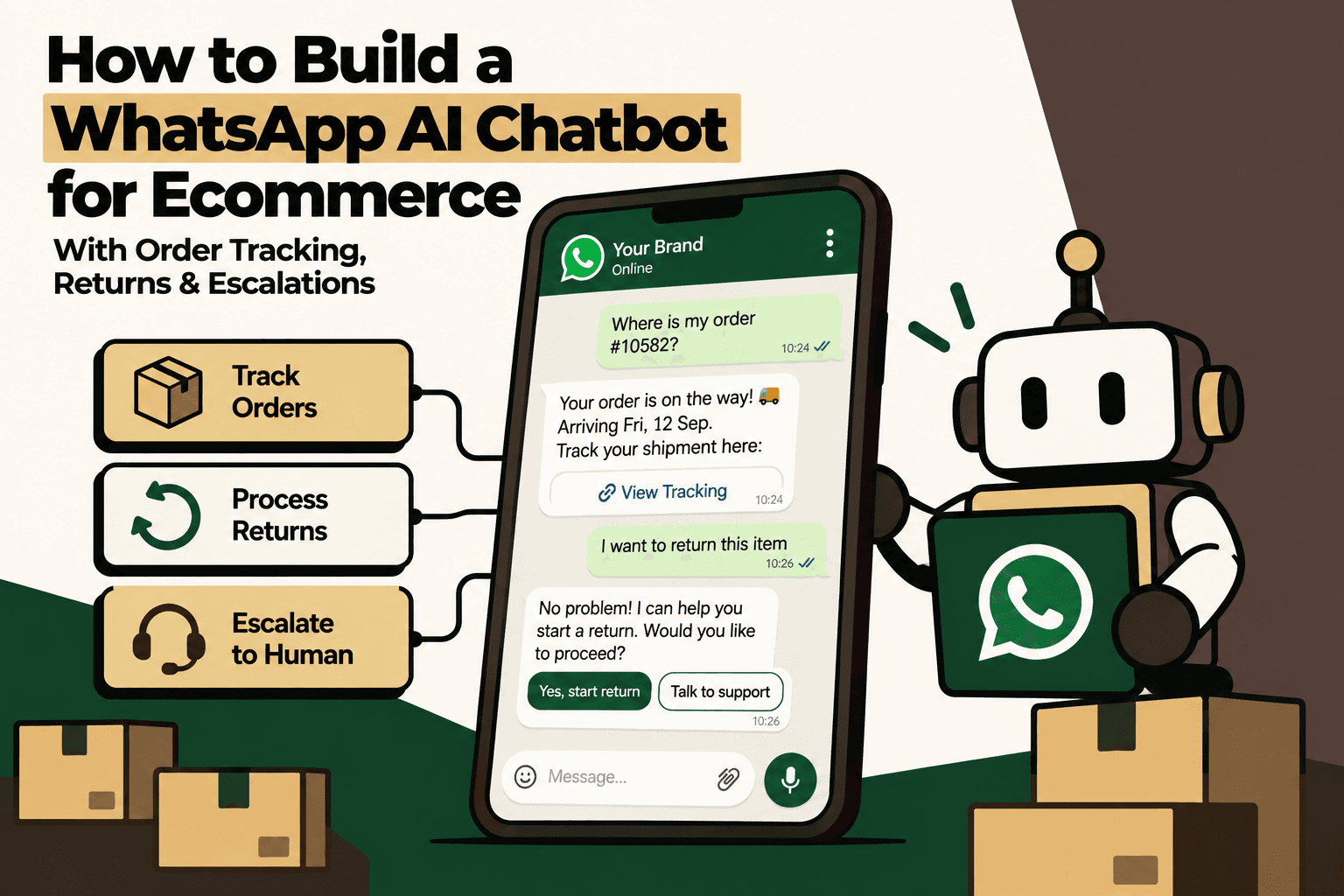
A WhatsApp AI chatbot for ecommerce should do more than answer frequently asked questions. The useful version connects WhatsApp → AI orchestration → ecommerce systems → order and fulfillment data → returns workflows → human support, so customers can resolve routine post-purchase issues without forcing an agent to manually connect several systems.
The distinction matters because order tracking, returns and refund questions are not primarily language problems. They are operational-data problems. A customer may ask a simple question such as, “Where is my order?” but answering it accurately can require customer identification, order lookup, fulfillment status, carrier information and delivery context.
The same pattern appears with returns. “I want to return this item” may require checking the order, identifying the product, verifying the return window, checking eligibility, collecting a reason, creating a return request and communicating the next step.
A production chatbot therefore needs three things working together: a conversational interface, an AI decision layer and reliable connections to the systems that own the underlying business data.
The short answer: How should an ecommerce WhatsApp AI chatbot be built?
Build the chatbot as an orchestration layer between WhatsApp and your ecommerce operation, not as a standalone LLM. WhatsApp should handle the conversation, the AI should understand intent and coordinate tools, and Shopify, ERP, OMS, WMS, shipping, returns and support systems should remain the sources of truth.
A practical architecture is:
- WhatsApp layer: receives and sends customer messages.
- Webhook and API layer: receives events and communicates with WhatsApp.
- AI orchestration layer: identifies intent, selects tools, manages conversation state and applies policies.
- Commerce integration layer: retrieves and updates approved information across ecommerce and operational systems.
- Workflow services: handle order tracking, returns, refunds, cancellations, delivery issues and support cases.
- Human escalation layer: transfers complex or sensitive cases with the relevant context.
- Monitoring and governance: tracks errors, actions, escalations, permissions and business outcomes.
The core principle is simple: AI should translate and orchestrate business information, not invent it.
Why a basic WhatsApp chatbot is not enough for ecommerce
A basic chatbot can answer questions from a knowledge base. That works for questions such as “What are your delivery options?” or “What is your return policy?”
Post-purchase support is different.
Customers ask questions about their specific transaction:
- Where is my order?
- Has my order shipped?
- When will it arrive?
- Can I cancel it?
- Can I return this item?
- Has my return been received?
- When will my refund arrive?
- My package says delivered but I did not receive it.
- I received the wrong item.
- The product arrived damaged.
These questions require live operational context.
A chatbot that only knows your FAQ content cannot reliably answer them. It needs access to the appropriate business systems through controlled tools.
This is why the architecture should not be WhatsApp → LLM → customer.
It should be:
WhatsApp → AI Orchestrator → Business Tools → Operational Systems → Verified Result → AI Response → WhatsApp
1. Define the chatbot's core ecommerce jobs
Before selecting an AI model or building the webhook, define the customer intents the chatbot is expected to resolve.
| Use case | What the workflow should do | Typical escalation |
|---|---|---|
| Order tracking | Identify order, retrieve fulfillment and shipment status, explain the current state | Carrier exception or unresolved delivery issue |
| Order status | Check payment, processing, fulfillment and dispatch state | System conflict or manual intervention |
| Returns | Check eligibility, collect reason and required information, create or guide the return | Policy exception or unusual case |
| Refunds | Retrieve refund state and explain the available status | Disputed or overdue refund |
| Cancellations | Check whether cancellation is permitted and initiate the supported workflow | Order already processed or policy exception |
| Damaged or incorrect item | Collect evidence and create a support case | Human investigation |
| Delivery problem | Interpret tracking state and initiate the relevant support path | Missing, damaged or disputed delivery |
| Human support | Transfer the conversation with customer and order context | Human owns the resolution |
Start with the highest-volume intents where the underlying data is structured and the desired outcome is clear. Do not begin by attempting to automate every possible customer interaction.
2. Use WhatsApp as the communication layer
The WhatsApp Business Platform provides the programmatic infrastructure required for this architecture, including APIs, webhooks, interactive messaging and message templates. The platform is designed to connect business messaging with other systems and supports automated customer-care flows. :contentReference[oaicite:0]{index=0}
At a conceptual level:
Customer → WhatsApp → WhatsApp Business Platform → Webhook → AI Orchestrator → Ecommerce Tools → Response
Your implementation needs a business-controlled WhatsApp setup, a backend endpoint for incoming events and a reliable mechanism for sending responses.
The important architectural decision is to keep WhatsApp separate from your business logic. Your order service should not depend on the WhatsApp interface, and your return workflow should not need to know whether the request originated in WhatsApp, web chat or another support channel.
This separation makes the chatbot easier to maintain and allows the same business tools to be reused across multiple customer channels.
3. Build the webhook layer first
The webhook is the entry point for customer conversations.
A typical flow is:
- WhatsApp delivers an incoming event.
- Your backend validates the request.
- The system identifies the customer and message.
- The message is normalized into an internal format.
- The conversation state is loaded.
- The AI orchestrator determines the intent.
- The required business tools are called.
- The result is checked against workflow rules.
- The AI creates the customer-facing response.
- The response is sent through WhatsApp.
The webhook layer should also account for operational realities such as duplicate events, retries, message identifiers, status updates, logging and failure handling.
Common failure: treating the webhook as a simple endpoint that forwards every message directly to an LLM.
Better approach: make the webhook an integration boundary. Validate, normalize, record and route the event before the AI layer processes it.
4. Add an AI conversation orchestrator
The AI orchestrator is the control layer between natural-language conversation and business systems.
Its responsibilities should include:
- Intent detection
- Conversation-state management
- Customer identification
- Authentication requirements
- Tool selection
- Policy checks
- Response generation
- Escalation detection
- Human handoff
- Action logging
For example, if a customer says, “Where is my order #10582?”, the AI should classify the intent as order tracking and request the relevant order information.
Conceptually:
Customer message → intent: order_tracking → tool: get_order → tool: get_fulfillment → tool: get_tracking → verified result → response
The LLM should not decide that an order is “in transit” based on language patterns. The operational system should provide that state.
5. Connect the chatbot to your ecommerce platform
The AI layer should not contain Shopify-specific logic throughout the application. Instead, create internal commerce tools or services that abstract the underlying platform.
Useful functions may include:
- get_customer
- get_orders
- get_order
- get_order_status
- get_fulfillment
- get_tracking
- check_cancellation_eligibility
- cancel_order
- check_return_eligibility
- create_return
- get_refund_status
- create_support_ticket
The exact functions depend on your systems and permissions. The important principle is that AI interacts with controlled business tools rather than unrestricted database access.
This also creates a cleaner architecture if order data is distributed across Shopify, ERP, OMS, WMS, returns platforms or logistics providers.
6. Build order tracking as a tool, not an AI answer
Order tracking is one of the clearest examples of why ecommerce AI needs operational integrations.
Suppose a customer writes:
“Where is my order #10582?”
The workflow should be:
- Extract the order reference.
- Verify that the customer is permitted to access the order.
- Retrieve the order.
- Retrieve fulfillment information.
- Retrieve available carrier or shipment information.
- Determine the current operational state.
- Translate that state into a concise customer response.
The result may be represented internally as:
Order found → fulfilled → shipped → carrier assigned → in transit → current estimated delivery information available.
The AI's job is to explain the verified state clearly. It should not invent an ETA, carrier event or delivery status that the connected systems do not provide.
Implementation implication: if your carrier information is unreliable or delayed, improving the AI prompt will not solve the problem. The integration and data quality need to be fixed first.
7. Design returns as a workflow
Returns are more complex than order tracking because they combine customer intent with policy and operational actions.
A production return flow can look like:
- Customer requests a return.
- Identify the order.
- Identify the item.
- Check whether the order qualifies.
- Check the return window.
- Check item-level eligibility.
- Ask for the reason.
- Collect required information or evidence.
- Create the return request if permitted.
- Provide return instructions.
- Track the return lifecycle.
- Communicate refund or exchange status.
The AI should not simply say “Your return is approved.” It should call the return workflow and report the actual outcome.
This distinction becomes critical when policies differ by product, category, order status, sale condition, location or return reason.
Rules should decide eligibility. AI can interpret the customer's language, collect information and guide the conversation. Human approval can remain in place for exceptions.
8. Use AI for intent, not policy invention
A customer may write:
“These shoes don't fit me and I need to send them back.”
The AI can interpret the intent as a return request and identify the likely product. But it should then call the return eligibility workflow.
The system may respond:
“I found the shoes from your order. Let me check whether they are eligible for return.”
Then the business system determines the result.
This architecture separates two responsibilities:
- AI: understands what the customer is asking.
- Business rules: determine what the company allows.
That separation reduces the risk of the model turning an ambiguous customer statement into an unauthorized business decision.
9. Add authentication before exposing sensitive information
Order numbers should not automatically be treated as sufficient proof that a person is authorized to access an order or initiate a sensitive action.
The authentication model should depend on the risk of the requested operation.
| Request | Potential verification level | Reason |
|---|---|---|
| General policy question | None or minimal | No customer-specific information required |
| Order tracking | Customer/order matching | Customer-specific information is being disclosed |
| Return request | Customer and order verification | Creates an operational action |
| Refund or account change | Stronger verification where required | Higher financial or account risk |
| High-value or unusual action | Verification plus human review | Greater consequence if incorrect |
WhatsApp supports authentication messaging with one-time passcodes, which can be part of an identity-verification workflow where appropriate. :contentReference[oaicite:1]{index=1}
The important point is not to add authentication everywhere. It is to match the friction level to the risk of the action.
10. Add escalation logic from the beginning
A production AI chatbot needs to know when to stop.
Escalation should not be treated as a failure of the AI. It is part of the workflow design.
Useful escalation triggers can include:
- The customer explicitly asks for a human.
- The customer repeats the same problem after an unsuccessful response.
- The system cannot retrieve required information.
- Two systems return conflicting information.
- The order is high value or otherwise high risk.
- The customer reports fraud or a payment dispute.
- The customer says a package was delivered but not received.
- The product arrived damaged or incorrect.
- The customer requests a policy exception.
- The requested action exceeds the AI's permissions.
- The customer is highly distressed or the complaint requires judgment.
The handoff should preserve context.
A human agent should receive something like:
Customer: Customer record
Order: Order reference
Issue: Package marked delivered but customer reports non-receipt
Carrier state: Delivered
AI actions: Order and tracking verified
Reason for escalation: Delivery dispute
Priority: High
The customer should not have to repeat the entire conversation.
11. Use interactive WhatsApp messages for predictable choices
Not every customer interaction needs to be open-ended.
Interactive messages can make common support flows easier to navigate. WhatsApp Business Platform supports interactive experiences such as reply buttons and other structured messaging capabilities. :contentReference[oaicite:2]{index=2}
For example:
How can I help?
- Track my order
- Return an item
- Check refund
- Talk to support
Structured options reduce ambiguity at the beginning of a workflow. Natural language can then take over when the customer needs to describe a specific problem.
This hybrid approach is usually better than forcing every interaction through either rigid menus or completely open-ended AI.
12. Expose controlled tools to the AI
The AI should interact with business systems through explicitly defined tools.
For example:
- get_order(order_id)
- get_tracking(order_id)
- check_return_eligibility(order_id, item_id)
- create_return(order_id, item_id, reason)
- get_refund_status(order_id)
- create_support_ticket(customer_id, issue)
A customer asking “What happened to my refund?” creates a controlled chain:
Customer message → refund intent → get_refund_status → structured result → AI explanation → WhatsApp response.
This is safer and more auditable than giving the model direct access to a database and asking it to interpret arbitrary tables.
13. Separate read actions from write actions
There is an important difference between an AI agent that can read operational information and one that can change operational state.
Reading order status may be relatively low risk when the customer is properly authenticated. Cancelling an order, creating a refund or changing an address can have greater consequences.
Use an action matrix:
| Action type | Recommended control |
|---|---|
| Read order status | Controlled tool and customer verification |
| Explain return policy | Approved knowledge source |
| Check return eligibility | Deterministic business rules |
| Create standard return | Tool permission plus policy validation |
| Cancel eligible order | Eligibility check plus explicit action confirmation |
| Large refund | Policy threshold and human approval |
| Fraud or payment dispute | Human-owned workflow |
The exact controls depend on the business. The principle is to design permissions deliberately rather than giving the chatbot broad access because the underlying APIs make it possible.
14. Connect the chatbot to the full ecommerce operation
Order support often crosses more than one platform.
A customer-facing chatbot may need information from:
- Shopify or another ecommerce platform
- ERP
- Order Management System
- Warehouse Management System
- Inventory system
- 3PL or shipping platform
- Carrier tracking
- Returns management
- CRM or helpdesk
That means the architecture should not assume Shopify is the complete source of truth.
A useful model is:
WhatsApp → AI Orchestrator → Integration Layer → Shopify / ERP / OMS / WMS / Logistics / Returns / Support
The integration layer can normalize customer, order, fulfillment, shipment and return information so the AI does not need to understand the internal structure of every system.
15. Use events to keep the chatbot current
A chatbot should not depend entirely on repeatedly polling every system whenever a customer asks a question.
Operational events can keep the support context current.
Useful event types include:
- order.created
- payment.confirmed
- order.fulfilled
- shipment.created
- shipment.in_transit
- shipment.delivered
- delivery.failed
- return.created
- return.received
- refund.created
- refund.completed
For example, when a shipment status changes, the integration layer can update the relevant customer-support context. The next time the customer asks for an update, the AI can retrieve the current state rather than reconstructing it from several disconnected systems.
Event-driven architecture also supports proactive communication, provided the message type, customer opt-in and applicable WhatsApp policy requirements are handled correctly.
16. Build proactive order notifications
A good WhatsApp support system should not wait for customers to ask every question.
Useful transaction-related notifications can include:
- Order confirmed
- Order packed
- Order shipped
- Out for delivery
- Delivered
- Delivery exception
- Return received
- Refund initiated
- Refund completed
WhatsApp's utility messaging category is designed for transaction-related updates such as order and delivery notifications. :contentReference[oaicite:3]{index=3}
Proactive communication changes the support workflow from:
Customer asks → agent or bot retrieves information → answer
to:
Operational event → proactive update → customer only asks when additional help is needed
The result is not simply a better chatbot. It is a different support operating model.
17. Understand WhatsApp's messaging rules before launch
The technical integration is only one part of the implementation.
WhatsApp Business Platform has rules around business-initiated messaging, templates, message categories and the customer-service window. Current WhatsApp Business guidance states that when a user messages a business, a 24-hour customer service window opens for service responses; outside that window, approved message templates are required for business-initiated messages. :contentReference[oaicite:4]{index=4}
This should be treated as an architecture requirement, not a marketing detail.
Your messaging layer should know:
- Whether the customer has recently initiated a conversation.
- Which type of message is being sent.
- Whether an approved template is required.
- Whether the customer has provided the relevant opt-in where applicable.
- Whether the message is transactional, authentication-related, service-oriented or marketing-related.
Because platform policies and pricing can change, verify the current Meta requirements before production deployment.
18. Add a customer conversation state
AI conversations should not be treated as isolated messages.
The system needs a state model that can track information such as:
- Customer identity
- Authenticated status
- Current intent
- Order reference
- Selected item
- Return reason
- Workflow status
- Last tool result
- Escalation status
- Human-assignment status
For example, a return conversation may progress through:
Return intent → order identified → item identified → eligibility checked → reason collected → return created → instructions delivered → return pending.
Without state, the customer may have to repeat information or the AI may lose track of which workflow it is executing.
19. Make the AI explain uncertainty
One of the most important customer-support guardrails is preventing false certainty.
If the carrier system says “in transit” but provides no reliable delivery estimate, the AI should not invent a date.
If the return system is unavailable, the AI should not claim that the return was created.
If Shopify and the ERP disagree about an order state, the AI should not silently choose whichever value appears first.
Better responses are explicit:
- “I can see that the order is in transit, but I do not have a reliable delivery date yet.”
- “I could not complete the return request because the returns service is currently unavailable. I can transfer this to support.”
- “I found conflicting order information, so I am sending this to a support specialist rather than giving you an incorrect status.”
Trust is more valuable than pretending the automation is infallible.
20. Design human escalation as a workflow, not a button
“Talk to a human” should trigger a structured handoff rather than simply opening a blank ticket.
A good escalation workflow is:
- Detect escalation condition.
- Gather customer context.
- Gather order and operational context.
- Summarize the issue.
- Assign priority.
- Create or update the support case.
- Route to the appropriate team.
- Transfer the conversation.
- Record the outcome.
The AI should ideally perform the investigation that is safe and deterministic before escalating.
For example, if a customer reports a missing delivery, the AI can retrieve the order, verify the tracking state and identify the last carrier event before handing the case to a human.
The human receives a prepared case instead of a raw conversation.
21. What should AI automate and what should remain human?
| Workflow | AI and automation | Human responsibility |
|---|---|---|
| Order tracking | Retrieve and explain verified status | Resolve unresolved delivery exceptions |
| Return eligibility | Collect information and invoke rules | Handle policy exceptions |
| Standard returns | Guide and create supported requests | Investigate unusual cases |
| Refund status | Retrieve and explain status | Resolve disputed or exceptional refunds |
| Delivery updates | Send approved proactive updates | Handle carrier disputes |
| Product questions | Answer from approved catalog information | Handle nuanced or high-risk product advice |
| Fraud concerns | Collect context and route | Own investigation and decision |
| Customer complaint | Summarize and prepare escalation | Own sensitive resolution |
The objective is not to maximize automation. It is to automate predictable work while directing human attention toward situations where judgment is required.
22. Build the smallest viable chatbot first
Do not begin by connecting every system and every possible intent.
A strong first release can focus on:
- Order identification
- Order tracking
- Basic delivery-status questions
- Return-policy guidance
- Return eligibility checks
- Human escalation
Once this workflow is reliable, add refund status, cancellation, exchanges, delivery exceptions and other actions.
The smallest viable workflow should have reliable data, clear rules, manageable risk and a measurable baseline.
This approach also makes debugging easier. If the chatbot fails, the team can determine whether the problem is customer identification, API integration, data quality, AI intent classification, business rules or escalation routing.
23. Measure the chatbot at the workflow level
The wrong KPI is simply “number of AI messages answered.”
A better measurement framework covers four areas.
Automation metrics
- AI resolution rate
- Human escalation rate
- Tool execution success rate
- Workflow completion rate
- Repeat-contact rate
Customer metrics
- Response time
- Customer satisfaction
- Conversation abandonment
- Repeat contact for the same issue
- Escalation satisfaction
Operational metrics
- Average handling time
- Return-processing time
- Refund-support volume
- Delivery-support volume
- Manual touches per case
Business metrics
- Support cost per resolved conversation
- Support cost per order
- Capacity created for human agents
- Repeat purchase rate where measurable
- Revenue influenced by WhatsApp where relevant
The most useful question is:
How many customer issues did the system resolve without creating additional operational work?
24. Use a practical automation prioritization model
If the business has many possible chatbot workflows, prioritize them rather than automating everything at once.
A practical model is:
Priority = volume × frequency × manual effort × error cost × revenue impact ÷ implementation complexity
This is a practical prioritization framework, not an industry-standard formula.
Order tracking may rank highly because the workflow is frequent, repetitive and based on structured information. A complex fraud investigation may rank lower for automation because the consequences of a mistake are higher and the workflow requires human judgment.
Use the score as a decision aid, then evaluate each workflow for data quality, customer risk, policy complexity and integration availability.
25. Monitor the integration, not just the AI
Many chatbot failures originate outside the language model.
Track integration health alongside AI quality.
- Webhook failures
- Duplicate events
- API errors
- Authentication failures
- Tool latency
- Stale order data
- Carrier-data delays
- Return-system failures
- Failed actions
- Escalation failures
For every important workflow, maintain enough logging to answer:
- What did the customer ask?
- What intent did the AI identify?
- Which tools did it call?
- What data did the tools return?
- Which policy was applied?
- What action was taken?
- Why was the case escalated?
- What did the human ultimately do?
This makes the system auditable and helps the team improve the workflow instead of merely changing prompts whenever something goes wrong.
26. Security and permissions need their own design
A WhatsApp AI chatbot may interact with customer information, order information, addresses, payment-related context and operational records.
The architecture should therefore use least-privilege access and separate read permissions from write permissions.
At minimum, define:
- Which customer data the AI can retrieve.
- Which order information can be disclosed.
- Which actions the AI can execute.
- Which actions require explicit customer confirmation.
- Which actions require human approval.
- What information is stored in conversation history.
- How long operational context is retained.
- Who can inspect action logs.
Do not give an AI agent access simply because an underlying API makes that access technically possible.
27. Build around business systems, not around WhatsApp
The strongest long-term architecture treats WhatsApp as one customer interface.
The business logic remains reusable:
Customer channel → conversation layer → AI orchestration → commerce services → operational systems
This allows the same order-status service to support WhatsApp, website chat, customer-support agents and other interfaces.
It also means that if the business changes its customer-support platform or adds another channel, the underlying order, return and escalation workflows do not need to be rebuilt from scratch.
28. Where Five Anchor fits
For a D2C business, the difficult part of a WhatsApp AI chatbot is usually not the conversational interface alone. It is connecting the customer conversation to the operational systems that contain the information required to resolve the request.
Five Anchor approaches this as AI Infrastructure for D2C & E-Commerce. For this use case, the relevant capability is AI-Powered Customer Operations, including AI chat operations, returns and exchange automation, customer self-service, automated customer communication and ticket automation.
The implementation can start with workflow mapping, then connect WhatsApp with the ecommerce platform, order and fulfillment systems, returns processes and support escalation. Guardrails determine what the AI can answer, what it can execute and where a human must take over.
Where the chatbot depends on deeper Shopify, ERP, inventory, warehouse or shipping connectivity, Five Anchor's Commerce Infrastructure capability is relevant to the underlying integrations and workflow orchestration. The resulting system should be measured by the operational problem it solves, not by the number of AI features it contains.
29. A practical implementation roadmap
- Map the customer journeys. Document order tracking, returns, refunds, delivery issues and escalation paths.
- Baseline the workload. Measure contact volume, manual handling time, repeat contacts, escalation rate and major support categories.
- Identify data ownership. Determine which system owns customer, order, fulfillment, shipment, return and refund information.
- Define the tools. Create controlled functions for reading information and executing approved actions.
- Build the WhatsApp layer. Configure the platform, webhook handling, message sending and required templates or interactive experiences.
- Build the AI orchestrator. Add intent detection, conversation state, tool selection and escalation logic.
- Connect the first workflow. Start with order tracking or another high-volume, low-risk use case.
- Add authentication. Match verification requirements to the sensitivity of each workflow.
- Add returns. Connect eligibility rules and supported return actions.
- Add human escalation. Transfer context instead of sending a blank support ticket.
- Add proactive notifications. Use approved transactional messaging where appropriate.
- Monitor the system. Track AI outcomes, API errors, failed actions, data quality and customer outcomes.
- Pilot with real conversations. Review edge cases and adjust rules before expanding.
- Scale by workflow. Add refunds, exchanges, cancellations and other use cases only after the core architecture is reliable.
30. Common mistakes to avoid
Building an FAQ bot and calling it ecommerce automation
FAQ answers are useful, but they do not solve order-specific support work. Connect the chatbot to operational data.
Letting the LLM determine business state
The model should interpret language. Your systems should determine order, return, refund and shipment state.
Giving unrestricted write access
Separate read access, low-risk actions, approval-gated actions and human-only decisions.
Automating returns without encoding policy
Return automation needs explicit eligibility rules, not just a natural-language return conversation.
Ignoring customer authentication
Customer-specific information and operational actions need appropriate identity controls.
Making human escalation an afterthought
Every production chatbot needs a clear and direct path to human support, with context preserved.
Ignoring WhatsApp messaging policy
Design around current service-window, template, opt-in and message-category requirements rather than treating WhatsApp as unrestricted messaging infrastructure.
Measuring AI instead of the business workflow
A chatbot can produce thousands of responses without reducing manual work. Measure resolution, escalation, handling time, repeat contacts and operational cost.
Conclusion: Build the support system behind the chatbot
The most important idea is that an ecommerce WhatsApp AI chatbot is not primarily a chatbot project.
It is a customer-operations integration project with an AI interface.
WhatsApp provides the conversation channel. The AI orchestrator interprets customer intent and coordinates tools. Shopify, ERP, OMS, WMS, carrier, returns and support systems provide operational truth. Rules determine eligibility and permissions. Humans handle exceptions and higher-risk decisions.
The resulting architecture is:
WhatsApp → AI Orchestrator → Controlled Business Tools → Ecommerce Operations → Verified Result → Customer Response
That architecture can support order tracking, returns, refund-status questions, delivery problems and intelligent escalation without turning the LLM into the system of record.
The best starting point is one high-volume workflow with reliable data and a clear business outcome. Build the integration, add the guardrails, measure the baseline against the automated workflow and then expand.
The goal is not to make the AI answer every customer.
The goal is to make fewer customer issues require manual work while giving human agents better context when their judgment is needed.
Key Takeaways
- •A useful ecommerce WhatsApp chatbot is an operational integration layer, not simply an FAQ bot connected to an LLM.
- •Order tracking should retrieve verified order, fulfillment and shipment information instead of asking AI to infer operational status.
- •Returns should be implemented as rule-based workflows with AI handling conversation, information collection and workflow guidance.
- •AI should use controlled tools for order lookup, tracking, return eligibility, refund status and support-ticket creation.
- •Read permissions, executable actions and human approvals should be designed separately.
- •Customer authentication should match the sensitivity and financial impact of each workflow.
- •Escalation is a core capability: complex, sensitive and high-risk cases should transfer to humans with context.
- •
Basic WhatsApp Bot vs Integrated Ecommerce AI Support
| Basic Chatbot | Integrated AI Support Agent | Business Role |
|---|---|---|
| Inventory Sync Frequency | 15–30 min batch polling (high oversell risk) | Sub-second atomic locking (<450ms) |
| Concurrent Drop Resilience | Fails under concurrency; causes negative stock balance | Redis atomic reservation queue guarantees exact counts |
| Error Handling & Retries | Silent failure; manual CSV audit needed | Dead-letter queues with automated exponential retry |
| Fulfillment Routing Speed | 2–4 hours delayed batch export to 3PL warehouse |