Ecommerce support becomes difficult to scale when customers have to ask a human for information the business already has in its systems.
“Where is my order?” should not require an agent to open Shopify, search a tracking portal and manually interpret a carrier status. “Can I return this?” should not require a customer to wait while someone checks the order, return policy and eligibility rules. And a voice customer should not receive a completely different support experience from someone using WhatsApp or web chat.
The practical way to build an AI support agent is to treat it as an operational system, not simply a chatbot.
The agent needs customer context, access to commerce data, controlled business tools, authentication, guardrails, channel integrations and a reliable human handoff path. The AI handles conversation and intent. The backend decides what actions are actually permitted.
What Is an AI Support Agent for Ecommerce?
Answer: An ecommerce AI support agent is a conversational system that can understand customer requests, retrieve real-time business information, execute approved support workflows and escalate exceptions to human agents.
Unlike a basic FAQ chatbot, it can be connected to systems such as Shopify, ERP, shipping, returns, CRM and helpdesk platforms.
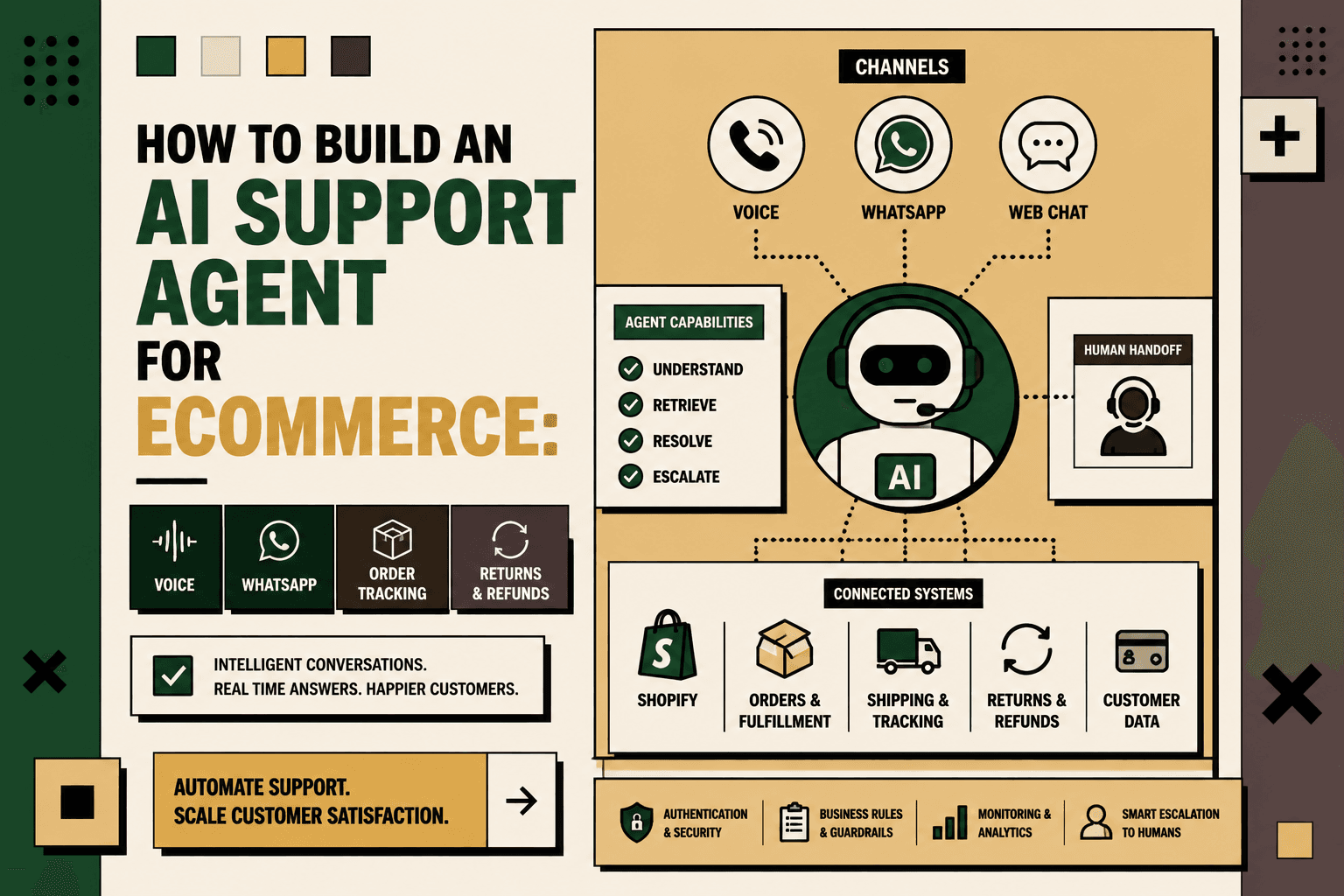
A useful architecture is:
Customer → Voice / WhatsApp / Web Chat → AI Agent → Tool & API Layer → Commerce Systems → Result → Customer
The AI should not receive unrestricted access to Shopify, ERP or shipping systems. Instead, the agent should call narrowly defined tools, while backend services validate authentication, permissions, business rules and action eligibility.
Shopify's current Admin GraphQL API exposes order information including customer details, line items, financial information and fulfillment status, while fulfillment resources provide tracking information and shipment events. Shopify Order documentation Shopify Fulfillment documentation
The Architecture: One Agent, Multiple Channels
The first architectural decision is to avoid building a separate intelligence layer for every channel.
Voice, WhatsApp, web chat and other support channels should feed into a shared agent and tool layer.
| Layer | Responsibility | Examples |
|---|---|---|
| Customer channels | Receive and deliver conversations | Voice, WhatsApp, web chat, email |
| Conversation layer | Understand intent and maintain context | AI agent, conversation memory |
| Tool layer | Expose controlled business actions | Order lookup, tracking, returns, refunds |
| Commerce systems | Provide authoritative operational data | Shopify, ERP, WMS, shipping, CRM |
| Control layer | Authorize, validate and escalate actions | Authentication, rules, approvals, handoffs |
This architecture creates an important separation: the AI decides what it wants to do; the application decides whether it is allowed to do it.
Why a Chatbot Alone Is Not Enough
A traditional support chatbot can answer questions from a knowledge base. That is useful for policies, product information and general FAQs, but it breaks down when the customer asks about a specific transaction.
Consider the difference between these two questions:
- “What is your return policy?”
- “Can I return the shoes from order #10452?”
The first can often be answered from static content.
The second requires the agent to identify the customer, retrieve the order, determine whether the item is eligible, apply the relevant policy and potentially create a return.
That is why ecommerce AI support should be designed around tools and workflows, not only prompts and knowledge bases.
Step 1: Map the Support Workflows Before Building the Agent
Start by documenting what customers actually ask and what agents currently do to resolve those requests.
For each support workflow, document:
- Customer intent
- Required customer information
- Required order information
- Systems the agent currently checks
- Business rules
- Actions that can be automated
- Actions requiring approval
- Exception conditions
- Human handoff requirements
- Expected customer outcome
Do not begin by asking which AI model to use. Begin by asking which repetitive support workflows are structured enough to automate safely.
Five Anchor implementation principle: Map the workflow first, then decide where AI, deterministic automation and human judgment belong.
Step 2: Start With High-Value Support Use Cases
Not every support request should become an autonomous AI workflow.
A useful first group is made up of requests that are frequent, data-driven and relatively predictable.
| Support workflow | Recommended approach | Why |
|---|---|---|
| Order status | AI + API lookup | Structured and repeatable |
| Delivery tracking | AI + shipping API | Real-time operational data is available |
| Return eligibility | AI + deterministic rules | Requires policy and order validation |
| Refund status | AI + backend lookup | Usually a status-retrieval workflow |
| Address change | Rules + authentication | Action may depend on fulfillment state |
| Order cancellation | Rules + confirmation | Financial and fulfillment implications |
| Damaged product | AI intake + human review | Evidence and exception handling may be required |
| Complex complaint | Human escalation | Requires judgment and context |
A practical priority model is:
Volume × frequency × manual effort × error cost × revenue impact ÷ implementation complexity.
This is a practical prioritization framework, not an industry-standard formula.
Step 3: Build the Tool and API Layer
The agent should not directly manipulate raw commerce APIs.
Instead, expose narrowly scoped tools that represent business actions.
For example:
- Get customer orders
- Get order status
- Get shipment tracking
- Check return eligibility
- Create return request
- Check refund status
- Update shipping address
- Cancel order
- Create support ticket
- Escalate to human
The tool layer should normalize backend responses into information the agent can safely interpret.
Instead of returning a large raw API response, return a structured support context such as:
Order: #10452
Status: Out for delivery
Carrier: Available from shipping system
Expected delivery: Available from tracking system
Tracking: Available from carrier integration
The model then converts that structured result into a natural response.
Step 4: Make the Backend the Source of Truth
The AI model should never invent an order status, refund state or return eligibility.
If a customer asks, “Has my order shipped?”, the agent should retrieve the current state from the relevant system.
If a customer asks, “Can I return this?”, the agent should query the actual order and apply the configured eligibility rules.
This is especially important because ecommerce data changes continuously.
Shopify's Order resource supports order management and fulfillment workflows, while its Fulfillment resource exposes shipment and tracking information. Shopify Order API Shopify Fulfillment API
The model should interpret business data, not become the database.
Step 5: Build Order Tracking First
Order tracking is a strong starting point because the workflow is relatively clear.
A customer asks:
Where is my order?
The workflow becomes:
- Identify the customer.
- Authenticate the customer.
- Find the relevant order.
- Retrieve fulfillment information.
- Retrieve tracking information.
- Translate the operational status into customer-friendly language.
- Provide the next useful action.
Shopify's fulfillment model includes tracking information such as carrier, tracking number and tracking URL, and fulfillment events can represent shipment progress. Shopify Fulfillment documentation
The agent should also handle ambiguity.
If a customer has three active orders, “Where is my order?” is not enough information to select one. The agent should ask for clarification rather than guessing.
Step 6: Add Returns as a Transactional Workflow
Returns are more complex because the agent is no longer just retrieving information. It may initiate a business transaction.
A practical return workflow is:
- Identify the customer.
- Find the order.
- Identify the relevant item.
- Check whether the item is eligible.
- Check the return window.
- Check the return reason.
- Present the applicable next step.
- Ask for confirmation before executing the transaction.
- Create the return request or return.
- Provide return instructions.
- Track the reverse fulfillment process.
- Provide refund status when available.
Shopify's current Return model supports return status, return line items, exchanges and reverse fulfillment workflows. Shopify also provides return operations for creating, requesting and processing returns. Shopify Return documentation
Important rule: Actions involving money, cancellations, refunds or irreversible changes should normally require explicit authorization and, where appropriate, customer confirmation or human approval.
For example, the agent can say that an item appears eligible and ask whether the customer wants to initiate the return. It should not silently create the transaction simply because the customer mentioned wanting a return.
Step 7: Connect WhatsApp to the Same Agent
WhatsApp should be treated as a channel, not as a separate support brain.
A practical flow is:
WhatsApp message → webhook → conversation service → AI agent → tool call → commerce system → response → WhatsApp
The same tool layer can serve WhatsApp, web chat and other channels.
The WhatsApp Business Platform provides programmatic messaging capabilities that can be integrated with backend systems. Meta WhatsApp Business Platform API collection
The important architectural requirement is shared customer context.
If a customer starts on WhatsApp and later calls the support team, the business should be able to provide the human agent with the relevant conversation and workflow state rather than forcing the customer to repeat the entire issue.
Step 8: Add Voice Without Building a Separate Support Brain
Voice requires additional technical components because the system must handle audio input, response generation, interruptions, latency and speech output.
The underlying support logic, however, should remain the same.
A voice interaction can follow:
Customer speech → realtime voice agent → intent detection → tool call → commerce API → result → spoken response
Current OpenAI Realtime Agents documentation describes realtime spoken interfaces with tools, guardrails, handoffs and session history. OpenAI Realtime Agents documentation
The voice layer should therefore be treated as another interface to the same support workflows.
A customer saying “Can you tell me where my order is?” over the phone should invoke the same order lookup and tracking tools used by a customer typing the same request into WhatsApp.
Step 9: Build Authentication Into Every Tool Call
Authentication is one of the most important parts of an ecommerce support agent.
The agent should not reveal private order information simply because someone knows an order number.
Depending on the channel and business risk, authentication can use:
- Authenticated customer sessions
- Verified phone numbers
- One-time passwords
- Email verification
- Order details combined with additional verification
- Authenticated messaging identities
Authentication should establish a customer context that is passed into the workflow.
For example:
Customer: Authenticated
Channel: WhatsApp
Customer ID: Verified
Order: Active order selected
Every sensitive tool call should independently validate that context.
Do not rely on the model to enforce authorization. Authorization belongs in the backend.
Step 10: Separate AI Guardrails From Backend Authorization
A production ecommerce agent needs at least two control layers.
AI guardrails control what the agent can say, request and attempt.
Backend authorization controls what the system actually permits.
Consider an order cancellation.
The AI may determine that the customer wants to cancel the order. The backend should then check:
- Is the customer authenticated?
- Does the order belong to that customer?
- Is the order cancellable?
- Has fulfillment started?
- Has payment been settled?
- Does the business policy permit cancellation?
- Does the action require confirmation?
Only after those checks should the cancellation tool execute.
This prevents the AI agent from becoming an unrestricted interface to commerce infrastructure.
Step 11: Use Deterministic Rules Where AI Is Not Needed
One of the most common architecture mistakes is using AI for every decision.
Some ecommerce support rules are deterministic.
For example:
- If an order has already shipped, do not allow a pre-shipment cancellation workflow.
- If a return is outside the configured return window, route according to the exception policy.
- If a refund has already been completed, return the current refund status.
- If the customer is not authenticated, do not reveal protected order information.
These are rules, not reasoning problems.
AI becomes more useful when the system needs to interpret natural language, classify intent, summarize context, explain an operational state, identify an exception or recommend the next action.
Use rules for predictable decisions. Use AI for interpretation and contextual reasoning. Use humans for high-impact judgment.
Step 12: Build Human Handoff Into the Core Architecture
A support agent should not be judged by how many conversations it refuses to escalate.
The objective is to resolve appropriate requests automatically while making exceptional cases easier for humans to handle.
A practical escalation model is:
| Situation | Agent behavior | Human involvement |
|---|---|---|
| Order tracking | Resolve automatically | Usually unnecessary |
| Return eligibility | Check rules and explain | Only for exceptions |
| Refund status | Retrieve and explain | Only if status is unresolved |
| Damaged product | Collect information and evidence | Review when required |
| Fraud signal | Stop sensitive workflow | Escalate |
| Angry or complex complaint | Summarize context | Escalate |
| Policy exception | Explain limitation | Escalate to authorized team |
The handoff should carry context with it.
A human agent should receive the customer's identity, order, intent, relevant actions already taken, tool results and reason for escalation.
This turns human support into the exception layer instead of forcing humans to repeat the entire diagnostic process.
Step 13: Normalize Backend Data Before Giving It to the AI
Commerce systems expose technical data structures that are useful to software but not necessarily useful to customers.
The agent should receive normalized business context.
For example:
Raw system state: Multiple fulfillment records, carrier events, timestamps and status codes.
Agent context: Order has shipped, package is currently in transit, carrier reported a delay, updated delivery information is available.
This separation improves consistency and reduces the amount of backend interpretation the model has to perform.
It also creates a clean place to standardize terminology across Shopify, ERP, WMS, 3PL and carrier systems.
Step 14: Design the Agent Around Business Tools
A useful tool inventory might look like this:
| Tool | Input | Output |
|---|---|---|
| Get customer orders | Authenticated customer | Relevant orders |
| Get order status | Order ID | Current order state |
| Get tracking | Order or fulfillment ID | Carrier and tracking state |
| Check return eligibility | Order and item | Eligibility and reason |
| Create return | Authorized return request | Return ID and instructions |
| Check refund | Order or refund ID | Refund state |
| Update address | Order and new address | Success or rejection reason |
| Cancel order | Authenticated order | Success or rejection reason |
| Human handoff | Conversation context | Support case |
Each tool should have clear permissions, validation and failure responses.
A tool should never return “success” when the downstream system rejected the action.
Step 15: Handle Failure States Explicitly
Production support agents must assume that something will fail.
The Shopify API may be unavailable. A carrier may not return tracking data. A return may fail validation. An ERP may contain a different order status. A customer may provide incomplete information.
Design explicit states such as:
- Success
- Needs clarification
- Authentication required
- Not eligible
- Temporary system failure
- Business rule rejection
- Human escalation required
The agent should never turn an unknown state into a confident answer.
For example, if tracking data is unavailable, the correct response is to explain that the current tracking information could not be retrieved and offer the next available path.
Step 16: Measure the Agent as an Operational Workflow
Do not measure success only by the number of conversations handled by AI.
Measure the business workflow.
| Metric | Why it matters |
|---|---|
| Resolution rate | Shows how often the workflow reaches a useful outcome |
| Human handoff rate | Shows where automation boundaries are working or failing |
| Response time | Measures customer-facing speed |
| Tool failure rate | Reveals integration reliability |
| Authentication failure rate | Highlights friction and security issues |
| Return workflow completion | Measures transactional automation |
| Ticket deflection | Shows whether avoidable support contacts are declining |
| Customer satisfaction | Measures the experience, not just automation volume |
| Exception rate | Shows where human review remains necessary |
Also track the cost of incorrect automation. A system that handles more conversations but creates more refunds, cancellations, policy violations or customer complaints is not necessarily improving the business.
The Goal Is Not Zero Support Tickets
Some support cases genuinely require human judgment.
The better objective is to remove avoidable support demand while improving the handling of complex cases.
A useful operating principle is:
Automate the predictable. Proactively communicate the uncertain. Escalate the exceptional.
For example, an order delay should not necessarily wait for the customer to ask what happened. If the system detects a meaningful delivery exception, the business can proactively communicate the issue and provide the next step.
This changes support from a reactive queue into a connected post-purchase operation.
What Data Does an Ecommerce AI Support Agent Need?
An agent becomes substantially more useful when it has controlled access to the operational information required to resolve requests.
Typical data sources include:
- Customer identity
- Order history
- Order status
- Product and SKU information
- Inventory availability
- Fulfillment state
- Shipment tracking
- Delivery exceptions
- Return status
- Refund status
- Customer support history
- Return and refund policies
- Warranty information
The agent does not necessarily need unrestricted access to every system. It needs the minimum information required to complete the approved workflow.
Security and Privacy Considerations
An ecommerce support agent can access customer information, order data, addresses, financial states and support conversations. Security therefore needs to be designed into the architecture.
Important controls include:
- Least-privilege access
- Authentication before sensitive lookups
- Backend authorization for every business action
- Secure credential management
- Data minimization
- Audit logs
- Tool-level permissions
- Human approval for high-impact actions
- Monitoring for abnormal behavior
Do not assume that because the AI model is trustworthy, every tool it can call is safe. The tool layer must enforce its own controls.
Voice Requires Additional Operational Design
Voice agents introduce challenges that do not exist in exactly the same form in text chat.
The system needs to handle interruptions, latency, speech recognition errors, accents, background noise, authentication, call transfers and conversation state.
Realtime agent architectures can support tools, approvals, handoffs and guardrails during live conversations. OpenAI Realtime Agents guide
For ecommerce, the important design decision is to keep the transactional tools identical wherever possible.
The voice agent should call the same order lookup, tracking, return eligibility and escalation services used by other channels.
Build a Shared Customer Context Across Channels
A fragmented multichannel support architecture creates unnecessary complexity.
Instead of:
WhatsApp agent + voice agent + web chatbot + email bot
Build:
Voice + WhatsApp + web chat + email → shared AI support layer → shared tool layer → commerce infrastructure.
The channel should change how the response is delivered, not how the underlying business workflow works.
For example, a voice response may be conversational and concise. WhatsApp may include a tracking link. Web chat may present additional order details. All three can still rely on the same order and fulfillment tools.
How Five Anchor Can Implement the System
Problem: Ecommerce support teams often work across Shopify, ERP, shipping, returns, CRM and helpdesk systems to answer questions that require current operational data.
Architecture: The solution is to place a controlled AI support layer above those systems, with a tool and API layer between the agent and the underlying commerce infrastructure.
Implementation: Five Anchor's AI-Powered Customer Operations capability covers AI voice operations, AI chat operations, returns and exchange automation, customer self-service, automated customer communication and ticket automation. Its Commerce Infrastructure capability can connect the agent to Shopify, ERP, inventory, warehouse and shipping workflows.
Business outcome: The objective is not simply to add an AI chatbot. It is to create a support workflow that can retrieve real operational information, execute approved actions, proactively communicate where appropriate and route exceptions to humans with context.
A practical Five Anchor implementation would start with workflow mapping and baseline measurement, identify the highest-value support journeys, define system ownership and tool permissions, connect the required APIs, implement authentication and guardrails, deploy the smallest viable workflow, and then measure resolution, response time, exception rate and customer impact.
A Practical Implementation Sequence
- Map: Document the highest-volume support workflows, systems, decisions, actions and exceptions.
- Baseline: Measure ticket volume, manual handling time, response time, error rate, escalation rate and relevant customer metrics.
- Prioritize: Select workflows with meaningful volume and structured data.
- Classify: Separate deterministic rules, AI-assisted decisions, human approvals and human-only cases.
- Connect: Build the tool layer and integrate Shopify, ERP, shipping, returns, CRM and support systems as required.
- Authenticate: Establish secure customer identity before exposing protected data.
- Guardrail: Add authorization, validation, confirmations, approvals, retries, monitoring and failure handling.
- Pilot: Start with order tracking or another high-volume, low-risk workflow.
- Measure: Compare operational performance with the baseline.
- Scale: Add returns, refunds, address changes, voice and proactive workflows only after the foundation is reliable.
What Not to Automate First
There are several tempting but risky starting points.
Do not start with unrestricted refunds. Financial actions need strong authorization and business rules.
Do not start with complex complaints. These are often better suited to AI-assisted intake and human resolution.
Do not give the model direct database access. Use controlled tools instead.
Do not automate unclear policies. Resolve the policy first.
Do not build separate business logic for every channel. Centralize the workflow and expose it through multiple interfaces.
Do not measure only AI containment. A high containment rate is not useful if customers receive incorrect answers or actions.
Illustrative Scenario: From Ticket to Automated Resolution
Illustrative scenario: A customer sends a WhatsApp message saying, “My order hasn't arrived.”
- The system identifies the customer.
- Authentication is confirmed.
- The agent retrieves active orders.
- The customer selects the relevant order.
- The agent retrieves fulfillment and tracking information.
- The shipping status indicates a delay.
- The agent explains the latest available status.
- The system checks whether the delay meets a proactive-support threshold.
- If appropriate, the customer receives the next action or escalation path.
The customer gets an answer without a human manually opening multiple systems.
If the tracking system is unavailable or the order has an unusual exception, the workflow can escalate with the relevant context already attached.
The Architecture Should Create a Closed Loop
The strongest ecommerce support systems do more than answer questions.
They create a loop:
Customer signal → Understand → Retrieve data → Decide → Execute → Communicate → Measure.
For example, repeated delivery-delay conversations can reveal an operational issue in a carrier, warehouse or fulfillment workflow.
Repeated return questions can reveal unclear product information or return-policy communication.
Repeated refund-status questions can reveal gaps in the refund workflow or customer communication.
This means support data becomes operational intelligence.
The AI agent is therefore not only a customer-facing interface. It can become a source of structured information about where the ecommerce operation is creating friction.
Conclusion: Build the Support System Behind the Agent
An ecommerce AI support agent is most useful when it is connected to the business systems that contain the truth.
Voice, WhatsApp and web chat are interfaces. The real infrastructure sits underneath them.
That infrastructure needs authenticated customer context, controlled tools, reliable commerce APIs, deterministic business rules, AI reasoning, transactional safeguards, monitoring and human escalation.
The practical model is simple:
Automate predictable requests. Give AI access to verified operational data. Keep business authorization in the backend. Require confirmation for sensitive transactions. Escalate exceptions with context. Measure the workflow, not just the chatbot.
When built this way, an AI support agent can become part of the ecommerce operating layer rather than another disconnected support tool.
Key Takeaways
- •An ecommerce AI support agent is an operational workflow system, not simply a chatbot.
- •Voice, WhatsApp and web chat should use the same underlying agent and tool layer rather than separate business logic.
- •The AI should interpret intent and select tools while backend services enforce authorization and business rules.
- •Order tracking is a strong first workflow because it is structured, repetitive and dependent on real operational data.
- •Returns, refunds, cancellations and other transactional actions need confirmation, authentication and backend validation.
- •Human handoff should be designed into the architecture for fraud signals, policy exceptions, complex complaints and other high-impact cases.
- •Use deterministic rules for predictable decisions and AI for interpretation, classification, explanation and contextual reasoning.
- •
Traditional Ecommerce Support vs. AI Agent Workflow
| Traditional Support | AI Support Agent | Operational Principle |
|---|---|---|
| Inventory Sync Frequency | 15–30 min batch polling (high oversell risk) | Sub-second atomic locking (<450ms) |
| Concurrent Drop Resilience | Fails under concurrency; causes negative stock balance | Redis atomic reservation queue guarantees exact counts |
| Error Handling & Retries | Silent failure; manual CSV audit needed | Dead-letter queues with automated exponential retry |
| Fulfillment Routing Speed | 2–4 hours delayed batch export to 3PL warehouse |