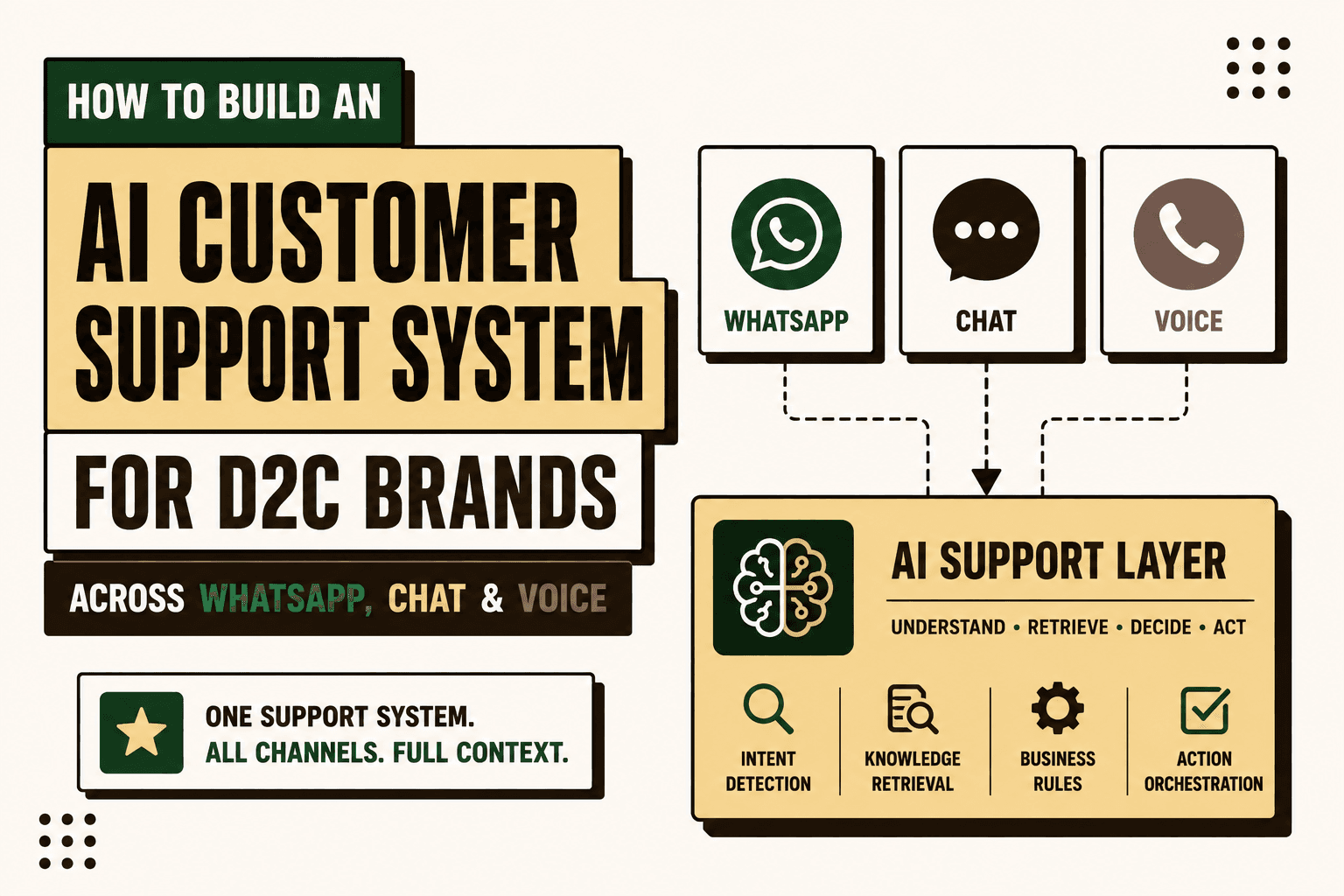
For a D2C brand, WhatsApp, website chat and voice should not become three separate support systems.
The better architecture is one AI customer support layer with multiple customer-facing channels. The AI should understand the customer, retrieve current business data, perform approved actions, maintain context and escalate exceptions to a human.
The core idea is simple: build one support system, not three AI bots.
This guide explains how to design that system, connect commerce and operational data, decide what AI should handle, add guardrails, preserve context across channels and launch the smallest useful workflow before expanding.
What Is an AI Customer Support System for D2C?
Answer: An AI customer support system for D2C is an operational layer that connects customer conversations across WhatsApp, website chat and voice to commerce, CRM, logistics, payment and ticketing systems.
A basic chatbot can answer questions from a knowledge base. A customer support system can do more: identify the customer, retrieve an order, check fulfillment status, explain a return policy, initiate an approved workflow and create a human escalation when the request falls outside its authority.
Example: A customer asks, “Where is my order?” The AI should be able to identify the relevant order and retrieve its current fulfillment or delivery information rather than simply sending the customer back to a tracking page.
Implication: The difficult part is not generating the response. It is connecting the response to reliable operational data and controlled actions.
Action: Design the support infrastructure first, then choose the AI interface and model.
The Architecture: One Support Layer, Three Channels
A practical architecture looks like this:
WhatsApp + Website Chat + Voice → AI Support Layer → Customer Data + Commerce + Logistics + Payments + Ticketing → Human Agent
Each channel should act as an interface into the same operational system.
| Layer | Role | Typical systems |
|---|---|---|
| Customer channels | Conversation interface | WhatsApp, website chat, voice |
| AI support layer | Understand, classify and orchestrate | LLM, agent runtime, retrieval |
| Commerce | Orders and products | Shopify, WooCommerce |
| Operations | Fulfillment and delivery | OMS, WMS, 3PL, shipping APIs |
| Customer data | Identity and history | CRM, CDP, customer database |
| Financial systems | Payments and refunds | Payment gateway, ERP |
| Support operations | Cases and escalation | Helpdesk, ticketing platform |
The AI layer should not become the source of truth for orders, inventory or refunds. Those systems should remain authoritative for the data they own.
Step 1: Map the Customer Support Workflows
Before building an AI agent, document the support work your team already performs.
For most D2C operations, recurring requests can be grouped into three categories:
- Informational: product specifications, availability, shipping policy, COD availability and general FAQs.
- Transactional: order status, cancellations, returns, exchanges, refund status and delivery questions.
- Escalation: damaged orders, disputes, unusual exceptions, high-value refunds and requests requiring human judgment.
This classification matters because not every support task should be automated in the same way.
| Support type | Best starting approach | Human role |
|---|---|---|
| Informational | AI plus approved knowledge | Review exceptions |
| Transactional | AI plus APIs and business rules | Approve higher-risk actions |
| Escalation | AI classification and context collection | Own the resolution |
Five Anchor POV: The first automation opportunity is usually not “answer every customer.” It is identifying the repetitive decisions that consume support capacity and determining which ones have enough structured data and clear rules to automate safely.
Step 2: Build a Unified Customer Data Layer
Your AI support system needs more than FAQs. It needs customer context.
A useful data flow is:
Commerce → Order Management → CRM → Logistics → Payments → Ticketing → AI Support Layer
The exact systems will differ by brand, but the AI may need access to:
- Customer identity
- Order history
- Order status
- Product information
- Inventory availability
- Fulfillment status
- Tracking events
- Return eligibility
- Refund status
- Payment status
- Previous support conversations
- Open tickets
Shopify provides APIs and webhooks that can support order and event-driven workflows. Its documentation describes order information retrieval and webhook-based updates for order changes. Shopify order documentation Shopify webhook documentation
The important architectural distinction is between knowledge and transactional truth.
A return policy can come from a knowledge source. Whether a specific order is eligible for a return should be checked against current order data and the applicable rules.
Step 3: Design a Customer Identity Strategy
Cross-channel support becomes difficult when the same customer appears as three unrelated conversations.
The system should establish a consistent customer identity across channels where appropriate.
Potential identifiers include:
- Customer ID
- Verified phone number
- Email address
- Order ID
- Authenticated account session
Do not assume that a phone number or email address alone proves identity for every sensitive action.
For actions such as refunds, account changes or order modifications, define the authentication level required before the AI can proceed.
Illustrative scenario: A customer contacts the brand through WhatsApp and later calls the support number. If both conversations can be safely associated with the same customer and the relevant order, the second interaction can start with existing context instead of forcing the customer to repeat the entire problem.
Step 4: Build the WhatsApp Support Channel
WhatsApp can function as a customer-service interface for notifications, two-way conversations and support workflows. Twilio's WhatsApp documentation describes using the WhatsApp Business Platform through its APIs and supports customer support and chatbot use cases. Twilio WhatsApp documentation
The channel should connect to the same support orchestration layer as website chat and voice.
A typical request can follow this flow:
- Customer sends a WhatsApp message.
- System identifies the customer or requests verification.
- AI classifies the intent.
- AI retrieves relevant customer and transaction data.
- Business rules determine what is permitted.
- AI responds or invokes an approved action.
- Conversation and action are logged.
- Exceptions are escalated to a human.
Twilio's WhatsApp API documentation also describes sending and receiving WhatsApp messages through server-side APIs. Twilio WhatsApp quickstart
For production implementations, messaging permissions, sender configuration, templates, opt-in requirements and platform policies need to be handled as part of the channel design rather than treated as an afterthought.
Step 5: Build the Website Chat Interface
Website chat should use the same underlying support capabilities as WhatsApp.
The customer should not receive a fundamentally different answer simply because they switched channels.
For example:
Website: “Where is my order?”
WhatsApp: “Where is my order?”
Voice: “Can you tell me when my order will arrive?”
All three requests can map to the same underlying intent: order status.
The channel changes. The business capability does not.
Step 6: Add Voice AI for Customers Who Prefer Calling
Voice requires a different interface but can use the same operational backend.
A voice workflow typically requires speech recognition, conversational reasoning, text-to-speech and telephony integration.
Twilio's current voice documentation supports AI voice experiences through Conversation Relay, which connects live calls with AI applications while handling speech recognition, text-to-speech and voice synthesis. Twilio Conversation Relay documentation
Twilio also documents virtual-agent integrations for conversational AI over Programmable Voice. Twilio Virtual Agent documentation
Voice support should not be treated as a separate knowledge base. It should call the same customer, order, logistics and ticketing capabilities available to the other channels.
Example: A customer calls about a delayed delivery. The voice agent authenticates the customer, retrieves the order, checks the latest shipment event, explains the current status and creates an escalation if the shipment meets the brand's exception criteria.
Step 7: Create a Shared Intent and Action Layer
The three channels should map customer language to a common set of support capabilities.
| Customer request | Intent | Potential action |
|---|---|---|
| Where is my order? | Order status | Retrieve fulfillment and shipment data |
| Can I cancel? | Cancellation | Check eligibility and cancel if permitted |
| I want to return this | Return | Check policy and initiate approved return |
| Where is my refund? | Refund status | Retrieve payment or refund status |
| My product arrived damaged | Complaint | Collect evidence and escalate |
| I want to speak to someone | Human escalation | Create or route support case |
This shared capability layer prevents channel-specific logic from becoming duplicated and difficult to maintain.
Step 8: Separate AI From Deterministic Business Rules
AI is good at interpreting natural language and handling context. It should not replace simple business rules that can be evaluated deterministically.
Use rules for:
- Return windows
- Refund thresholds
- Order status conditions
- Authentication requirements
- Eligibility criteria
- Restricted products
- Escalation thresholds
Use AI for:
- Intent classification
- Natural-language understanding
- Conversation summarization
- Context extraction
- Response generation
- Selected exception classification
- Choosing among approved next actions
Use human approval for decisions where the business risk is too high for autonomous execution.
Step 9: Give the AI Controlled Tools
The AI agent should not have unrestricted access to databases or operational systems.
Instead, expose narrowly defined tools such as:
- get_customer
- get_order
- get_tracking_status
- check_return_eligibility
- create_return
- check_refund_status
- create_ticket
- escalate_to_agent
Each tool should have defined inputs, permissions, validation and failure behavior.
Example: Instead of allowing an AI agent to directly edit an order database, provide a controlled cancel_order capability that first validates customer identity, order state and cancellation rules.
This makes the system easier to audit and reduces the consequences of an incorrect model decision.
Step 10: Add Retrieval for Policies and Product Knowledge
Customer support agents need access to business knowledge that does not live in the order database.
Useful sources include:
- Return and exchange policies
- Warranty terms
- Shipping policies
- Product manuals
- Product specifications
- FAQs
- Support SOPs
- Escalation rules
A retrieval layer can select the relevant information before the AI generates an answer.
The resulting workflow becomes:
Customer message → Intent → Customer data → Business knowledge → Rules → AI response or action
Keep retrieved policy information separate from live transactional information. A document can explain the policy; the commerce system should determine the current state of the order.
Step 11: Preserve Context Across WhatsApp, Chat and Voice
Omnichannel support is useful only when the context moves with the customer.
The support system should maintain an appropriate conversation record containing:
- Customer identity
- Recent conversation summary
- Relevant order IDs
- Current issue
- Actions already attempted
- Current ticket status
- Escalation reason
Twilio's current Agent Connect documentation describes support for Voice, WhatsApp and Chat with shared conversation context and memory capabilities. Twilio Agent Connect core concepts
The architectural principle remains broader than any single vendor: conversation history should be a shared support resource rather than a property of one channel.
Step 12: Design Human Escalation Before Launch
Human escalation is not a failure of the AI system. It is a required part of a production support architecture.
Escalate when:
- The AI cannot verify the customer.
- Required data is missing.
- Two systems contain conflicting information.
- The request falls outside policy.
- The action has high financial impact.
- The customer disputes an automated decision.
- The conversation becomes sensitive or unusually complex.
- The customer explicitly requests a human.
The handoff should contain context rather than forcing the human agent to start from zero.
A useful escalation record includes:
- Customer identity
- Order information
- Conversation summary
- Intent
- Relevant policy
- Actions attempted
- System responses
- Reason for escalation
Step 13: Add Authentication and Security Controls
Customer support AI can touch personal information, orders, payments and refunds. Security therefore needs to be designed into every workflow.
Define:
- Which customer data each channel can access
- How customer identity is verified
- Which tools can be called without authentication
- Which actions require stronger verification
- Which actions require human approval
- How credentials are stored
- How tool calls are logged
- How sensitive information is handled
- How access is revoked
Apply least-privilege access to AI tools just as you would to other production software.
Step 14: Build Idempotency and Failure Handling
Operational automation must assume that APIs fail, messages are duplicated and network calls can time out.
For every action, define:
- Timeout behavior
- Retry policy
- Duplicate-event handling
- Partial-failure handling
- Rollback or compensation where appropriate
- Human escalation
- Audit logging
Shopify's webhook documentation, for example, describes webhook delivery and retry behavior, reinforcing the need for reliable event handling rather than assuming every event will arrive exactly once. Shopify webhook guidance
AI workflows should follow the same engineering discipline as other transactional software.
Step 15: Start With One Support Workflow
Do not launch WhatsApp, chat, voice, returns, refunds, cancellations, warranties and complaints simultaneously.
Start with one high-volume, relatively low-risk workflow.
Strong candidates include:
- Order-status questions
- Delivery-status questions
- Basic product FAQs
- Return-policy questions
- Refund-status questions
A good first workflow has a clear trigger, reliable data, limited actions and measurable performance.
Five Anchor POV: The smallest viable support workflow is usually the right starting point. Once the integration, guardrails, escalation path and measurement are proven, the same infrastructure can support additional use cases.
Step 16: Measure the Support System
Do not judge the system only by how natural the AI sounds.
Measure the operational workflow.
| Metric | What it tells you | Why it matters |
|---|---|---|
| Automation rate | Share handled without human intervention | Operational capacity |
| Escalation rate | Share requiring humans | Exception volume |
| First response time | How quickly customers receive a response | Customer experience |
| Resolution time | Time to complete the issue | Workflow efficiency |
| Error rate | Incorrect responses or actions | Operational risk |
| Ticket deflection | Support demand avoided or resolved earlier | Capacity impact |
| Customer satisfaction | Customer perception of the interaction | Experience quality |
| Integration failure rate | Technical reliability | Production stability |
Track the metrics separately by channel. A workflow may perform well in website chat but poorly in voice because speech recognition, authentication or conversation length introduces additional complexity.
Step 17: Calculate the Business Case
AI support economics should be based on the workflow being changed, not on generic AI claims.
Illustrative scenario: If a brand receives 1,000 repetitive support requests per day and each request takes an average of four minutes of human handling, the workflow represents about 66.7 hours of handling per day. If an automated system safely resolves only a portion of those requests, the actual capacity impact depends on the automation rate, exception rate, implementation cost, maintenance requirements and human review time.
The useful business calculation is therefore:
Current workflow cost − post-automation workflow cost − implementation and maintenance cost = potential operating benefit
Measure this against the baseline rather than assuming every automated interaction becomes an equivalent cost saving.
Common AI Customer Support Implementation Mistakes
Building Separate Bots for Each Channel
This creates duplicated prompts, knowledge sources, integrations and maintenance.
Better: Build one support capability layer and expose it through multiple channels.
Connecting AI Only to the FAQ
A support system that cannot access current order and customer data will struggle with transactional questions.
Better: Connect the AI to authoritative operational systems through controlled tools.
Letting AI Decide Everything
Predictable business rules should not be delegated to probabilistic reasoning.
Better: Use deterministic rules for eligibility and AI for interpretation and orchestration.
Skipping Human Escalation
Edge cases are inevitable in ecommerce.
Better: Design escalation as a normal workflow with structured context.
Ignoring Data Quality
Incorrect order states, stale tracking information or inconsistent customer records can produce incorrect support decisions.
Better: establish data ownership, freshness requirements and reconciliation processes.
Measuring Only Deflection
A high automation rate does not automatically mean a good customer experience.
Better: measure resolution quality, errors, escalations, customer satisfaction and operational cost together.
A Practical 30-60-90 Day Implementation Blueprint
First 30 Days: Map and Prepare
- Audit support tickets and conversations.
- Group requests by intent.
- Identify high-volume workflows.
- Document systems and data sources.
- Establish baseline metrics.
- Define AI, rules and human responsibilities.
- Select the first pilot workflow.
Days 31–60: Integrate and Pilot
- Connect the commerce platform.
- Connect logistics and ticketing data.
- Implement customer identity handling.
- Build controlled AI tools.
- Add business rules.
- Connect one customer channel.
- Implement human escalation.
- Test failure and edge cases.
Days 61–90: Measure and Expand
- Measure automation and escalation.
- Review incorrect responses and actions.
- Improve knowledge retrieval.
- Improve exception handling.
- Add a second channel.
- Introduce voice if the workflow justifies it.
- Expand into returns, exchanges or other approved workflows.
How Five Anchor Fits the Architecture
Problem: D2C brands often have customer conversations separated from the operational systems needed to resolve those conversations.
Architecture: Five Anchor's AI-powered customer operations capability is designed around connecting AI chat, AI voice, customer self-service, returns and exchange automation, automated communication and ticket workflows with the underlying commerce and operational infrastructure.
Implementation: A practical deployment can begin with workflow mapping and baseline measurement, followed by commerce and logistics integrations, AI-agent implementation, controlled actions, guardrails, human escalation and KPI measurement.
Business outcome: The goal is a support workflow that can resolve appropriate requests automatically while giving human agents the context and system access needed for exceptions.
Five Anchor POV: The strongest D2C support architecture is not a chatbot with more features. It is an operational system where WhatsApp, chat and voice are simply different entry points into the same customer and business context.
The AI Customer Support System Checklist
Before going live, verify that the system can answer “yes” to these questions:
- Is the customer support workflow clearly mapped?
- Are the highest-volume intents identified?
- Is there a baseline for response time, resolution time and ticket volume?
- Can the system identify the customer safely?
- Can it retrieve current order information?
- Can it retrieve current delivery information?
- Are policies available through a controlled knowledge layer?
- Are business rules separate from AI reasoning?
- Are actions exposed through controlled tools?
- Are high-risk actions restricted?
- Is human escalation defined?
- Does the human receive conversation and system context?
- Are API failures and duplicate events handled?
- Are support conversations logged appropriately?
- Are channel-level metrics tracked?
- Is there a process for reviewing incorrect AI behavior?
The Core Principle
The practical way to build AI customer support for a D2C brand is not to create three independent bots.
Build one AI support infrastructure with three customer-facing channels.
WhatsApp, website chat and voice should share the same customer context, operational data, business rules, approved actions and escalation system.
The AI should understand the customer's request. The commerce and operational systems should provide the truth. Rules should constrain decisions. APIs should execute approved actions. Humans should own high-risk exceptions.
That architecture turns AI customer support from a conversational interface into an AI-powered customer operations system.
Key Takeaways
- •WhatsApp, website chat and voice should be interfaces into one support architecture, not isolated AI bots.
- •The AI needs live customer and operational data, not only FAQ documents.
- •Deterministic business rules should control eligibility, permissions and high-risk decisions.
- •AI should access approved tools rather than unrestricted databases.
- •Customer identity and conversation context should persist across channels where appropriate.
- •Human escalation should be designed before launch, not added after failures occur.
- •Start with one high-volume, low-risk workflow and expand after integration reliability is proven.
- •Measure automation rate, escalation, resolution time, errors, customer satisfaction and integration reliability together.
Channel-Specific Bots vs Unified AI Support Infrastructure
| Dimension | Separate Channel Bots | Unified AI Support Infrastructure |
|---|---|---|
| Inventory Sync Frequency | 15–30 min batch polling (high oversell risk) | Sub-second atomic locking (<450ms) |
| Concurrent Drop Resilience | Fails under concurrency; causes negative stock balance | Redis atomic reservation queue guarantees exact counts |
| Error Handling & Retries | Silent failure; manual CSV audit needed | Dead-letter queues with automated exponential retry |
| Fulfillment Routing Speed | 2–4 hours delayed batch export to 3PL warehouse |