Ecommerce customer service automation is moving beyond FAQ chatbots. The more useful model connects AI agents to live commerce data, business policies, and approved workflows so they can identify a customer, retrieve order context, take permitted actions, verify the result, and escalate exceptions to a human.
That distinction matters. A customer asking “Where is my order?” does not primarily need a generated sentence. They need an accurate order lookup, current shipment information, a useful next step, and a way to reach a person if the shipment is abnormal.
Modern ecommerce support stacks increasingly connect communication channels with commerce platforms, customer records, order data, self-service, automation, and analytics. Shopify’s ecommerce contact-center technology guide describes a layered approach in which customer conversations connect with the systems and context required to resolve issues.
The central thesis is simple: the best ecommerce customer service automation does not automate conversations in isolation; it automates the operational workflow behind the conversation.
What Is Ecommerce Customer Service Automation?
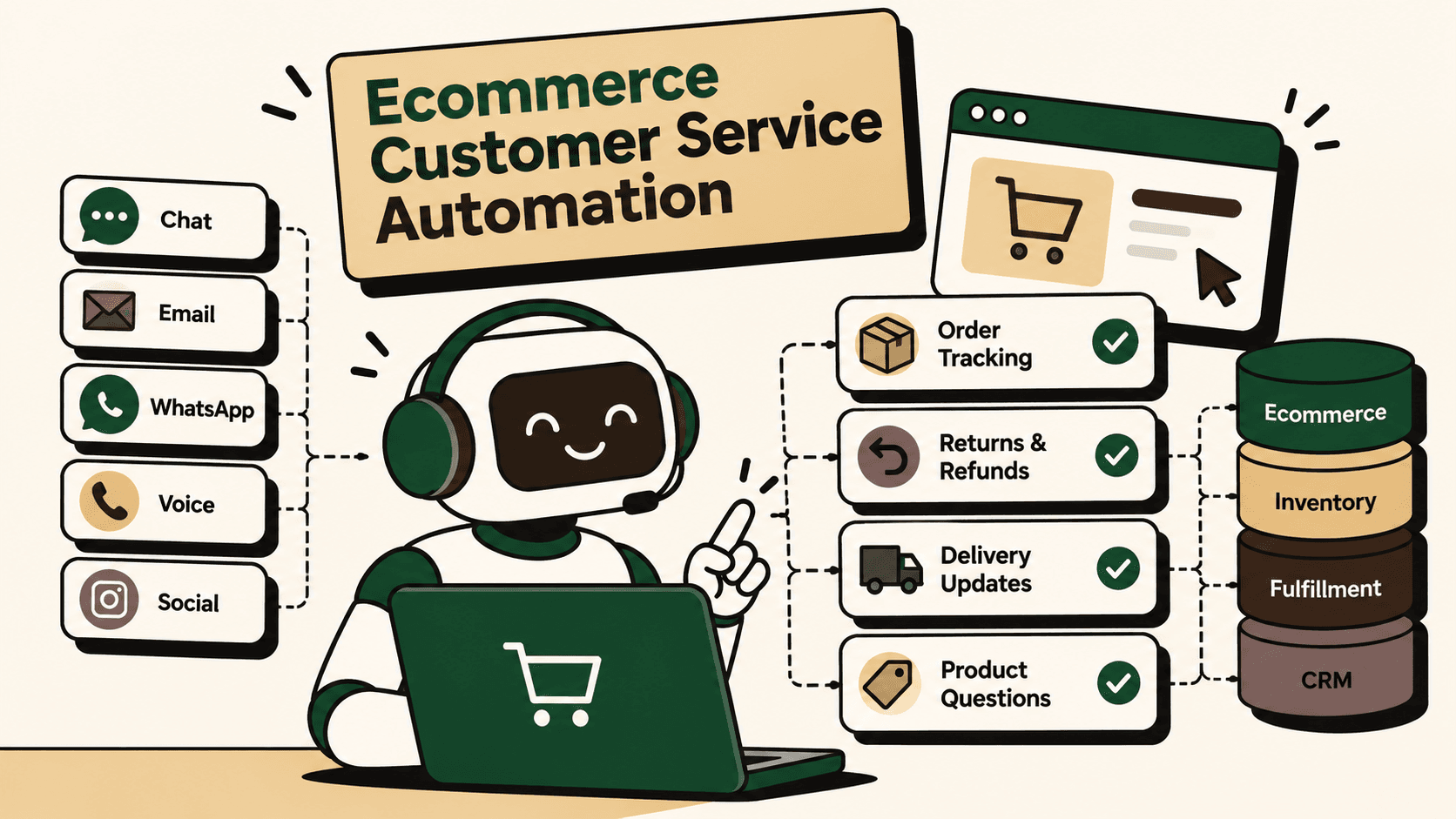
Answer: Ecommerce customer service automation uses AI agents, workflow automation, commerce integrations, and business rules to handle repetitive customer-service tasks across channels such as chat, email, WhatsApp, voice, and messaging.
The important distinction is between answer automation and resolution automation.
- Answer automation: Generates a response using a knowledge base or predefined information.
- Resolution automation: Retrieves live customer and order context, checks policies, performs an approved action, verifies the outcome, and communicates the result.
For ecommerce brands, resolution automation is usually more valuable because many support requests are attached to operational systems. Order status lives in an order-management or commerce platform. Shipment status lives with a carrier or logistics system. Return eligibility depends on policy and order information. Refund status depends on payment and financial systems.
The supplied research identifies order tracking, returns, refunds, delivery questions, product information, COD confirmation, post-purchase support, and human escalation as important ecommerce customer-service automation use cases.
Why Ecommerce Customer Service Becomes Difficult to Automate
The difficulty is rarely the customer message itself. The difficulty is everything the support agent has to do after reading it.
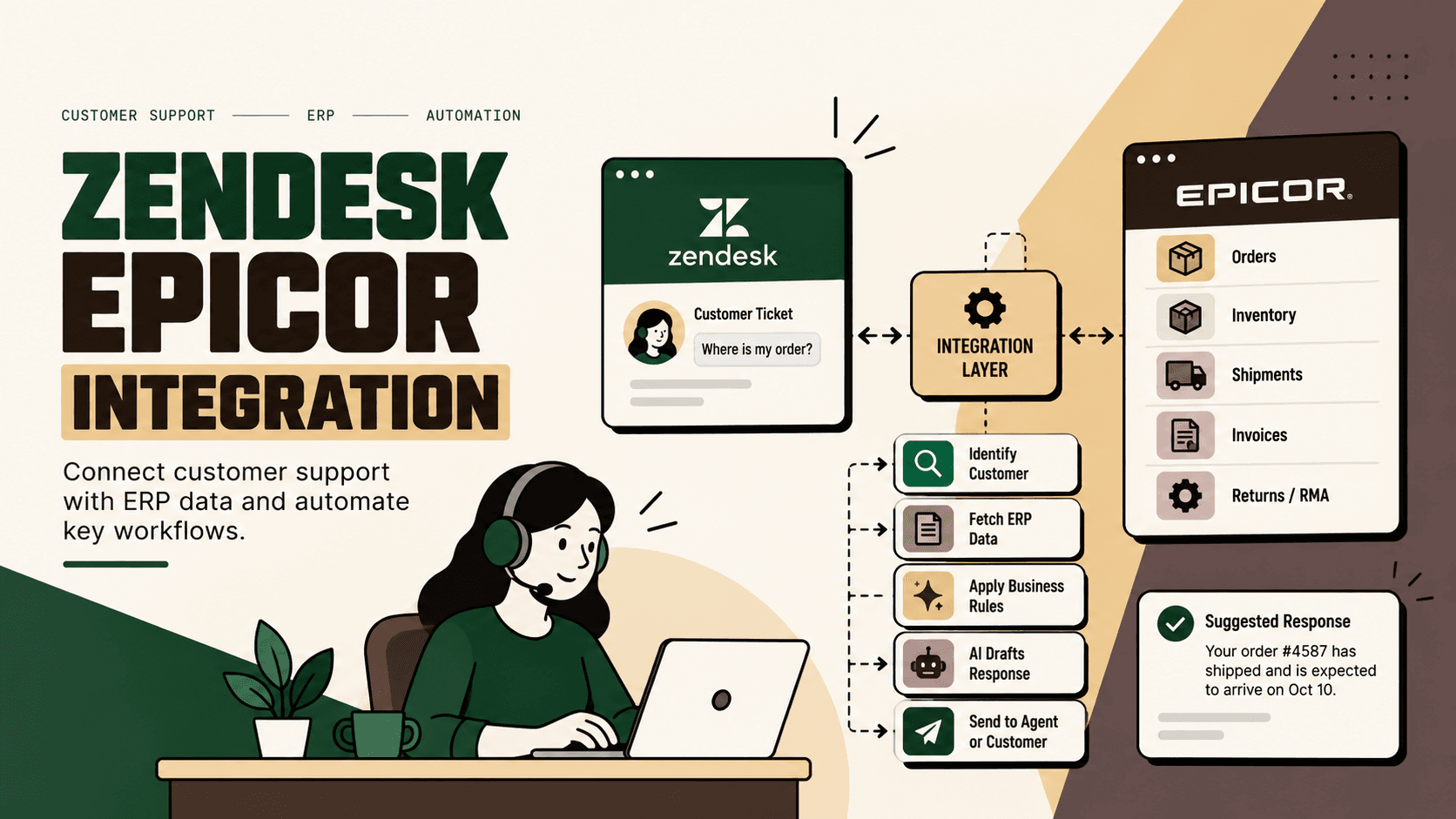
Consider a typical “Where is my order?” request.
- Identify the customer.
- Identify the relevant order.
- Check whether the order has shipped.
- Find the current fulfillment or carrier status.
- Interpret an exception if one exists.
- Explain the status in customer-friendly language.
- Escalate if the shipment requires intervention.
A basic chatbot can perform step six. A commerce-connected automation system can potentially perform the entire workflow.
This is why ecommerce customer service automation should be designed as an operational architecture rather than added as a chatbot widget. StateSet’s ecommerce customer-service automation material similarly describes workflows that retrieve commerce context, check policy, execute permitted actions, and escalate unsupported or disputed cases.
The Core Architecture: Customer → AI Agent → Commerce Infrastructure → Action → Customer
A practical architecture looks like this:
Customer → AI Agent → Commerce Infrastructure → Approved Action → Verification → Customer
The AI agent handles intent, context, conversation, and decision support. The connected systems provide authoritative data and execute permitted operations.
Illustrative scenario: “Where Is My Order?”
- The customer asks for an order update through chat, WhatsApp, email, or voice.
- The AI identifies the customer and order.
- The integration layer retrieves current order and fulfillment information.
- The system checks carrier or shipment status.
- The AI explains the current status and provides the appropriate next step.
- If the shipment falls into an exception category, the workflow creates or routes a human escalation with the context already collected.
The customer experiences a single conversation. Behind the scenes, several systems may be involved.
Illustrative architecture: Ecommerce platform → order-management system → warehouse or 3PL → carrier → helpdesk or CRM → AI customer-service layer.
For ecommerce brands, the practical requirement is to connect customer conversations with order, fulfillment, return, and customer-account information rather than operating the AI as an isolated communication layer. Shopify
What Ecommerce Customer Service Can Be Automated?
The strongest starting point is not “automate everything.” It is to identify workflows that are high-volume, repetitive, governed by clear rules, and supported by reliable data.
| Customer request | Potential automation | Human involvement |
|---|---|---|
| Where is my order? | Order and tracking lookup | Shipment exceptions |
| Delivery delayed | Carrier-status lookup and explanation | Escalated intervention |
| Return request | Eligibility check and return initiation | Policy exceptions |
| Refund status | Refund-state lookup and explanation | Disputed or failed refunds |
| Cancel order | Eligibility check and cancellation | Orders already in fulfillment |
| Address change | Check fulfillment state and update when permitted | Restricted or shipped orders |
| Product question | Catalog-aware answer | Ambiguous or specialist questions |
| Size and fit | Product and size-guide assistance | Complex recommendations |
| Discount issue | Coupon and eligibility validation | Commercial exceptions |
| COD confirmation | Automated confirmation workflow | Suspicious or disputed orders |
| Complex complaint | Classification and context collection | Human resolution |
These workflows are attractive because many contain structured inputs, predictable policy rules, and identifiable system states. The supplied research specifically highlights order tracking, delivery, returns, refunds, product information, COD confirmation, post-purchase support, and human escalation as important ecommerce automation use cases.
From FAQ Bots to Action-Oriented AI Agents
An FAQ chatbot can tell a customer what a return policy says. An action-oriented AI agent can determine whether a specific order qualifies for a return and, where the integration and permissions allow it, initiate the workflow.
This difference can be expressed as:
| Capability | Basic FAQ chatbot | Commerce-connected AI automation |
|---|---|---|
| Knowledge | Static or curated answers | Knowledge plus live operational context |
| Order context | Usually limited | Can retrieve relevant order state |
| Actions | Primarily responds | Can execute approved workflows |
| Policy handling | Explains policy | Checks requests against policy rules |
| Verification | Usually absent | Can verify that an action completed |
| Exceptions | Generic fallback | Defined escalation with context |
This does not mean every support interaction should become autonomous. The right architecture deliberately separates actions the system can safely complete from actions that require human approval.
Sobot’s ecommerce AI-agent deployment guide emphasizes starting with suitable support intents, preparing knowledge and policy content, connecting customer or order data, defining handoff rules, testing with real conversations, and launching in phases.
Which Customer-Service Workflows Should You Automate First?
Answer: Start with workflows that combine high volume, clear rules, structured data, low ambiguity, and measurable outcomes.
A useful prioritization model is:
Priority = volume × frequency × manual effort × error cost × revenue impact ÷ implementation complexity
This is a practical prioritization framework, not an industry-standard formula. Its purpose is to prevent teams from selecting automation projects simply because they sound technically impressive.
1. Order Tracking and WISMO
“Where is my order?” is an obvious starting point because the request is usually tied to an identifiable order and shipment state.
The workflow can retrieve order status, fulfillment status, carrier information, and tracking details before generating the response.
Automate: identification, lookup, status explanation, and tracking communication.
Keep human: lost shipments, disputed deliveries, unusual carrier events, and high-value exceptions.
2. Return Eligibility
Returns can be automated when eligibility is governed by clear rules such as purchase date, product category, order status, return window, or predefined exclusions.
The AI should not invent eligibility. It should retrieve the relevant order, apply the approved policy, and execute only actions permitted by the integration.
3. Refund Status
Refund questions often require a lookup rather than a long explanation. An automated workflow can identify the transaction, retrieve the current refund state, and explain what has happened.
Failed refunds, disputed transactions, payment exceptions, or cases requiring financial judgment should be routed to humans.
4. Delivery Exceptions
Delivery automation becomes more valuable when the system can distinguish between normal transit, delay, failed delivery, address issue, and other predefined states.
The customer message should reflect the actual operational state rather than a generic “please wait” response.
5. Product Questions
Catalog-aware AI can handle product specifications, availability, product attributes, and size-guide questions when the underlying product data is accurate and maintained.
Product recommendations that materially affect a purchase should be constrained by approved catalog information rather than generated from unsupported assumptions.
What Should Not Be Fully Automated?
Automation should be governed by risk, not enthusiasm.
High-impact decisions can create financial, legal, reputational, or customer-experience consequences. The system should therefore distinguish between information retrieval, low-risk actions, and high-impact decisions.
- Usually suitable for automation: order lookup, tracking information, policy lookup, basic product information, and status notifications.
- Suitable with guardrails: returns, cancellations, address changes, exchanges, and routine refunds.
- Usually requires human review: disputed refunds, abuse allegations, exceptional compensation, legal complaints, sensitive customer situations, unusual high-value orders, and requests outside documented policy.
The principle is straightforward: AI should have enough permission to resolve useful work, but not enough permission to create uncontrolled business risk.
Human Escalation Is Part of the Automation Design
A common mistake is treating escalation as a failure of automation. In a mature system, escalation is an intentional workflow outcome.
A good escalation should transfer:
- Customer identity and authentication state.
- Relevant order and shipment information.
- Conversation history.
- Customer intent.
- Actions already attempted.
- Policy checks performed.
- Reason for escalation.
- Recommended next step when appropriate.
This prevents the customer from repeating the entire story to a human agent.
StateSet’s customer-support automation material describes automated handling for eligible workflows alongside human involvement for unsupported, disputed, or exceptional requests.
The Data Layer Matters More Than the Chat Interface
An AI agent cannot reliably resolve an order problem if it cannot access the systems that own the relevant information.
A practical ecommerce customer-service architecture may include:
- Ecommerce platform.
- Order-management system.
- ERP.
- Warehouse-management system.
- 3PL and shipping platforms.
- Payment gateway.
- Returns platform.
- CRM.
- Helpdesk.
- Product information system.
- Customer communication channels.
The integration layer is responsible for connecting these systems while controlling what the AI can read and what it can change.
Read Access and Write Access Are Different
Reading an order status is fundamentally different from changing an order or issuing a refund.
For example, a support agent may need permission to retrieve a customer's order but not permission to issue an arbitrary refund. Similarly, an AI agent may be allowed to initiate a return only when the order meets defined conditions.
That distinction should be reflected in the technical architecture: read permissions, action permissions, approval requirements, and auditability should be designed separately.
Implementation Framework for Ecommerce Customer Service Automation
Automation projects become more predictable when implementation begins with the workflow rather than the AI vendor.
Step 1: Map the Existing Workflow
Choose one support intent and document what happens today.
- What starts the request?
- How does the agent identify the customer?
- Which systems are opened?
- What information is retrieved?
- Which business rules are applied?
- What actions are performed?
- What exceptions occur?
- When is a manager or specialist involved?
- How is the customer notified?
Do not automate a process that the business itself cannot clearly describe.
Step 2: Establish a Baseline
Measure the current workflow before automation.
- Ticket volume by intent.
- Average and median resolution time.
- First-contact resolution.
- Reopened tickets.
- Escalation rate.
- Customer satisfaction.
- Agent handling time.
- Operational errors.
- Refund or return processing time.
These measures create a baseline against which the automation can be evaluated.
Step 3: Separate Rules, AI Decisions, and Human Decisions
This is one of the most important design steps.
- Rules: deterministic eligibility checks, order states, thresholds, required fields, and permissions.
- AI: intent classification, natural-language understanding, summarization, conversational responses, and contextual interpretation.
- Human: disputes, policy exceptions, high-risk decisions, ambiguous cases, and sensitive complaints.
Using AI where a deterministic rule is sufficient can add unnecessary variability. Using rigid rules where natural-language interpretation is required can make the experience brittle.
Step 4: Connect the Systems of Record
Identify which system owns each important piece of information.
| Data | Typical system of record | Automation requirement |
|---|---|---|
| Customer identity | Commerce platform or CRM | Secure lookup |
| Order status | Commerce platform or OMS | Current or appropriately fresh access |
| Inventory | ERP, OMS, or inventory platform | Current availability |
| Shipment status | Carrier or logistics system | Tracking lookup |
| Return eligibility | Policy plus order data | Rule evaluation |
| Refund state | Payment or commerce system | Transaction lookup |
| Conversation history | Helpdesk or CRM | Context retrieval |
Step 5: Add Guardrails
Guardrails should define what the system may do, what it must confirm, and what requires human approval.
- Authentication requirements.
- Permitted actions.
- Refund thresholds.
- Return eligibility rules.
- Cancellation windows.
- Data-access boundaries.
- Confidence thresholds.
- Escalation conditions.
- Audit logging requirements.
Step 6: Build the Smallest Viable Workflow
Do not begin with ten channels and twenty support intents.
A better pilot could be one channel, one high-volume intent, one system-of-record integration, one action, and one escalation path.
Illustrative workflow: Website chat → order lookup → delivery status → customer response → exception escalation.
Once this workflow is stable, expand into returns, refunds, cancellations, product questions, or voice support.
Step 7: Test Against Real Conversations
Use historical tickets and representative edge cases rather than testing only ideal prompts.
- Incomplete customer information.
- Multiple orders.
- Cancelled orders.
- Partially shipped orders.
- Delayed shipments.
- Out-of-policy returns.
- Duplicate requests.
- Angry or confused customers.
- Requests requiring multiple systems.
The objective is not simply to measure whether the AI produces a plausible answer. It is to verify whether the workflow produces the correct business outcome.
Step 8: Pilot and Monitor
Launch with a controlled percentage of traffic or a restricted set of use cases. Review failures and escalations regularly.
Sobot’s deployment guidance recommends phased launches and ongoing review rather than treating deployment as a one-time installation.
How to Measure Ecommerce Customer Service Automation
Deflection alone is not enough.
A customer who stops replying because the AI failed to help is not a successful automated resolution.
Better metrics include:
- End-to-end resolution rate: percentage of eligible requests actually resolved.
- Median resolution time: time required to reach an outcome.
- Tail resolution time: performance of difficult or slow cases.
- Reopen rate: percentage of supposedly resolved cases that return.
- Escalation rate: percentage requiring human intervention.
- Customer satisfaction: whether customers consider the outcome successful.
- Agent handling time: how much manual work remains after automation.
- Action accuracy: whether automated changes were correct.
- Exception rate: how often the workflow encounters unsupported conditions.
The research reviewed for this topic emphasizes measuring actual resolution and operational outcomes rather than treating deflection as the only indicator of success.
Illustrative ROI Reasoning
Illustrative scenario: Suppose an ecommerce business receives 600 support requests per day and 35% concern order tracking, delivery status, or another clearly structured post-purchase question. That represents 210 requests per day in the selected category.
If the automation resolves a portion of those requests without agent intervention, the potential operational value can be estimated from the actual baseline handling time and fully loaded support cost.
For example, if 100 requests are resolved automatically and the historical average handling time was 6 minutes, the workflow represents 600 minutes, or 10 hours, of manual handling capacity per day.
Potential labor capacity released = automated resolutions × average manual handling time.
This is an illustrative calculation, not an industry benchmark or guaranteed saving. The actual business case should use the company's own ticket volumes, handling times, labor costs, escalation rates, and implementation costs.
Where Ecommerce AI Automation Commonly Fails
1. Automating Before Cleaning the Process
If return rules are inconsistent across teams, an AI agent will not solve the underlying process problem. It may simply make inconsistent decisions faster.
2. Using Stale Data
A polished response based on outdated inventory, fulfillment, or order information can be worse than a slower human response.
3. Giving AI Excessive Permissions
Automation should not receive broad write access merely because the integration makes it technically possible.
4. Measuring Deflection Instead of Resolution
A low ticket volume can indicate successful self-service, but it can also indicate failed support. Resolution and customer outcomes must be measured alongside deflection.
5. Ignoring Edge Cases
Normal orders are easy. Partially shipped orders, split shipments, disputed refunds, address changes after fulfillment, and policy exceptions are where workflow quality is tested.
6. Treating the AI as a Standalone Tool
The AI becomes much less useful when it cannot access the systems that actually contain order, fulfillment, customer, and policy state.
Voice, Chat, WhatsApp, and Email Should Share the Same Operational Layer
Customers may contact an ecommerce brand through different channels, but the underlying support workflow should not need to be reinvented for each channel.
The channel is the interface. The commerce-connected workflow is the operational layer.
For example, the same order-status workflow could be exposed through:
- Website chat.
- Email automation.
- WhatsApp.
- Voice AI.
- Customer self-service.
A voice interaction may require a different conversational design from chat, but both can rely on the same order lookup, fulfillment rules, permissions, escalation logic, and system integrations.
The research for this topic also identifies AI voice support for order status, COD confirmation, delivery exceptions, returns, refunds, product questions, abandoned-cart recovery, and post-purchase support as relevant use cases.
How Five Anchor Fits the Architecture
For an ecommerce business, customer-service automation is not just a support-software decision. It is an integration problem across commerce, operations, customer data, fulfillment, and communication.
Problem: Support agents spend time moving between the ecommerce platform, order systems, logistics tools, CRM, helpdesk, and policy documentation.
Solution: Connect those systems through an integration layer and place AI-powered customer operations on top of the shared operational context.
Implementation: Map the highest-volume support workflows, connect the required systems, define permissions and policies, create AI-assisted workflows, add human escalation, and measure completed resolutions.
Business outcome: Routine customer requests can move from manual investigation toward structured, measurable workflows while complex cases retain human oversight.
This is where Five Anchor, positioned as AI Infrastructure for D2C & E-Commerce, is relevant. Its AI-Powered Customer Operations offering includes AI voice operations, AI chat operations, returns and exchange automation, customer self-service, automated customer communication, and ticket automation. These workflows can sit alongside commerce and ERP integrations rather than operating as an isolated chatbot.
The practical objective is not to remove humans from customer service. It is to remove unnecessary system navigation and repetitive handling so human agents can concentrate on exceptions, judgment, relationship recovery, and cases where context matters.
A Practical 90-Day Implementation Path
A staged rollout reduces technical and operational risk.
Days 1–30: Discover and Design
- Analyze support volume by intent.
- Select one or two high-volume workflows.
- Document the current process.
- Establish baseline metrics.
- Identify systems of record.
- Define business rules and permissions.
- Define human escalation criteria.
Days 31–60: Build and Pilot
- Connect the commerce and customer systems.
- Build the selected workflow.
- Prepare knowledge and policy content.
- Add authentication and guardrails.
- Test historical conversations and edge cases.
- Launch to a controlled group of customers.
- Review failures and human escalations.
Days 61–90: Measure and Expand
- Compare resolution metrics with the baseline.
- Analyze reopened cases.
- Review customer satisfaction.
- Measure remaining agent handling time.
- Fix failed intents and integration gaps.
- Expand to the next high-priority workflow.
- Document governance and monitoring procedures.
The exact timeline will vary with system complexity, data quality, integration availability, and workflow risk. The important principle is to scale from proven workflows rather than launching broad autonomy before the underlying process is understood.
The Business Case for Resolution, Not Just Automation
The strongest ecommerce customer-service automation programs improve the economics of support without degrading the customer experience.
That requires looking beyond the number of automated conversations.
A better business question is:
How much customer work can the system complete correctly, through the existing operational stack, without unnecessary human intervention?
That question changes the implementation priorities. It encourages teams to connect systems, define permissions, improve data quality, measure outcomes, and preserve human escalation where judgment is required.
It also prevents an expensive mistake: deploying an AI interface on top of disconnected systems and expecting the interface itself to fix the workflow.
Conclusion
Ecommerce customer service automation works best when AI is connected to the systems that actually run the customer journey.
The progression is straightforward:
- Identify repetitive support workflows.
- Measure the current cost and outcome.
- Connect the systems of record.
- Separate deterministic rules from AI interpretation.
- Give automation only the permissions it needs.
- Add verification and human escalation.
- Pilot one workflow.
- Measure resolution quality, not just deflection.
- Expand only after the workflow proves reliable.
The result is not simply a chatbot that answers faster. It is a customer-service operation where the AI can retrieve context, act within defined boundaries, verify what happened, and hand complex cases to a human with the relevant information already assembled.
For ecommerce brands, that is the more durable model: AI that does not just reply, but checks, acts, resolves, and escalates when the workflow requires judgment.
Key Takeaways
- •The highest-value ecommerce customer service automation resolves operational requests instead of simply generating answers.
- •Order tracking, returns, refunds, delivery exceptions, product questions, and post-purchase support are strong starting workflows when rules and data are reliable.
- •AI agents need access to live commerce and customer context to perform useful resolution workflows.
- •Deterministic business rules should govern eligibility, permissions, and high-impact actions while AI handles language and contextual interpretation.
- •Human escalation should be designed as a normal workflow outcome for disputes, exceptions, ambiguity, and high-risk decisions.
- •Measure end-to-end resolution, resolution time, reopened cases, customer satisfaction, escalation rate, and remaining agent handling time rather than relying on ticket deflection alone.
- •A phased pilot with one high-volume workflow is safer and more measurable than attempting broad customer-service autonomy at once.
FAQ Chatbot vs. Commerce-Connected AI Customer Service
| Capability | Basic FAQ Chatbot | Commerce-Connected AI Automation |
|---|---|---|
| Inventory Sync Frequency | 15–30 min batch polling (high oversell risk) | Sub-second atomic locking (<450ms) |
| Concurrent Drop Resilience | Fails under concurrency; causes negative stock balance | Redis atomic reservation queue guarantees exact counts |
| Error Handling & Retries | Silent failure; manual CSV audit needed | Dead-letter queues with automated exponential retry |
| Fulfillment Routing Speed | 2–4 hours delayed batch export to 3PL warehouse |