Introduction: The Best Live Chat Is More Than a Chat Widget
As customer support grows, the problem is rarely just the number of incoming conversations. It is the amount of customer context agents must find before they can resolve each one. A conversation may start on a website, continue through email or WhatsApp, involve a CRM record, and require information from an ecommerce platform, order management system, or previous support ticket.
When these systems operate independently, agents switch between tools, repeat questions, and make decisions using incomplete information. Customers experience the same fragmentation: they explain an issue more than once, receive inconsistent updates, or wait while an agent searches for an order or account record.
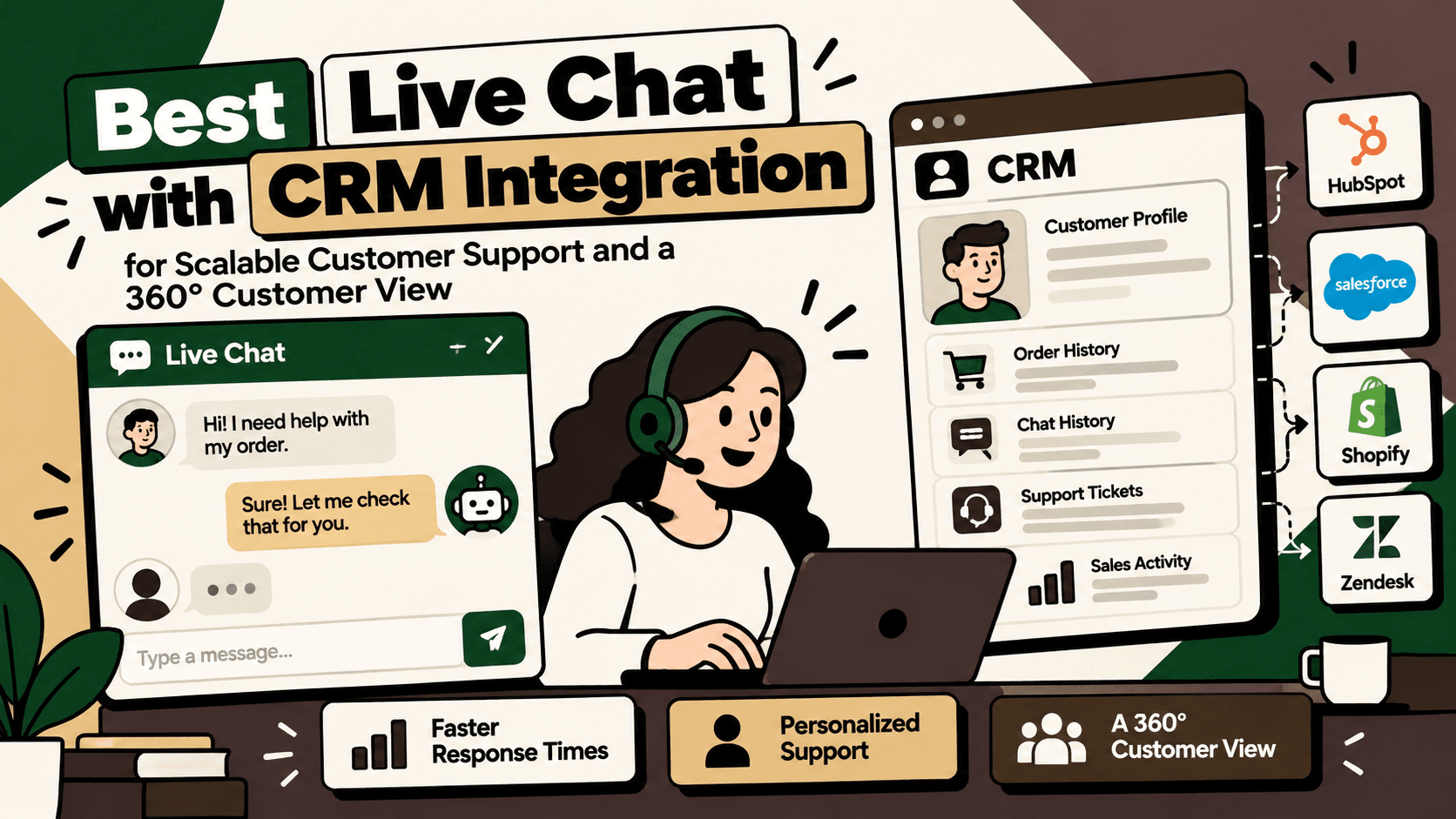
The best live chat software with CRM integration connects conversations to reliable customer records, interaction history, and the business data needed to resolve requests. The objective is not simply to collect contact details. It is to give the right team enough accurate context to respond, take an approved action, and record the outcome.
For growing businesses, five platforms worth evaluating are HubSpot Service Hub, Intercom, Zendesk, Freshchat, and LiveChat. Each serves a different combination of CRM integration, AI-assisted support, conversation management, and operational complexity. The best choice depends on your existing technology stack, support workflows, customer volume, and requirements for data synchronization.
This guide compares the platforms, explains what a genuine 360° customer view requires, and outlines an implementation approach for scalable customer support.
1. Best Live Chat Software with CRM Integration Compared
The following comparison reflects the use cases identified in the supplied research. It is not a universal performance ranking. Capabilities, integration depth, and costs depend on the selected plan, configuration, and connected systems.
| Platform | Best suited for | Key advantage | What to evaluate |
|---|---|---|---|
| HubSpot Service Hub | Businesses already using HubSpot CRM | Support conversations connected to CRM contacts and sales or marketing activity | Plan requirements, workflow needs, and data synchronization |
| Intercom | AI-assisted conversational support | Customer messaging, automated support workflows, and CRM integrations | AI usage costs, integration configuration, and escalation controls |
| Zendesk | Complex or high-volume support operations | Structured ticketing, routing, service-level agreements, and multichannel support | CRM integration depth and the configuration needed for business context |
| Freshchat | Teams seeking conversational and omnichannel support | Shared conversations, automation, and integration with the Freshworks ecosystem | Compatibility with the existing CRM and supported synchronization fields |
| LiveChat | Website engagement and lead capture | Website chat and integrations for contact records, conversation history, and lead handoffs | Whether additional products are required for broader service workflows |
HubSpot Service Hub: Best starting point for a unified CRM view
HubSpot Service Hub is worth evaluating when customer support needs to work closely with sales, marketing, and contact management in the HubSpot ecosystem. The value of this approach is that teams can use shared customer records instead of maintaining disconnected histories in separate applications.
It can suit organizations that want support conversations to inform account follow-up, customer communication, and the wider relationship with a contact. Before selecting a plan, confirm which inbox, automation, reporting, and integration capabilities are included.
Explore the official HubSpot Service Hub product page.
Intercom: Best for AI-assisted conversational support
Intercom is a relevant option for businesses prioritizing conversational support, AI-assisted resolution, and customer messaging. Its CRM integrations can connect customer and conversation information with systems such as HubSpot and Salesforce, subject to configuration and product requirements.
For teams considering AI agents, evaluate more than the quality of a generated response. Check whether the workflow can retrieve accurate customer context, perform only authorized actions, verify the result, and hand unresolved or sensitive cases to a human agent.
Also review usage-based costs, integration limits, escalation behavior, and the availability of reporting needed to distinguish automated conversations from genuinely resolved requests.
Explore Intercom's official website and its CRM integration documentation.
Zendesk: Best for structured support operations
Zendesk is worth considering when the service organization depends on ticket management, queue routing, service-level agreements, and support across multiple channels. Its value is especially relevant when customer conversations must become trackable cases with owners, priorities, statuses, and documented resolutions.
For a complete customer view, determine how CRM, commerce, and account information will appear inside the agent workflow. The required data may be available through native integrations, marketplace applications, APIs, or custom integration work.
Review Zendesk's live chat and AI support information and confirm the capabilities relevant to your plan.
Freshchat: Best for teams evaluating conversational support in the Freshworks ecosystem
Freshchat is an option for businesses that want shared conversations, automation, and a conversational support workflow within the Freshworks ecosystem. It should be evaluated against the channels customers use, the routing requirements of the support team, and the CRM data agents need during a conversation.
Do not assume that an available integration synchronizes every field or object. Validate contact matching, conversation history, update direction, synchronization timing, and how errors are handled before making a platform decision.
Explore Freshworks' customer service product information.
LiveChat: Best for website chat and lead capture
LiveChat is relevant when the primary requirement is engaging website visitors, qualifying inquiries, and transferring useful conversation details to a CRM. This can help sales teams follow up with context rather than relying on a disconnected chat transcript.
Organizations with more complex post-purchase support should also evaluate whether their desired ticketing, omnichannel, automation, and reporting workflows require additional products or integrations.
Explore the official LiveChat website and its CRM integration marketplace.
2. What Is a 360° Customer View?
A 360° customer view is a consolidated, usable representation of a customer's identity, interactions, account or order history, open issues, and relevant business context. It helps authorized teams understand the relationship without manually reconstructing it from multiple systems.
A live chat tool does not create a complete customer view simply because it displays a name and email address. The view depends on identity matching, data quality, integration coverage, synchronization rules, and permissions.
The data a useful customer profile should contain
- Identity and account: verified contact information, customer or account ID, account ownership, and relevant preferences.
- Conversation history: previous chats, email interactions, support tickets, customer requests, and documented resolutions.
- Sales and relationship context: lead stage, account status, relevant opportunities, and authorized notes from customer-facing teams.
- Commerce context: orders, payment status where appropriate, shipping updates, returns, exchanges, and warranty records.
- Current issues: unresolved tickets, escalations, service commitments, and the next action required.
- Customer outcomes: satisfaction feedback, repeat-contact patterns, and other approved indicators relevant to the service workflow.
Not every agent needs every field. A useful customer view shows the minimum relevant information required to resolve the current request, with access controlled by role and business purpose.
3. How Live Chat and CRM Integration Should Work
A reliable integration is a workflow connecting the conversation, customer identity, relevant business systems, and the final outcome. It should do more than copy a transcript into a CRM record.
Step 1: Capture the conversation
A customer starts a chat on the website or enters a conversation through another supported channel. The live chat platform records the interaction and creates or retrieves the relevant conversation record.
Step 2: Identify the customer reliably
The integration attempts to match the conversation to an existing customer or account using a stable identifier. A verified email or unique customer ID is generally more reliable than a display name alone. If identity remains uncertain, the workflow should ask for appropriate verification or keep the conversation in an unidentified state rather than merging records based on a guess.
Step 3: Retrieve relevant context
Once the identity is established, the workflow retrieves permitted data from the CRM, support platform, ecommerce system, or other connected applications. This may include prior issues, an order's current status, or the stage of a sales conversation.
Step 4: Route and resolve
Rules classify the request, set priority, and determine the next step. A routine question may receive an approved answer. A complex complaint may go to a specialist. A request involving refunds, account access, or other sensitive changes may require authentication and human approval.
Step 5: Synchronize the outcome
The integration records the relevant transcript, case status, resolution, and follow-up action in the appropriate system. It should avoid creating duplicate contacts or tickets when an event is retried or a conversation changes channels.
Step 6: Measure the result
The business measures response time, resolution time, repeat contacts, customer satisfaction, escalation rate, and other indicators appropriate to the workflow. Where support data is connected to commerce or CRM outcomes, teams can also examine the relationship between service quality, retention, and revenue without assuming correlation proves causation.
4. The Integration Architecture Behind Scalable Customer Support
As support grows, the integration design becomes as important as the chat interface. A practical architecture connects interaction channels to the support platform, matches customer identities, retrieves data from source systems, applies workflow rules, and records outcomes.
| Layer | Responsibility | Implementation consideration |
|---|---|---|
| Interaction channels | Capture website chat and other supported customer conversations | Consistent conversation identifiers and channel attribution |
| Live chat and support platform | Manage conversations, agent queues, tickets, and handoffs | Ownership, priorities, service rules, and escalation paths |
| CRM and customer records | Maintain customer, account, and relationship information | Stable identifiers, duplicate prevention, and field ownership |
| Commerce and operational systems | Provide order, shipment, inventory, return, or warranty context where relevant | Accurate source data, permissions, and supported integrations |
| Integration layer | Map fields, synchronize events, enforce rules, and handle failures | Retries, idempotency, monitoring, and error recovery |
| Analytics and reporting | Connect service activity to operational and business outcomes | Consistent metric definitions and traceable data sources |
Each system should have a clear responsibility for the data it owns. For example, the CRM may be the authoritative source for account ownership, while an ecommerce platform or order management system remains authoritative for order status. The support interface can display information from both without becoming the master record for everything.
This separation reduces the risk of conflicting updates and makes it easier to diagnose whether an incorrect answer came from stale source data, a failed synchronization, a faulty identity match, or a support workflow rule.
5. What to Evaluate Before Choosing a Live Chat CRM Integration
CRM compatibility and synchronization depth
Confirm that the platform supports your existing CRM and the objects your workflow requires. A connector may synchronize contacts but not companies, opportunities, custom fields, ticket outcomes, or historical conversations. Establish the exact field and object requirements before purchasing.
One-way versus bidirectional synchronization
Determine which system can create or update each record and whether changes flow in one direction or both. Bidirectional synchronization is not automatically better. If two systems can independently update the same field without a clear ownership rule, they can overwrite each other or create update loops.
Customer identity and duplicate prevention
Test cases involving multiple email addresses, shared inboxes, guest checkout, phone-number changes, repeat visitors, and customers who move between channels. The integration should distinguish a confirmed match from a probable match and provide a safe fallback when identity is uncertain.
Automation and human escalation
Assess whether the platform can route requests, create or update tickets, trigger workflows, and transfer conversations with context intact. For AI-assisted support, test whether the system can retrieve current information, stay within approved policies, recognize uncertainty, and hand off cases it cannot safely resolve.
Reporting and business visibility
Check whether reporting can show conversation volume, first response time, resolution time, backlog, repeat contacts, customer satisfaction, and automation outcomes. If the business wants to connect service to retention or revenue, define how support records will be joined to CRM or commerce outcomes.
Total cost of ownership
Compare more than the headline subscription. Include agent seats, AI or conversation usage, add-ons, integration software, implementation, data cleanup, monitoring, maintenance, and staff training. The least expensive subscription may not produce the lowest operating cost if it requires substantial custom integration or manual work.
6. How AI Can Improve CRM-Connected Live Chat
AI can assist with intent classification, retrieval of approved information, response drafting, summarization, and selected support actions. Its value depends on whether it changes the workflow in a measurable way, not merely whether it generates a fluent response.
Useful AI-assisted workflows
- Intent classification: identify whether a customer needs product information, order support, a return, a technical fix, or sales assistance.
- Context retrieval: assemble relevant CRM history, support records, and authorized order information before the agent responds.
- Response assistance: draft a reply using approved policies and retrieved information, with an agent reviewing uncertain or sensitive responses.
- Conversation summaries: create structured summaries of the issue, steps taken, outstanding actions, and promised follow-up.
- Ticket routing: recommend the right queue based on intent, urgency, customer context, and business rules.
- Approved self-service actions: perform limited actions such as retrieving a shipment status or checking return eligibility when identity, policy, and system access requirements are satisfied.
Separate rules, AI, and human decisions
| Decision type | Preferred method | Example |
|---|---|---|
| Predictable and deterministic | Business rules or standard automation | Route a billing question to the billing queue |
| Language-dependent or ambiguous | AI classification or response assistance | Interpret a customer's description of a product issue |
| High-impact or sensitive | Human approval with controlled automation | Approve an exceptional refund or change account access |
| Uncertain identity or missing data | Clarification or human escalation | Two customer records appear to match one conversation |
For action-taking AI, use a retrieve, validate, act, verify, and escalate pattern. The system should retrieve relevant data, check permissions and policy, perform only an approved action, confirm the result from the source system, and escalate if verification fails.
Do not let an AI agent claim that an order was cancelled, a refund was issued, or a customer record was updated unless the connected system confirms the action. A well-written answer is not evidence that the underlying operation succeeded.
7. Common Integration Failures and How to Prevent Them
Duplicate or fragmented customer records
Different systems may represent the same person using different identifiers. Establish matching rules, define the authoritative customer identifier, and create a review path for ambiguous matches. Do not merge records solely because names are similar.
Stale or conflicting data
Agents may see outdated order statuses or an old CRM field. Define which system owns each field, how updates propagate, and how the interface signals that data could not be refreshed. For time-sensitive information, display the source and last-updated time where practical.
Failed synchronization that goes unnoticed
API limits, expired credentials, validation errors, and temporary outages can prevent updates from reaching the destination. Implement error logs, bounded retries, alerting, and a process for replaying failed events without creating duplicate tickets or actions.
Incomplete handoffs
When a bot transfers a conversation to a human, the agent should receive the verified identity, customer intent, relevant records, actions already attempted, and the reason for escalation. Without that context, automation can increase customer effort instead of reducing it.
Automation that oversteps policy
Define the actions an AI workflow can perform, the data it may access, and the cases requiring approval. Apply authentication and authorization checks to sensitive changes. Keep an audit trail of the information retrieved, action attempted, system result, and any human decision.
Security and privacy gaps
Limit access to the data needed for the task, review vendor and integration permissions, and define retention and transcript-access policies. Customer conversations may contain personal or sensitive information, so access controls, secure transport, and appropriate handling practices should be part of the implementation from the beginning.
8. A Practical Implementation Plan
A scalable implementation should begin with a specific support problem rather than an attempt to connect every system and automate every conversation at once.
Phase 1: Map the current workflow
- Document the channels customers use and how conversations reach agents.
- Identify where agents switch systems to find customer, order, or account information.
- Record common intents, current handoff rules, and recurring exceptions.
- Identify the authoritative source for customer identity, order status, ticket state, and other critical fields.
- Document privacy, authentication, and approval requirements for sensitive actions.
Phase 2: Establish baseline metrics
Measure current first response time, resolution time, backlog, repeat-contact rate, customer satisfaction, and the proportion of cases escalated or reopened. Add automation resolution rate only when a resolution is verified, not merely when a bot conversation ends.
Estimate the current manual effort for the selected workflow and document the costs of integration, licensing, maintenance, and review. These baselines provide a fair comparison after deployment.
Phase 3: Select the smallest viable workflow
Choose a frequent, well-defined use case with accessible data and limited downside if the workflow fails. Examples include retrieving order status, showing prior ticket history, summarizing a conversation, or routing a known category of request.
Avoid beginning with an open-ended AI agent that can change accounts, approve refunds, or modify multiple systems without clear boundaries. Prove identity matching, data retrieval, synchronization, and escalation before adding higher-impact actions.
Phase 4: Configure integration and guardrails
- Connect the live chat platform to the CRM using a supported integration or documented API.
- Map the required fields and specify which system owns each one.
- Implement customer matching, duplicate prevention, and access checks.
- Configure workflow rules, retries, logging, and failure alerts.
- Set human approval and escalation conditions for sensitive or uncertain cases.
- Test normal cases, missing data, duplicate events, outages, and unsuccessful actions.
Phase 5: Pilot and measure
Run the workflow with a defined team, channel, or case category. Compare performance with the baseline and review conversation samples for accuracy, customer effort, policy compliance, and successful completion of underlying actions.
Set decision criteria before the pilot begins. If response time improves but repeat contacts rise, the workflow may be producing fast but incomplete answers. If automation volume rises without verified resolution, the measurement is overstating the benefit.
Phase 6: Scale with governance
Expand only after the initial workflow demonstrates reliable data retrieval, correct actions, appropriate escalation, and acceptable customer outcomes. Assign owners for integration maintenance, AI behavior, data quality, reporting, and policy updates.
As new channels and use cases are added, preserve consistent customer identifiers and event records. Review performance regularly so that changes in policies, APIs, products, or customer behavior do not silently degrade the workflow.
9. How to Measure the Business Impact
The purpose of CRM-connected live chat is to improve service and customer context while keeping operating costs and risks under control. Measurement should cover both service quality and the effort required to deliver it.
| Metric | What it indicates | Important qualification |
|---|---|---|
| First response time | How quickly a customer receives an initial response | A fast response does not prove that the issue was resolved |
| Resolution time | Time from case creation to verified resolution | Define when the clock starts and what qualifies as resolved |
| Repeat-contact rate | How often customers return about the same issue | Use a consistent window and reliable case matching |
| Customer satisfaction | Customer feedback on the support experience | Account for survey response bias and sample size |
| Verified automation resolution rate | Share of eligible cases resolved without unnecessary human intervention | Require evidence of task completion and monitor reopen rates |
| Escalation rate | Share of conversations passed to a human or specialist | Some escalation is appropriate and should not automatically be treated as failure |
| Cost per resolved case | Operating cost relative to completed support work | Include platform, integration, review, and maintenance costs |
For ecommerce and subscription businesses, teams may also examine repeat purchases, retention, refunds, and customer lifetime value. These measures need consistent cohort definitions and appropriate attribution. A change after implementation is not automatically caused by the live chat integration.
Illustrative calculation: If a team handles 1,000 eligible conversations each month and each currently requires four minutes of manual context gathering, that activity represents about 66.7 hours of work per month. If an integration reduces that context-gathering time, the time saved can be estimated from the measured reduction per conversation. This is a hypothetical calculation; actual savings depend on conversation mix, adoption, exceptions, and the cost of maintaining the integration.
10. Where Five Anchor Fits for Ecommerce Businesses
For ecommerce and D2C brands, a CRM-connected live chat platform may still leave agents without the operational information needed to resolve post-purchase questions. Customer identity may live in the CRM, order status in the commerce platform or order management system, shipment information in a logistics platform, and return eligibility in a separate workflow.
Five Anchor's positioning is AI Infrastructure for D2C and E-Commerce. Its relevant services include AI-Powered Customer Operations, Commerce Infrastructure, and E-Commerce Intelligence. The fit is strongest when a business needs to connect customer support with the operational systems that determine what an agent or AI workflow can accurately say and do.
What an implementation could include
- Map the customer-support workflow and identify where agents lose time searching for information.
- Connect the CRM and support platform to relevant ecommerce, order, shipping, returns, or ERP systems.
- Define canonical identifiers and rules for matching customers, conversations, orders, and cases.
- Deploy AI-assisted classification, response drafting, self-service, or approved actions for selected use cases.
- Introduce verification, policy controls, human escalation, and audit logging.
- Measure resolution quality, repeat contacts, handling effort, and operating cost against a baseline.
The goal is not to replace every customer support platform. It is to make the existing systems work together so that agents and automation have reliable context and a controlled way to complete approved tasks. Five Anchor is relevant when this requires practical integration between customer operations and ecommerce infrastructure.
11. Final Recommendation: Choose the Platform That Fits the Workflow
For businesses seeking a shared view across CRM, sales, marketing, and customer support, begin by evaluating HubSpot Service Hub. For AI-assisted conversational support, shortlist Intercom. For structured, high-volume service operations, evaluate Zendesk. Freshchat and LiveChat are also worth considering when their conversation-management and integration capabilities match your requirements.
Do not make the decision on brand recognition or feature lists alone. Test the integration with realistic customer records, confirm which fields synchronize, verify that customer identity is matched correctly, and check how the workflow behaves when data is missing or a system is unavailable.
For ecommerce businesses, the larger opportunity may be the integration architecture connecting the CRM, live chat, commerce platform, shipping, and support systems. A well-designed customer view helps people and AI workflows retrieve relevant information, perform authorized actions, and preserve a reliable record of the outcome.
The best live chat CRM integration is the one that reduces customer effort without sacrificing data accuracy, security, or accountability. Establish the data foundation first, automate a bounded workflow, measure verified results, and scale only when the evidence supports it.
Key Takeaways
- •Choose live chat software based on workflow fit, CRM compatibility, integration depth, support complexity, and total cost—not feature lists alone.
- •A genuine 360° customer view requires reliable identity matching and connected customer, conversation, account, and operational data.
- •Define which system owns each field and whether synchronization is one-way or bidirectional to prevent conflicting updates and duplicate records.
- •AI can assist with intent classification, retrieval, summaries, response drafting, and approved actions, but sensitive or uncertain decisions need suitable guardrails and human escalation.
- •Measure verified resolution, repeat contacts, customer satisfaction, handling effort, and cost per resolved case rather than counting chatbot conversations as successful outcomes.
- •Start with one bounded workflow, establish baseline metrics, test failure cases, and scale only after the integration demonstrates reliable behavior.
- •Five Anchor is relevant when ecommerce and D2C businesses need to connect customer support workflows with CRM, order, shipping, returns, and other operational systems.
Live Chat CRM Integration Comparison
| Decision factor | CRM-connected live chat | Disconnected support tools |
|---|---|---|
| Inventory Sync Frequency | 15–30 min batch polling (high oversell risk) | Sub-second atomic locking (<450ms) |
| Concurrent Drop Resilience | Fails under concurrency; causes negative stock balance | Redis atomic reservation queue guarantees exact counts |
| Error Handling & Retries | Silent failure; manual CSV audit needed | Dead-letter queues with automated exponential retry |
| Fulfillment Routing Speed | 2–4 hours delayed batch export to 3PL warehouse | Instantaneous automated webhook dispatch (<90 sec) |