What Is Amazon Seller Central and Access Dimensions Integration?
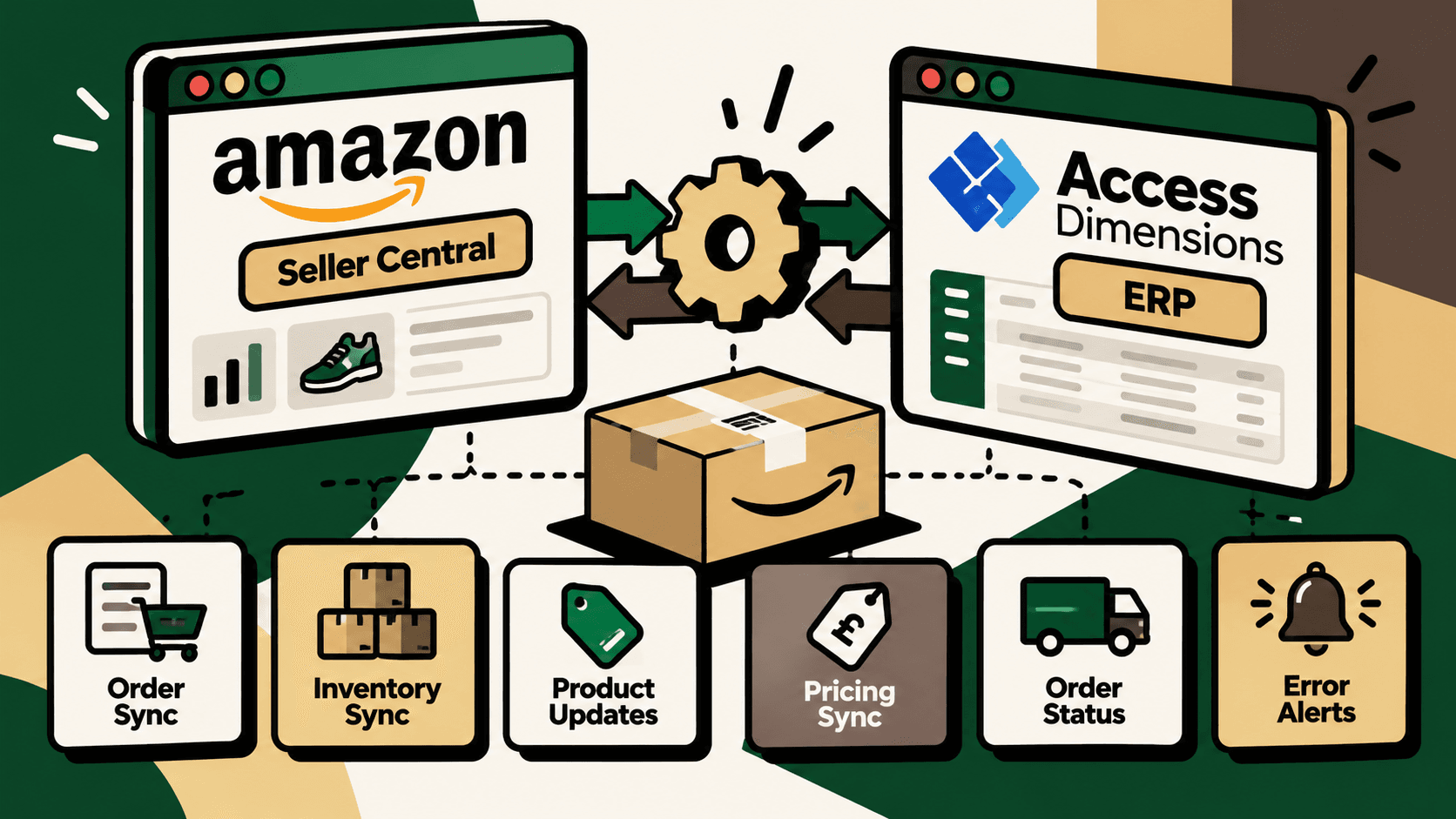
Amazon Seller Central and Access Dimensions integration connects Amazon marketplace operations with the ERP and accounting processes managed in Access Dimensions. Instead of manually transferring sales and product information between systems, an integration can synchronize supported data, validate records and route failed transactions for investigation.
The main business objective is to establish a reliable flow of information between marketplace activity and internal operations. Amazon Seller Central manages marketplace-facing information such as orders, listings, prices and seller inventory. Access Dimensions holds relevant ERP records, including sales orders, stock information, product data and financial records, depending on the organization's configuration.
A published integration option is available from Codeless Platforms through its BPA Platform. Its solution describes workflows for Amazon and Access Dimensions data exchange, including order, inventory, product and pricing synchronization. Review the Codeless Platforms Amazon Access Dimensions integration solution for provider-specific details and confirmation of supported functions.
The important distinction is that connecting two systems does not automatically make every business process seamless. The result depends on data mapping, connector compatibility, synchronization rules, error handling and the way each company manages orders, stock and accounting.
Why Integrate Amazon Seller Central with Access Dimensions?
When Amazon sales are processed separately from an ERP, operations teams may need to copy order details, update inventory in multiple places, maintain product information and investigate mismatched records. These tasks create avoidable work and make it harder to determine which system contains the latest valid information.
Integration reduces these handoffs by defining how marketplace events become ERP transactions and how approved ERP data is returned to Amazon. It is particularly relevant when order volumes increase, several people manage marketplace operations or stock accuracy depends on timely updates.
Common operational problems
- Manual order entry: staff re-enter Amazon order details into the ERP, increasing handling time and the risk of transcription errors.
- Inventory discrepancies: marketplace quantities and ERP stock records can diverge when updates are delayed or performed independently.
- Inconsistent product information: product codes, descriptions, weights, tax classifications and prices may differ between systems.
- Delayed exception discovery: failed imports or rejected updates can remain unnoticed until a customer, warehouse worker or finance team identifies a problem.
- Fragmented reporting: marketplace sales and operational records may need manual consolidation before management can review performance.
Integration addresses the movement and validation of data. It does not, by itself, resolve inaccurate source records, unclear stock ownership, incorrect tax configuration or poorly defined accounting policies. Those issues must be addressed as part of implementation.
What Can Be Automated?
1. Amazon order synchronization
A supported integration can import Amazon sales orders into Access Dimensions and map marketplace fields to the corresponding ERP records. Depending on the connector and configuration, relevant fields may include order references, SKU or product codes, quantities, delivery details and other order information.
The implementation team should define how cancelled orders, partially fulfilled orders, duplicate events, refunds and changes after initial import are handled. Each Amazon order should have a stable reference that allows the integration to identify an existing transaction instead of creating duplicates when an event is retried.
Expected operational outcome: less repetitive order entry and a clearer connection between marketplace orders and ERP sales records.
2. Inventory synchronization
Inventory synchronization transfers approved stock quantities between the ERP and Amazon according to a defined source-of-truth policy. If Access Dimensions is the authoritative inventory system for the relevant stock, the integration can use its available quantity data to update Amazon listings where the connector supports that direction of flow.
A safe design should not simply publish every physical unit as available for sale. The available-to-sell calculation may need to account for reservations, damaged stock, safety stock, warehouse allocation and inventory already committed to other channels.
Expected operational outcome: fewer stock mismatches and a lower risk of selling inventory that is not actually available. The improvement depends on synchronization frequency, stock rules and the accuracy of the underlying records.
3. Product catalog synchronization
Product synchronization can maintain selected shared fields across the systems, such as SKU, description, weight, tax classification or other product attributes supported by the connector. Before enabling updates, determine which system owns each field. An ERP may be the source of truth for internal product codes and stock, while marketplace-specific content may remain managed in Seller Central.
Field ownership prevents an update in one system from unintentionally overwriting a carefully maintained value in the other. Product identifiers should also be normalized so that the same item is recognized consistently across the marketplace and ERP.
4. Pricing and order-status updates
Where supported, the integration may transfer approved price changes to Amazon or synchronize relevant order-status information. Pricing rules should specify which price field is authoritative, how rounding and currency are handled, and whether promotions or marketplace-specific pricing require separate treatment.
Order status should be updated only when the source system provides a valid business event. A status change should not be interpreted as proof that a shipment has physically left a warehouse unless the underlying event confirms that meaning.
5. Workflow monitoring and error alerts
Monitoring makes the difference between an integration that runs and one that can be operated reliably. A workflow should record the source transaction, processing time, destination record, result and error details. Failed imports, invalid product mappings and rejected updates should generate actionable alerts.
Retries should be controlled and safe to repeat. For example, retrying an order import must not create a second sales order if the first attempt succeeded but its confirmation was lost. Transactions that continue to fail should enter an exception queue for investigation rather than being retried indefinitely.
How the Integration Architecture Works
A practical architecture has three main layers: Amazon Seller Central, an integration or middleware layer, and Access Dimensions. The middleware moves data between the systems and applies mappings, validation, workflow logic and error handling.
| Layer | Primary responsibility | Implementation checks |
|---|---|---|
| Amazon Seller Central | Marketplace orders, listings, prices and seller inventory data | Permissions, marketplace, available data and supported operations |
| Integration middleware | Data mapping, validation, scheduling, retries, logging and alerts | Connector compatibility, authentication, error recovery and monitoring |
| Access Dimensions | ERP sales orders, stock records, product information and relevant financial operations | Field mappings, accounting rules, stock ownership and record validation |
The supplied research identifies Codeless Platforms BPA Platform as a preconfigured integration option. A middleware approach can be useful when workflows require configuration between existing systems. A custom connector may be considered if the required functions, system versions or business rules are not supported by an available integration. The right choice depends on verified compatibility and the actual workflow requirements, not on the assumption that one architecture is always superior.
Preconfigured Connector or Custom Integration?
A preconfigured connector may reduce the amount of workflow construction needed when its supported data flows match the business requirements. A custom integration may provide more control over specialized accounting logic, multiple warehouses, additional sales channels or exception handling, but it also creates responsibilities for development, testing, monitoring and maintenance.
| Decision factor | Preconfigured middleware connector | Custom integration |
|---|---|---|
| Initial configuration | Potentially faster when standard workflows fit | Requires design and development for required workflows |
| Business-specific rules | Limited to available configuration and extensions | Can be tailored to documented requirements |
| Maintenance | Depends on vendor support, connector updates and configuration | Requires an owner for code, monitoring and API changes |
| Compatibility | Must be confirmed for the actual software versions and marketplace | Depends on available APIs, access permissions and technical constraints |
| Total cost | Subscription, configuration and any additional services | Discovery, development, hosting, monitoring and ongoing support |
Before selecting either option, document the required data flows and ask the provider to demonstrate the most important scenarios. Confirm whether order synchronization, inventory updates, product changes, pricing, status updates and error alerts are available out of the box or require additional configuration or development.
Integration Cost: What Should Businesses Budget For?
The supplied research records a published starting price of £350 per month, billed annually, for the Codeless Platforms Amazon Access Dimensions BPA solution, with configuration days potentially costing extra. Treat this as a provider-published starting figure from the research, not as a confirmed current quote or the total cost of implementation. Check the official integration page for current pricing and commercial terms.
The total cost of ownership may include subscription charges, initial configuration, data cleanup, mapping, testing, staff training, monitoring, support and changes required when business processes or connected systems change.
Questions to ask before committing
- Does the quoted package support the exact Access Dimensions version and Amazon marketplace in use?
- Which data flows are included in the base subscription?
- Are implementation, configuration days and custom workflows charged separately?
- What monitoring, alerting and support are included?
- How are connector updates and changes to marketplace APIs handled?
- Can failed transactions be replayed safely, and are logs available for audit?
- What additional costs apply if another marketplace, warehouse or system is added?
Step-by-Step Implementation Plan
Step 1: Map the existing workflow
Document how an Amazon order currently moves from Seller Central to order processing, warehouse fulfilment and accounting. Include inventory updates, cancellations, returns and the handling of exceptions. Identify who performs each step, which system they use and where duplicate entry or delays occur.
The purpose is to automate a defined business process rather than merely connect two applications. If the current process has conflicting rules or unclear ownership, integration can reproduce those problems at a higher speed.
Step 2: Establish baseline metrics
Measure current handling effort and reliability before changing the workflow. Useful baseline metrics include manual minutes per order, order-import failures, duplicate records, inventory mismatches, time to resolve exceptions and the frequency of delayed updates.
Record the measurement period and how each metric is calculated. Without a baseline, the team may be able to confirm that the integration is running but unable to determine whether it has improved operations.
Step 3: Confirm compatibility and permissions
Verify the Access Dimensions version, Amazon marketplace, supported connector functions, authentication requirements and available API or integration mechanisms. Confirm who will own credentials and how access will be limited to the permissions required by the workflow.
Do not assume that every marketplace region, account configuration or software version supports identical operations. The selected provider or implementation team should confirm these details before promising a specific data flow.
Step 4: Define field mappings and system ownership
Create a mapping document for order identifiers, SKUs, quantities, prices, tax fields, shipping information and other required attributes. For each field, specify the source of truth, transformation rules, validation requirements and destination.
Pay special attention to SKU mismatches, tax treatment, currencies, rounding, time zones, order statuses and stock reservations. Define how missing or invalid data will be handled instead of allowing incomplete records to pass silently.
Step 5: Build the smallest useful workflow
Begin with a limited, well-defined process such as importing eligible Amazon orders into Access Dimensions with duplicate protection and failure logging. Validate that the ERP record is correct before expanding to inventory, product or pricing updates.
A smaller first release makes it easier to isolate mapping problems and establish reliable monitoring. It also limits the operational impact if an assumption proves incorrect.
Step 6: Test normal cases and edge cases
Test successful orders alongside cancelled orders, duplicate events, missing SKUs, invalid quantities, partial fulfilment, delayed responses, API failures and interrupted connections. Test inventory updates where stock is reserved or unavailable. If financial data is involved, reconcile sample transactions against the relevant source records.
Testing should verify both the intended result and the absence of unintended side effects. For example, a retried event should not create a duplicate order, and a failed stock update should not be treated as a successful synchronization.
Step 7: Pilot with controlled scope
Run the integration with a limited set of transactions, products or an agreed operational window. Compare imported records against Amazon and Access Dimensions, monitor exceptions and collect feedback from the people who handle daily operations.
Define explicit acceptance criteria before the pilot begins. These might include successful processing of the selected order types, no unexplained duplicates, traceable failures and reconciliation within the business's agreed tolerance.
Step 8: Deploy, monitor and improve
After the pilot meets its acceptance criteria, expand the workflow gradually. Assign an owner for alerts, failed transactions, credential management and connector updates. Review exception trends and adjust mappings or rules when recurring issues appear.
Scaling should follow evidence that the workflow is reliable. Adding more channels or more automation before the original process is stable increases the number of interactions that must be diagnosed when something goes wrong.
Data Quality, Security and Failure Handling
Data quality and duplicate protection
Integration depends on stable identifiers and consistent source records. Normalize product codes, define required fields and validate values before writing transactions into the destination system. Use idempotent processing or an equivalent duplicate-prevention mechanism so that retries do not create repeated business records.
Inventory and accounting controls
Define which system owns inventory quantities and which records are authoritative for financial reporting. Marketplace sales proceeds, fees, refunds and settlement information should not be assumed to reconcile automatically simply because orders are imported into an ERP. Confirm which financial data the connector actually transfers and whether separate settlement or payout reconciliation is required.
Authentication and access control
Use approved authentication methods, restrict permissions to the required functions, protect credentials and limit access to integration logs that may contain commercially sensitive information. Establish a process for credential rotation and access removal when staff or vendors change.
Monitoring and operational ownership
Every critical workflow should provide enough information to identify the affected transaction, understand the failure and decide what to do next. Alerts should distinguish transient technical errors from data-quality problems that require correction. Assign an owner and a response process rather than sending notifications to an unattended inbox.
Human review for high-impact exceptions
Automated rules are suitable for predictable, well-defined cases. Human review should remain available for ambiguous product mappings, material inventory discrepancies, unusual financial adjustments and changes that could create customer or accounting consequences. The integration should make exceptions visible rather than silently choosing a potentially incorrect result.
How to Measure Integration ROI
Measure operational impact against the baseline established before deployment. Do not assume that the existence of an integration proves a financial return.
- Manual handling time: minutes spent importing, checking and correcting transactions.
- Processing reliability: proportion of eligible transactions completed successfully without manual repair.
- Exception rate: number and type of failed or rejected transactions relative to total processed volume.
- Inventory accuracy: frequency and impact of discrepancies between ERP and marketplace records.
- Order processing time: elapsed time from marketplace order availability to creation of the corresponding ERP record.
- Cost of operation: integration subscription, implementation, maintenance and exception-handling costs.
Illustrative calculation: suppose a business handles 400 eligible orders per working day and saves an average of two minutes of manual entry per order. That represents 800 minutes, or approximately 13.3 hours, of handling time per working day before accounting for exception review, integration costs or other changes. These numbers are hypothetical and are not a reported result from an integration provider.
A practical return calculation compares the value of measured time savings and avoided errors with recurring subscription costs, implementation expenditure and ongoing maintenance. Use the business's actual labour cost, transaction volume and error data. Include the time needed to monitor and resolve exceptions, because automation rarely eliminates every manual task.
Where Five Anchor Fits
For businesses that need to connect marketplace operations with ERP, inventory and downstream workflows, the Amazon–Access Dimensions use case fits within commerce infrastructure. Five Anchor's work in this area can include mapping the order lifecycle, integrating supported systems, defining inventory and product-data ownership, automating repeatable processing and implementing exception alerts.
The implementation should start by separating what the existing connector already supports from what requires additional configuration or custom development. This avoids promising functionality before compatibility, data access and business rules have been verified.
Where the business also needs warehouse or shipping coordination, additional systems can be evaluated as separate integration steps. Where management needs a consolidated view of sales and operations, reporting and reconciliation can be designed around the available, validated data rather than assuming that all financial settlement data is already synchronized.
Five Anchor's role is to make the workflow operationally dependable: define the process, connect the appropriate systems, validate data, handle failures visibly and measure whether the resulting workflow improves business performance.
Conclusion
Amazon Seller Central and Access Dimensions integration can reduce repetitive order handling and improve the consistency of inventory, product and pricing data when the selected connector supports the required workflows. Codeless Platforms BPA Platform is one documented option in the supplied research, but businesses should verify its current capabilities, compatibility and pricing before implementation.
The strongest implementation is not simply the one that transfers the most data. It is the one with clear source-of-truth rules, safe retry behavior, reliable monitoring, tested exception handling and measurable operational outcomes. Start with one valuable workflow, prove that it is accurate and supportable, then expand based on evidence.
Key Takeaways
- •Amazon–Access Dimensions integration can reduce manual data transfer for supported order, inventory, product and pricing workflows.
- •Codeless Platforms offers a documented BPA Platform integration option, but current compatibility, included features and pricing should be confirmed directly.
- •Middleware should handle field mapping, validation, retries, logs and actionable alerts.
- •Define a source of truth for each important field, especially SKU, inventory, price and order status.
- •Importing marketplace orders does not automatically guarantee complete settlement or payout reconciliation.
- •Start with a small pilot and test duplicates, cancellations, missing SKUs, stock reservations and interrupted connections.
- •Measure manual handling time, exception rates, processing reliability, inventory discrepancies and total integration cost.
- •
Preconfigured Connector vs Custom Integration
| Decision factor | Preconfigured middleware connector | Custom integration |
|---|---|---|
| Inventory Sync Frequency | 15–30 min batch polling (high oversell risk) | Sub-second atomic locking (<450ms) |
| Concurrent Drop Resilience | Fails under concurrency; causes negative stock balance | Redis atomic reservation queue guarantees exact counts |
| Error Handling & Retries | Silent failure; manual CSV audit needed | Dead-letter queues with automated exponential retry |
| Fulfillment Routing Speed | 2–4 hours delayed batch export to 3PL warehouse |