AI integration in ecommerce is not primarily an AI-model problem. It is an architecture problem. A Shopify store can manage customer-facing commerce while an ERP manages finance and purchasing, inventory systems manage stock availability, a WMS manages warehouse execution, and logistics systems manage shipment movement. If those systems remain disconnected, an AI agent inherits the same fragmentation as the human team.
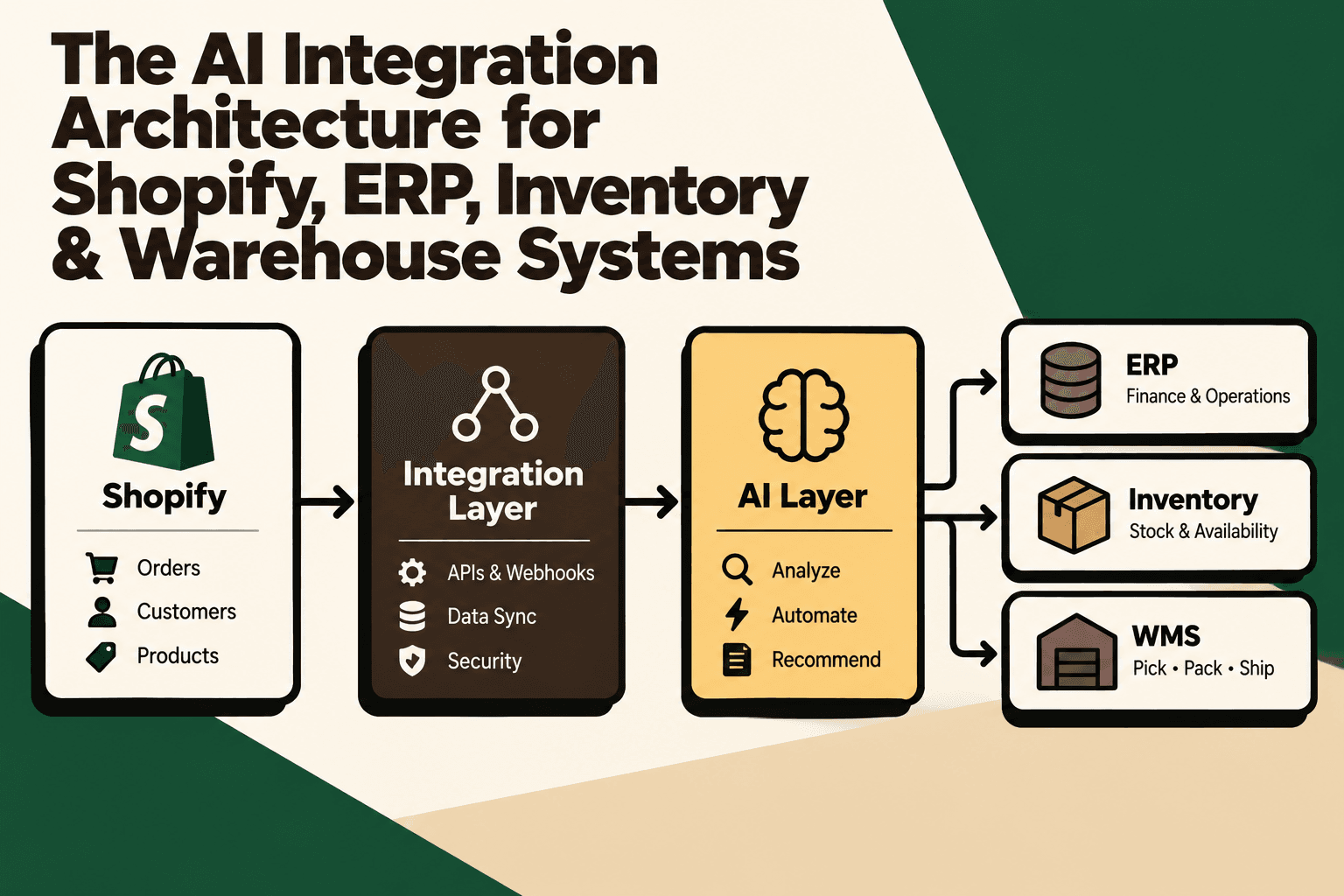
The more useful architecture is therefore not Shopify plus an AI chatbot. It is a connected operating model in which Shopify acts as a commerce system, ERP as a business system, inventory as an availability layer, WMS as an execution layer, an integration layer as the orchestration boundary, and AI as an intelligence and automation layer across those systems.
This article explains that architecture, the role of APIs and webhooks, how to normalize commerce data, where AI should and should not take action, how to implement the smallest viable integration, and how to measure whether the architecture is improving operations.
The short answer: What should an AI ecommerce integration architecture look like?
A scalable AI integration architecture should connect Shopify, ERP, inventory, WMS and logistics systems through a governed integration layer, normalize their business data into usable context, and place AI above that context with explicit permissions and human approval for higher-risk actions.
A useful six-layer model is:
- Commerce layer: Shopify and other sales channels create customer, order, product and fulfillment events.
- Integration layer: APIs, webhooks, queues, transformation, validation, routing, retries and audit logging connect systems without creating uncontrolled point-to-point dependencies.
- Business systems: ERP, inventory, OMS, WMS, CRM and logistics systems remain responsible for the operational domains they own.
- Commerce data and context layer: orders, SKUs, inventory states, fulfillment, shipments, customers and business rules are normalized into a consistent representation.
- AI layer: agents and models analyze context, classify events, recommend actions and execute approved low-risk workflows.
- Operations and governance: dashboards, alerts, policies, permissions, human approvals, monitoring and audit trails control the system.
The architectural principle is simple: AI should sit on top of connected business context, not replace the systems that own the underlying data.
Why Shopify alone is not an AI integration architecture
Shopify is an important commerce system, but a growing D2C operation usually contains several additional sources of truth. The storefront may know that an order was placed, while the ERP knows its financial state, the inventory system knows available stock, the WMS knows whether it has been picked, and the carrier knows where the shipment is.
Consider a customer asking, “Where is my order?” A useful answer may require information from the order, fulfillment, warehouse and carrier layers. A chatbot that only sees Shopify data may know that the order exists without knowing whether it has been picked, dispatched, delayed or delivered.
The same problem appears internally. A question such as “Can we safely sell another 500 units of this SKU?” may require current stock, reserved inventory, open purchase orders, warehouse quantities, sales velocity and supplier lead time.
This is why the architecture should treat Shopify as one important participant in the operating stack rather than the entire backend.
The architecture at a glance
A practical architecture can be represented as:
Customer and sales channels → Shopify → Integration layer → ERP / Inventory / WMS / 3PL → Normalized commerce context → AI agents → Operations, customer support and planning
The integration layer is the architectural boundary that prevents every application from having to understand every other application.
Without that boundary, the system tends toward point-to-point connections:
Shopify → ERP
Shopify → WMS
Shopify → Inventory
Shopify → 3PL
Shopify → AI
As systems multiply, each new connection introduces additional authentication, data mapping, failure handling, monitoring and maintenance requirements.
With an integration hub, the pattern becomes:
Shopify → Integration Hub → ERP / Inventory / WMS / 3PL / AI
This does not eliminate complexity. It puts complexity in a place where it can be governed.
1. Shopify should be an event source, not the entire backend
Shopify provides APIs and webhook mechanisms that allow applications to retrieve commerce information and respond to operational events. Current Shopify documentation positions the GraphQL Admin API as the primary direction for new integrations, while the REST Admin API is now classified as legacy. Shopify states that new public apps submitted from April 1, 2025 must use the GraphQL Admin API. :contentReference[oaicite:0]{index=0}
For an integration architecture, useful Shopify events can include changes involving orders, inventory and fulfillment. Shopify's current webhook topics include fulfillment creation and updates as well as inventory-level updates. :contentReference[oaicite:1]{index=1}
The important design decision is what happens after an event arrives.
A Shopify order event should not automatically become a series of uncontrolled API calls to every downstream system. Instead, the integration layer should validate the event, normalize its structure, determine which systems need it, deliver it reliably and record what happened.
Example: an order-paid event could be normalized into an internal commerce event and routed to the ERP for financial processing, the inventory system for reservation, the WMS for fulfillment preparation and a customer-communication workflow for confirmation.
Action: document which Shopify events matter to the business before building integrations. Do not begin with a list of APIs. Begin with business events and the downstream decisions those events should trigger.
2. The integration layer is the core architecture
The integration layer is where the technical work of making different systems behave like one operating environment takes place.
It can include:
- API authentication and authorization
- Webhook ingestion
- Event queues
- Data transformation
- SKU and identifier mapping
- Order normalization
- Event routing
- Deduplication and idempotency
- Retry handling
- Error queues
- Rate-limit handling
- Observability and logging
- Audit trails
- Human approval workflows
The most important property is not that every event is processed instantly. It is that the system can explain what happened when something goes wrong.
If an inventory update does not reach Shopify, operations should be able to determine whether the source event was never received, the mapping failed, the downstream API rejected the request, the request was retried, or a later event superseded it.
That level of traceability becomes especially important when AI is allowed to initiate actions.
3. Define system ownership before adding AI
One of the most common architecture mistakes is allowing every system to become a source of truth for every object.
Instead, define ownership explicitly.
| Business object | Likely system of record | Integration responsibility |
|---|---|---|
| Customer-facing order | Shopify | Synchronize lifecycle events and downstream identifiers |
| Financial transaction | ERP or finance system | Map order and payment information into financial workflows |
| Product master | ERP or product information system | Publish approved product data to commerce channels |
| Available inventory | Inventory or OMS layer | Calculate and publish sellable quantities |
| Warehouse execution | WMS | Send fulfillment work and return execution status |
| Shipment tracking | Carrier or logistics platform | Normalize tracking and delivery events |
The exact ownership model will differ by business. The architectural principle does not: every important data object should have a clearly defined owner.
This prevents AI from making a decision based on stale or contradictory versions of the same business fact.
4. ERP integration: connect commerce to the business layer
The ERP typically contains information that Shopify should not be expected to own, such as purchasing, supplier information, accounting, costing, purchase orders and financial workflows.
A common flow is:
Shopify order → integration layer → ERP → financial and operational processing
In the opposite direction, the ERP may publish approved product, cost, purchasing or availability information back through the integration layer.
The important point is that the integration should not simply copy every field between systems. It should translate business events and objects according to defined ownership rules.
For example, a product update may require mapping an ERP SKU to the corresponding Shopify variant, validating required fields and determining whether the change is allowed to overwrite the commerce record.
Failure mode: treating synchronization as a simple field-copying exercise. This often breaks when identifiers differ, statuses do not have equivalent meanings, or one system allows states that another does not.
Better approach: create canonical mappings for core entities such as SKU, order, customer, location, fulfillment and shipment.
5. Inventory architecture: physical stock is not the same as sellable stock
Inventory becomes substantially harder when a D2C brand operates multiple warehouses, marketplaces, retail locations or 3PLs.
A useful conceptual model is:
Physical stock → reserved stock + damaged stock + in-transit stock + available stock → sellable inventory
AI should not interpret a raw physical quantity as automatically sellable.
For example, if a warehouse physically holds 1,000 units but 200 are reserved against existing orders, 50 are damaged and another allocation rule requires a safety buffer, the commercially available quantity may be substantially lower than 1,000.
Shopify's current API model supports inventory and fulfillment concepts that can be used as part of this synchronization architecture. Its webhook topics include inventory-level updates, while its GraphQL Admin API exposes order, fulfillment and fulfillment-order structures. :contentReference[oaicite:2]{index=2}
AI implication: an inventory agent should receive normalized inventory context rather than raw values from a single platform.
For a replenishment recommendation, that context might include current available stock, reserved stock, open purchase orders, supplier lead time, sales velocity and warehouse-level distribution.
6. WMS integration: separate warehouse execution from commerce
The WMS should primarily manage warehouse execution.
A simplified lifecycle is:
- Order received
- Allocation
- Pick
- Pack
- Dispatch
- Shipment handoff
Shopify's fulfillment model provides a useful representation of this separation. A fulfillment order describes fulfillment work associated with order items and locations, while fulfillment records can contain shipment and tracking information. Shopify also supports multiple fulfillment records for an order when items ship separately or from different locations. :contentReference[oaicite:3]{index=3}
This distinction matters for AI because an order being created does not mean it has been fulfilled.
An AI support agent asking, “Where is my order?” needs to understand the difference between order creation, fulfillment allocation, warehouse execution, shipment creation and delivery.
Action: map the complete order-to-delivery lifecycle across Shopify, WMS and carrier systems before building customer-facing AI.
7. Why an event-driven architecture is useful
High-volume ecommerce systems can become fragile when every downstream process repeatedly polls every upstream system.
An event-driven approach allows a business event to be published once and consumed by multiple systems.
For example:
ORDER_CREATED → event bus → ERP + inventory + WMS + support + analytics
And:
INVENTORY_CHANGED → event bus → Shopify + marketplaces + inventory analytics + AI inventory workflow
This architecture allows consumers to evolve independently. A new analytics workflow can consume existing inventory events without requiring Shopify to establish another direct integration.
However, event-driven does not mean “fire and forget.” The system still needs idempotency, retries, dead-letter handling, ordering rules where necessary, monitoring and reconciliation.
8. Build a normalized AI data layer
AI becomes more reliable when it can work with a consistent business representation instead of learning the structure of every application individually.
A normalized order context might look conceptually like:
Customer → Order → Order Items → SKU → Fulfillment → Warehouse → Shipment → Carrier
A normalized SKU context could include:
- Commerce SKU
- ERP SKU
- WMS SKU
- Warehouse locations
- Available quantity
- Reserved quantity
- In-transit quantity
- Open purchase orders
- Supplier lead time
The purpose is not to create another ERP. It is to give automation workflows a consistent context model.
Example: if an AI agent receives the question “Can we replenish SKU ABC next week?”, it should not have to discover independently how the ERP calls the SKU, how the WMS represents locations, and how the inventory system represents reservations. The integration layer should already provide those relationships.
9. Where AI actually fits
AI should not be treated as a replacement for the commerce stack. It is better understood as an intelligence and decision layer operating over connected business context.
That creates several useful AI patterns.
Customer operations
A customer asks, “Where is my order?”
The workflow can retrieve the order, fulfillment status, tracking information and available delivery context before generating a response.
Result: the AI is not guessing a shipping status. It is translating operational data into a customer-facing answer.
Inventory operations
An operator asks, “Which SKUs need attention?”
The workflow can combine stock, reservations, sales velocity, open purchase orders and lead times to identify candidates for review.
Result: AI moves from generic recommendation to context-aware prioritization.
Operations intelligence
An operations manager asks, “Why are orders delayed today?”
The system can correlate warehouse backlog, inventory shortages, carrier exceptions and order volume to identify likely causes.
Result: AI becomes a reasoning interface over operational data.
Planning
A planner asks, “What should we replenish next week?”
The workflow can combine historical sales, current inventory, purchase orders, lead times and demand signals.
Result: AI can prepare a recommendation while keeping purchasing authority with the appropriate human or system policy.
10. Rules, AI and humans should have different jobs
A mature architecture does not ask AI to perform every decision. It assigns work according to predictability, risk and the quality of available data.
| Workflow | Rules / automation | AI / human role |
|---|---|---|
| Order status | Retrieve approved status and tracking data | AI explains the status; human handles exceptions |
| Inventory synchronization | Deterministic event and mapping rules | AI monitors anomalies |
| Ticket classification | Basic routing rules | AI handles ambiguous language and summarizes context |
| Replenishment recommendation | Policy thresholds | AI recommends; planner approves higher-impact decisions |
| Large refund or order cancellation | Permission and value thresholds | Human approval for higher-risk actions |
Key principle: deterministic rules should handle deterministic work, AI should handle interpretation and bounded reasoning, and humans should retain control over ambiguous or financially significant decisions.
11. AI agents need a permission layer
An AI agent that can read operational information is fundamentally different from an agent that can change operational state.
A useful action architecture is:
Business event → AI analysis → recommendation → policy check → auto-execute or human approval → action → audit log
Low-risk workflows may be suitable for automatic execution, such as answering approved order-status questions, classifying tickets or summarizing warehouse exceptions.
Higher-risk actions should normally have stronger controls. Examples include large refunds, material purchase-order changes, significant inventory movements, pricing changes or order cancellations.
Enterprise AI architecture also requires attention to permissions, governance, identity and auditability. The supplied research specifically highlighted these controls as prerequisites for responsible agentic systems. :contentReference[oaicite:4]{index=4}
Action: define an action matrix before enabling an AI agent to write back to business systems. For every action, specify who can authorize it, what data is required, what limits apply and what audit evidence must be retained.
12. APIs and webhooks solve different problems
A robust architecture normally needs both.
APIs are useful when the integration needs to retrieve or change a resource deliberately.
Webhooks are useful when a system needs to notify another system that an event has occurred.
For example, a Shopify fulfillment update can arrive as an event, after which the integration layer can call the relevant APIs to retrieve additional context or perform an approved downstream action.
Shopify's current documentation exposes both GraphQL Admin API resources and webhook topics covering fulfillment and inventory events. :contentReference[oaicite:5]{index=5}
The architecture should therefore avoid treating APIs and webhooks as competing approaches. They are complementary components of the integration design.
13. Integration reliability is part of AI reliability
AI quality cannot compensate for unreliable business data.
If the inventory feed is delayed, the AI can produce a confident answer from stale information. If the SKU mapping is wrong, the AI can reason correctly about the wrong product. If a fulfillment event is duplicated, the automation may attempt the same action twice unless the workflow is idempotent.
That means AI integration requires conventional integration engineering disciplines:
- Validation: reject malformed or incomplete events.
- Idempotency: prevent duplicate events from creating duplicate actions.
- Retries: recover from temporary downstream failures.
- Dead-letter handling: isolate events that cannot be processed automatically.
- Reconciliation: compare system states periodically.
- Observability: monitor latency, failure rate and processing status.
- Auditability: retain enough context to explain important changes.
Implication: an AI project that ignores integration reliability is not an AI automation project. It is an additional source of operational risk.
14. The implementation process: start with workflow mapping
The first implementation step should not be selecting an LLM.
Start by mapping one operational workflow from trigger to outcome.
- Identify the trigger. Example: order created, inventory changed or delivery exception detected.
- Map every system touched. Shopify, ERP, inventory, WMS, 3PL, helpdesk and communication channels.
- Identify the source of truth. Determine which system owns each important field.
- Map the current manual work. Document lookups, spreadsheets, approvals, messages and handoffs.
- Measure the baseline. Capture volume, processing time, error rate, exception rate and business impact.
- Separate deterministic work from judgment. Put fixed rules in automation and judgment-heavy tasks into AI or human workflows.
- Define permissions. Decide which actions are read-only, automatically executable or approval-gated.
- Build the smallest viable workflow. Avoid integrating every system before proving one useful path.
- Pilot with real operational data. Measure outcomes against the baseline.
- Expand only after reliability is established. Add more workflows, systems and actions incrementally.
15. A practical automation prioritization model
Not every ecommerce workflow deserves an AI agent.
A practical prioritization formula is:
Priority = volume × frequency × manual effort × error cost × revenue impact ÷ implementation complexity
This is a practical decision framework, not an industry-standard formula.
A high-volume order-status workflow may score highly because it happens frequently, consumes repetitive labor and has structured data. A rare, highly complex purchasing exception may score lower even if its financial impact is significant because the implementation and approval requirements are much harder.
Use the model to create a shortlist, then validate each candidate against data quality, risk and integration availability.
16. Build the smallest viable AI workflow first
A sensible first workflow should have three characteristics:
- The business data is already available digitally.
- The desired action is clearly defined.
- The consequences of an error are manageable.
Order-status automation is a useful example because the workflow can be bounded around order and fulfillment data. Shopify's current GraphQL Admin API exposes order and fulfillment structures that can support these types of workflows, subject to the required permissions and the broader systems involved. :contentReference[oaicite:6]{index=6}
Once the integration can reliably retrieve the correct context, the next step may be proactive delivery communication, support-ticket classification or exception summarization.
Do not begin by giving an AI agent unrestricted write access to ERP, inventory and warehouse systems.
17. Data quality must be treated as an architectural dependency
AI integration often exposes data problems that existed long before AI was introduced.
Common examples include:
- Duplicate SKUs
- Different SKU formats between systems
- Missing warehouse identifiers
- Inconsistent order statuses
- Stale inventory quantities
- Missing supplier lead times
- Unreliable shipment events
- Unclear ownership of product data
If those issues are not resolved, the AI layer may simply make the inconsistency easier to access.
Implementation rule: before an AI workflow goes live, define the minimum data contract it requires and the behavior when required data is missing or contradictory.
For example, if current inventory and ERP availability disagree, the agent should not silently choose one. It should flag the conflict or follow a predefined precedence rule.
18. Monitoring should cover both integration and AI behavior
Technical monitoring alone is not enough.
Track two categories of performance.
Integration metrics
- Event processing latency
- API failure rate
- Webhook delivery failures
- Retry volume
- Duplicate-event rate
- Data synchronization errors
- Reconciliation discrepancies
Business and AI metrics
- Automation completion rate
- Human escalation rate
- Exception rate
- Incorrect-action rate
- Support handling time
- Order-processing time
- Inventory discrepancy rate
- Forecast or recommendation acceptance rate
- Cost per automated workflow
The right KPI depends on the workflow. An order-status agent should not be measured using the same metric as an inventory replenishment workflow.
19. Security and governance are part of the architecture
Connecting Shopify, ERP, inventory and warehouse systems creates a broad operational data surface.
The architecture should therefore include:
- Least-privilege API permissions
- Credential management
- Environment separation
- Access logging
- Action authorization
- Data minimization
- Audit trails
- Human approval for defined high-risk actions
- Monitoring for anomalous behavior
AI should not receive unrestricted access simply because an API makes that access technically possible.
A good architecture asks two separate questions: What can the agent see? and What can the agent change?
Those permissions should be designed independently.
20. What a scalable D2C architecture looks like
A growing D2C operation can use the following logical model:
Sales channels → Integration Hub → ERP + Inventory + WMS + Logistics → Commerce Data Layer → AI Agents → Support + Operations + Planning
The integration hub handles system-to-system reliability. The data layer creates usable business context. AI handles interpretation, prioritization and bounded automation. Human operators retain authority over exceptions and high-impact decisions.
This separation makes the architecture easier to extend. Adding a new marketplace should not require redesigning every AI workflow. Adding a new warehouse should not require rewriting customer-support logic. Adding a new AI use case should not require every system to become AI-aware.
21. Where Five Anchor fits into this architecture
For D2C brands, the practical challenge is often not choosing another standalone AI tool. It is connecting the existing commerce infrastructure well enough for automation to work against reliable business context.
Five Anchor positions this problem within its AI Infrastructure for D2C & E-Commerce approach. The relevant work can span Shopify and marketplace integrations, ERP integration, order processing, inventory synchronization, warehouse and shipping connectivity, financial automation and custom AI workflows.
The implementation sequence is more important than the label “AI integration”: map the workflow, identify system ownership, connect the required APIs and events, normalize the operational data, add guardrails, define human escalation and measure the resulting business process.
For customer-facing workflows, Five Anchor's AI-Powered Customer Operations capability can be relevant when connected order, fulfillment and logistics context is needed for customer self-service, ticket automation or automated communication. For operational workflows, its Commerce Infrastructure and E-Commerce Intelligence capabilities are relevant to synchronization, reporting, inventory visibility and operational decision support.
22. The business outcome should be measured at the workflow level
The goal of this architecture is not to maximize the number of AI agents.
The goal is to improve measurable business processes.
For example:
| Workflow | Before integration | After a successful implementation |
|---|---|---|
| Order-status support | Agent manually checks multiple systems | Connected data supplies approved status automatically |
| Inventory visibility | Teams reconcile different stock sources | Normalized inventory context supports consistent decisions |
| Warehouse exceptions | Operators manually inspect multiple queues | AI summarizes and prioritizes exceptions for review |
| Replenishment planning | Planner combines spreadsheets and system reports | AI prepares recommendations from connected demand and inventory context |
| Operational reporting | Data is assembled manually across systems | Integrated events feed automated operational dashboards |
These outcomes should be measured against a baseline. If a workflow becomes more complex, more expensive or less reliable after automation, the architecture needs to change regardless of how sophisticated the AI model is.
23. Common architecture mistakes to avoid
Starting with the model
Choosing an LLM before defining the workflow often produces an impressive demonstration without a dependable production process.
Connecting everything directly
Point-to-point integrations may work at small scale but can create a maintenance problem as channels and systems multiply.
Giving AI write access too early
Read access and action permissions should be treated as different architectural decisions.
Ignoring system ownership
If Shopify, ERP and inventory all appear authoritative for the same field, AI may receive conflicting context.
Skipping reconciliation
Event-driven systems can fail. A production architecture needs mechanisms for detecting and repairing discrepancies.
Automating exceptions before routine work
AI is often more valuable when it first handles high-volume, structured workflows and escalates genuinely unusual cases.
Measuring model quality instead of business outcomes
A high-quality response is not necessarily a valuable workflow. Measure time saved, errors avoided, processing speed, exception handling and the relevant commercial metric.
24. A practical implementation checklist
- Map the current Shopify, ERP, inventory, WMS, 3PL and support architecture.
- Document the business owner for each important data object.
- Identify the highest-volume repetitive workflow.
- Establish baseline volume, time, errors and business impact.
- Define the required APIs and webhook events.
- Create canonical mappings for SKUs, orders, locations, fulfillment and shipments.
- Introduce validation, retries, idempotency and audit logging.
- Build the smallest useful integration path.
- Expose normalized context to the AI workflow.
- Separate recommendations from executable actions.
- Define permissions and human approval thresholds.
- Pilot with real operational data.
- Measure the business KPI against the baseline.
- Monitor failures and edge cases.
- Expand only after the workflow is reliable.
Conclusion: AI becomes useful when the commerce stack becomes connected
The central architectural lesson is straightforward: Shopify is the commerce layer, ERP is the business layer, inventory is the availability layer, WMS is the execution layer, logistics systems provide shipment context, the integration layer connects and governs them, and AI becomes the intelligence and automation layer across the stack.
This architecture changes the role of AI. Instead of answering questions from isolated application data, AI can reason over connected operational context. Instead of attempting unrestricted automation, it can operate inside explicit policies and permissions. Instead of replacing the systems of record, it can make those systems more useful to customers, operators and planners.
The practical starting point is not an enterprise-wide AI rollout. It is one workflow with clear data, a measurable baseline, defined system ownership and bounded actions.
Start by mapping the workflow where disconnected Shopify, ERP, inventory or warehouse data currently creates the most manual work. Then build the smallest reliable integration that gives that workflow the context and automation it needs.
Frequently asked questions
What is an AI integration architecture for Shopify?
An AI integration architecture for Shopify connects Shopify with operational systems such as ERP, inventory, WMS and logistics platforms through an integration layer, then exposes normalized business context to AI workflows. The AI can use that context for support, operations, analytics, recommendations and bounded automation.
Should Shopify be the system of record for inventory?
Not necessarily. Inventory ownership depends on the business architecture. A dedicated inventory, OMS, ERP or other operational system may own inventory availability, while Shopify receives the quantities required for commerce. The important requirement is explicit ownership and reliable synchronization.
Why use an integration layer between Shopify and ERP?
An integration layer provides a controlled place for authentication, transformation, mapping, routing, retries, validation, monitoring and auditability. It reduces the need for every application to maintain a separate point-to-point integration with every other application.
What is the role of webhooks in Shopify AI integrations?
Webhooks allow Shopify to notify downstream systems when relevant events occur. They can be combined with APIs to retrieve additional context or perform approved actions. Current Shopify documentation includes webhook topics for areas such as fulfillment and inventory. :contentReference[oaicite:7]{index=7}
Should AI have direct access to the ERP and WMS?
AI can be given controlled access where there is a clear business need, but read access and write access should be separated. Higher-risk actions should use explicit permissions, policy checks and human approval where appropriate.
What should be automated first in an ecommerce AI integration?
Start with a high-volume workflow where the required data is reliable, the desired action is well defined and the cost of an error is manageable. Order-status support, ticket classification, operational exception summaries and selected inventory workflows can be candidates depending on the business.
What data does AI need to work across Shopify, ERP, inventory and WMS?
The exact model depends on the use case, but useful context can include customers, orders, order items, SKUs, locations, available and reserved inventory, purchase orders, fulfillment status, warehouse state, shipment tracking and business rules. The integration layer should normalize these relationships before presenting them to AI.
How do you measure whether an AI integration is successful?
Measure the workflow rather than the model alone. Useful metrics can include processing time, automation completion rate, human escalation, exception rate, data synchronization errors, inventory discrepancies, support handling time, operational cost and the relevant revenue or service metric.
Key Takeaways
- •AI integration should be designed around business workflows and system ownership, not around an AI model alone.
- •Shopify should participate as the commerce layer while ERP, inventory, WMS and logistics systems retain their appropriate operational responsibilities.
- •An integration hub provides a controlled boundary for APIs, webhooks, transformation, routing, retries, validation, monitoring and auditability.
- •AI becomes more useful when it can access normalized relationships between customers, orders, SKUs, inventory, fulfillment, warehouses and shipments.
- •Rules are better for deterministic synchronization, AI is useful for interpretation and bounded reasoning, and humans should retain control over ambiguous or high-impact decisions.
- •A production AI integration needs idempotency, retries, reconciliation, observability, permissions and audit trails.
- •The best first automation is usually a high-volume workflow with reliable data, a clear action and manageable risk.
Point-to-Point vs Integration Hub Architecture
| Point-to-Point Architecture | Integration Hub Architecture | Preferred Model |
|---|---|---|
| Inventory Sync Frequency | 15–30 min batch polling (high oversell risk) | Sub-second atomic locking (<450ms) |
| Concurrent Drop Resilience | Fails under concurrency; causes negative stock balance | Redis atomic reservation queue guarantees exact counts |
| Error Handling & Retries | Silent failure; manual CSV audit needed | Dead-letter queues with automated exponential retry |
| Fulfillment Routing Speed | 2–4 hours delayed batch export to 3PL warehouse |